Template details
Quakemap Landing Site
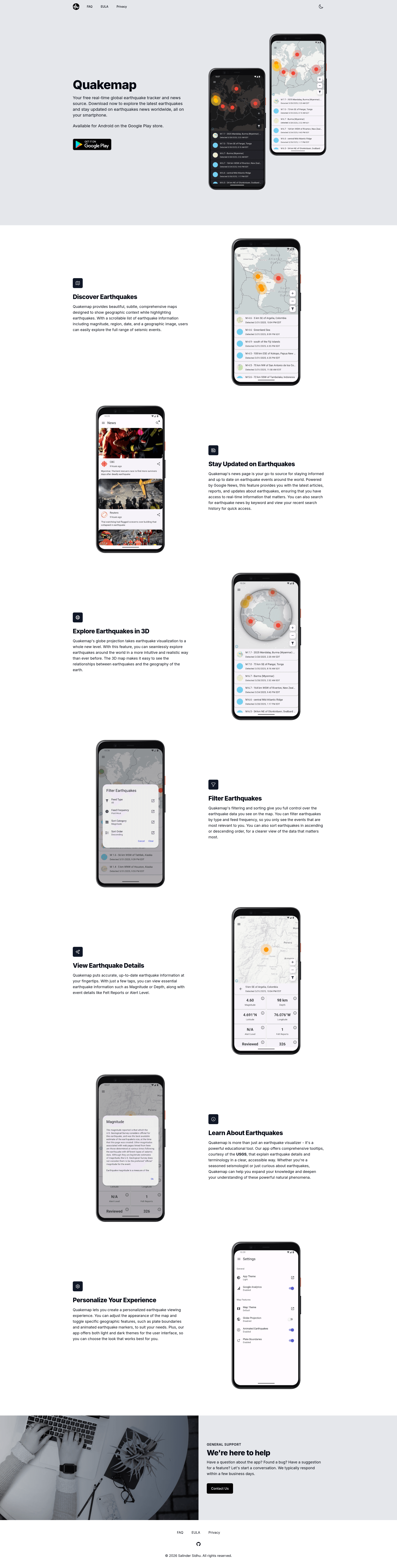
Official landing page template for the Quakemap mobile app, built with Next.js and Tailwind CSS and auto-deployed to Vercel.
About this template
Quakemap Landing Site is a Next.js landing page template that serves as the official homepage for the Quakemap mobile app, built with React and Tailwind CSS and automatically deployed to Vercel.
What is Quakemap Landing Site?
Quakemap Landing Site is the official landing page for Quakemap, an Android application available on Google Play. It is built using React with the Next.js framework (using the App Router pattern) and styled with Tailwind CSS, with PostCSS for CSS processing. The repository includes a complete project structure under src/app with dedicated pages for the home page, FAQ, EULA, and privacy policy, making it a ready-to-use template for product pages.
Key Features
- Next.js framework — Uses the App Router pattern (
src/appdirectory) with TypeScript files (.tsx) for type-safe development, and anext.config.tsfor configuration. - Tailwind CSS — Styled with Tailwind (via
tailwind.config.ts) and PostCSS (postcss.config.mjs); the repository topic also lists Tailwind UI. - Complete set of pages — Includes home, FAQ, EULA, and privacy policy pages, each as a separate
page.tsxfile undersrc/app. - Automatic Vercel deployment — Merging a Pull Request into the main branch triggers an automatic production deployment to https://quakemap.vercel.app/.
- MIT license — The project is open source under the MIT license, allowing free use and modification.
- Simple prerequisite setup — Requires only Git 2.20.1+ and Node 10.15.0+; installation is a single
npm icommand. - Development server — Run
npm run devto start a local server at http://localhost:3000 with hot reloading for rapid iteration. - Organized source structure — Separate folders for routes (
src/app), components (src/components), content data (src/data), and static assets (public).
Who is it for?
- Mobile app developers — Need a polished landing page to link from Google Play listings and app marketing materials; this template provides a pre-built structure with legal pages.
- Indie developers or small teams — Want a fast, minimal setup with Next.js and Tailwind to launch a product homepage without designing from scratch.
- Open source contributors — Can fork the repository, customize the content in
src/data, and contribute back; the MIT license permits reuse.
What can you do with Quakemap Landing Site?
- Publish an app homepage — Replace the placeholder content in
src/datawith your own app details and deploy to Vercel in minutes. - Add legal pages — Use the included FAQ, EULA, and privacy policy pages to display the necessary documentation for your mobile app.
- Customize styling — Modify
tailwind.config.tsandglobals.cssto match your brand colors and typography. - Set up continuous deployment — Create pull requests and merge to main to have the production site update automatically through Vercel.
How does Quakemap Landing Site work?
The template follows a standard Next.js workflow. After cloning the repository, run npm i to install dependencies, then npm run dev to launch the development server at localhost:3000. For production, create a pull request that gets merged into the main branch; the deployment pipeline at Vercel automatically builds and serves the site at quakemap.vercel.app. The project structure keeps routes in src/app, shared components in src/components, and static content in src/data.
FAQ
Is Quakemap Landing Site free to use?
Yes, the project is licensed under MIT, meaning you can use, copy, modify, and distribute it freely, including for commercial purposes, as long as you retain the copyright notice.
What tech stack does it use?
It uses Next.js (React framework) with the App Router, Tailwind CSS for styling, PostCSS for processing, and TypeScript for typing. The deployment targets Vercel.
What pages are included?
The template includes four main pages: the home page (src/app/page.tsx), FAQ (src/app/faq/page.tsx), EULA (src/app/eula/page.tsx), and privacy policy (src/app/privacy/page.tsx). Additional components and data are organized under src/components and src/data.
How do I deploy it to Vercel?
Connect the repository to Vercel, or use the automatic workflow already configured. When you merge a pull request into the main branch, the production site is deployed automatically to the Vercel URL provided in the repository.
What are the system requirements?
You need Git version 2.20.1 or higher and Node.js version 10.15.0 or higher to run the development environment locally. No other global dependencies are mentioned in the README.