Template details
Sendit
A polished Next.js marketing website template with blog, portfolio, and CloudCannon editing.
About this template
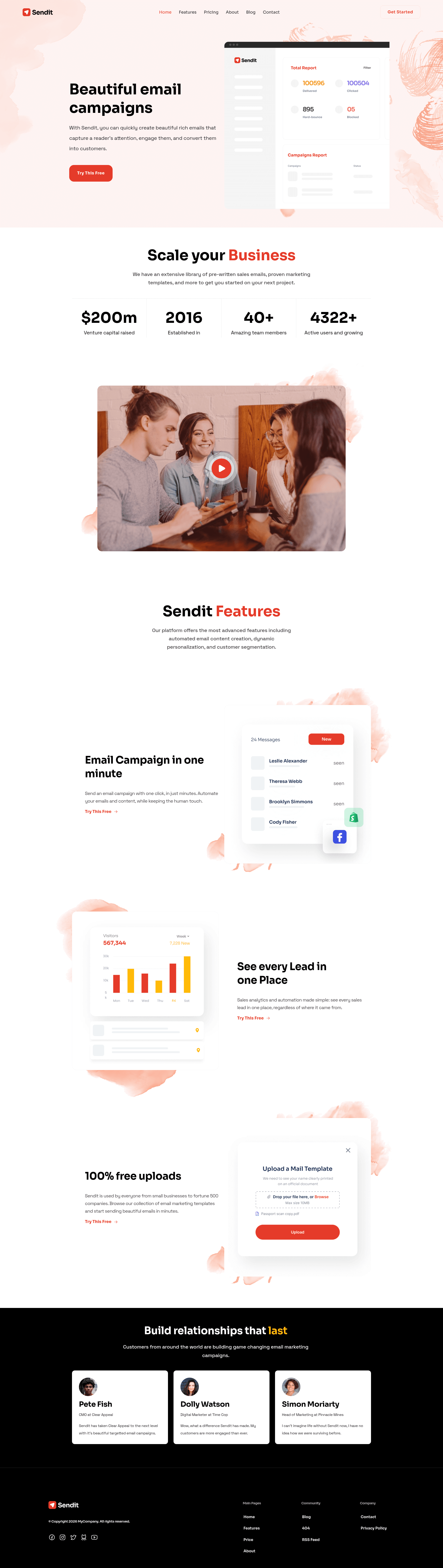
Sendit is a marketing website template for Next.js, built by CloudCannon, that lets you create a polished business site with a blog, portfolio, and configurable design. The template runs on Next.js version 13.0.4 and is optimised for editing in CloudCannon, a Git-based CMS, while also working as a standard local Next.js project.
What is Sendit?
Sendit is a Next.js 13.0.4 marketing template that produces a complete company site with pre-built pages, a blog with pagination and category pages, and portfolio items. As input, it takes content managed in CloudCannon collections—such as Posts, Staff, and company data—and outputs a static site with configurable navigation, footer, multiple hero options, and theme colors computed from a base palette. The template is hosted on GitHub under CloudCannon/sendit-nextjs-template and offers a live demo at https://mysterious-oryx.cloudvent.net/.
Key Features
- Pre-built pages — Sendit ships with ready-made marketing pages so you can populate them with content instead of designing from scratch.
- Pre-styled components — The template includes styled components for common sections like heroes, CTAs, and cards, with multiple hero layouts to choose from.
- Blog with pagination and category pages — Manage posts in the Posts collection; each post can reference a Staff Author from the Staff collection, and category pages are generated automatically.
- Configurable navigation and footer — Nav and footer links are defined once in the Data section and reused across the site, so updates apply everywhere.
- Configurable theme colors — Set your main colors in the Data/Theme section; the template computes lighter and darker variants, and the new colors apply on the next build.
- Optimised for CloudCannon editing — The template is set up to add, update, and remove pages, components, posts, portfolio items, company details, and footer elements directly from the CloudCannon CMS.
- One-click deploy to CloudCannon — A deploy button connects the GitHub repository to CloudCannon for a hosted editing workflow.
Who is it for?
- Marketing teams at small businesses or SaaS companies that need a professional site quickly and want to manage content without writing code.
- Digital agencies that deliver client sites and need a template with a portfolio and blog that the client can edit themselves.
- Developers who want a Next.js starter with CloudCannon integration for faster project setup and a clean editing experience for non-technical users.
What can you do with Sendit?
- Launch a marketing site: Deploy the template to CloudCannon and edit the pre-built pages, navigation, and theme colors to match your brand.
- Publish a blog: Add posts to the Posts collection, assign a Staff Author from the Staff collection, and let pagination and category pages build themselves.
- Keep company info consistent: Update company details once in the Data/Company section and reuse them across the site instead of editing every page.
- Rebrand with new colors: Change the main theme colors in Data/Theme, and the template computes the full color palette on the next build.
How does Sendit work?
- Deploy the template via the CloudCannon deploy button or run it locally with
npm installandnpm run dev. - Edit content in CloudCannon—pages, posts, portfolio items, company data, nav and footer details—or in your code editor.
- Set theme colors in the Data/Theme section; the site updates its computed color variants on the next build.
FAQ
Is Sendit free to use?
The template is publicly available on GitHub under the CloudCannon organisation, and the repository includes a deploy button to CloudCannon. For cost details, check the CloudCannon pricing page, as hosting and editing are provided by that platform.
Does Sendit work without CloudCannon?
Yes. Sendit is a standard Next.js project, so you can run it locally with npm install and npm run dev. CloudCannon is an optional editing layer; the template files work like any other Next.js app.
How do I change the blog author on a post?
In the CloudCannon Posts collection, edit the "Staff Author" field to link to a member in the Staff collection. That author's details are then reused wherever the template displays post metadata.
Can I update the footer across the whole site at once?
Yes. Footer details are stored in the Data section and reused around the site, so editing them once updates every page that uses that data.
Is there a live demo of Sendit?
A live demo is available at https://mysterious-oryx.cloudvent.net/ so you can see the template's layout and blog in action.