Template details
Sharp
Laravel 11+ content management framework for building CMS sections via a clean PHP API.
About this template
Sharp is a content management framework packaged for Laravel 11+ that lets you build a CMS section in your application through a clean, code-driven PHP API instead of writing any frontend code.
What is Sharp?
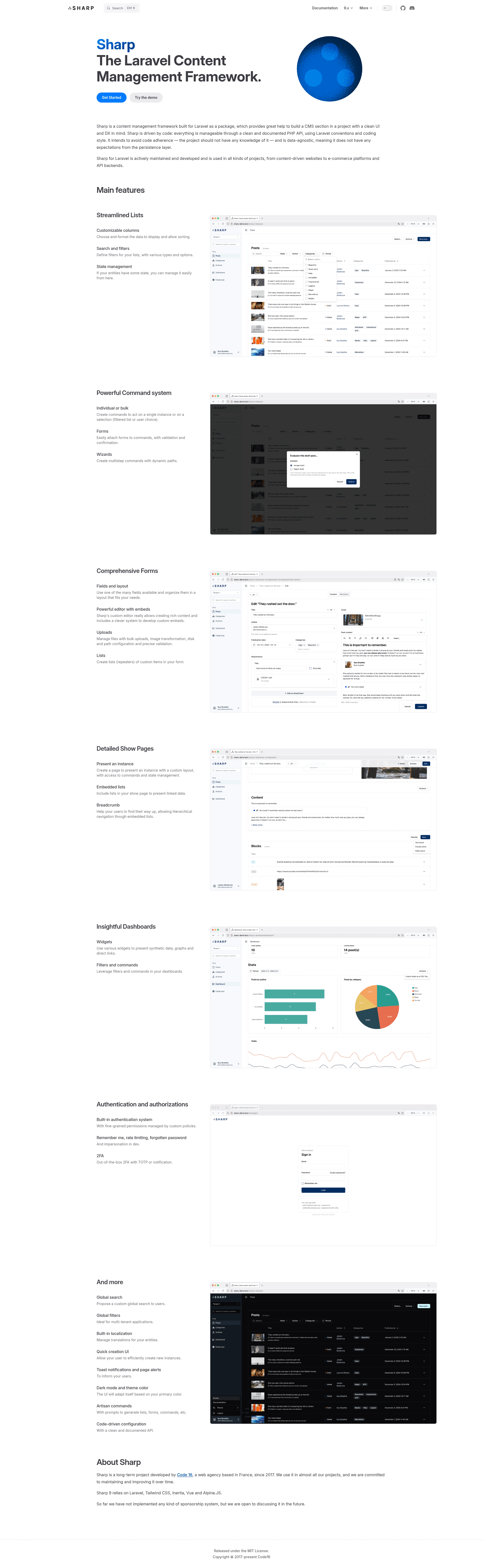
Sharp is a Laravel package maintained by Code 16 that acts as a content management framework for your project. It takes your Laravel project's structured data and exposes it through a complete admin UI, producing CRUD screens, listing views with search, sorting and filtering, and custom command actions. It is data-agnostic, meaning it works with any persistence layer, and your project code never needs to know it exists.
What makes Sharp stand out?
- Code-driven configuration — define all entities, fields, and behaviors through a documented PHP API using Laravel conventions and coding style; no frontend code needed.
- Full CRUD operations — create, update, and delete any structured data with built-in validation and error handling.
- Data browsing — display, search, sort, and filter data in the admin UI without custom views.
- Custom commands — execute actions on a single instance, a selection of instances, or all instances from the UI.
- Authorization and validation — handle per-user permissions and input validation from the same PHP API.
- Data-agnostic design — works with any persistence layer and does not impose a database or schema on your project.
- Laravel 11+ and PHP 8.3+ — requires these versions; an online demo instance with hourly data resets is available.
Who should use Sharp?
- Laravel developers who need to scaffold an admin panel for a client project without building a separate frontend.
- Content-driven website teams that want editors to manage structured content through a UI while keeping the codebase framework-agnostic.
- E-commerce platforms that need product, order, or inventory management screens on top of existing Laravel models.
- API backends that require an internal management interface for structured data without coupling the frontend.
What can you do with Sharp?
- Content editors: manage entries (create, update, delete) through the generated UI, including validation messages.
- Site administrators: use search, sort, and filters to find records and run custom commands like "publish" or "archive" on selected items.
- Project teams: add CMS capabilities to any Laravel app while keeping the project code free of Sharp dependencies.
How does Sharp work?
Sharp is installed as a Composer package, and you configure entities via PHP classes that describe fields, lists, validation rules, and permissions. Sharp then renders the admin interface for you, using its own UI, and connects to your data through Laravel conventions. A public demo is available online and its data is reset each hour.
FAQ
Is Sharp for Laravel free?
The page does not mention any price or commercial tier; Sharp is available as a public code repository and its documentation is open. The repository's topics list it as a Laravel package and CMS framework.
What versions of Laravel does Sharp require?
Sharp requires Laravel 11+ and PHP 8.3+, according to the project's README. You need a project on these versions to use the package.
Do I need to write frontend code with Sharp?
No. Sharp is code-driven and provides the admin UI itself. You define everything through a documented PHP API, and the package generates the interface, so you do not write HTML, CSS, or JavaScript for the CMS.
Is Sharp data-agnostic?
Yes. Sharp has no expectations from the persistence layer, so it works with whatever database or storage your Laravel app uses. This also means your domain code stays independent of Sharp.
Where can I see Sharp in action?
A demo instance is online at sharp.code16.fr/sharp/ and the data is reset every hour, so you can safely test CRUD, filters, and custom commands before integrating it into your project.