Template details
SQLAdmin
SQLAlchemy Admin for FastAPI and Starlette
About this template
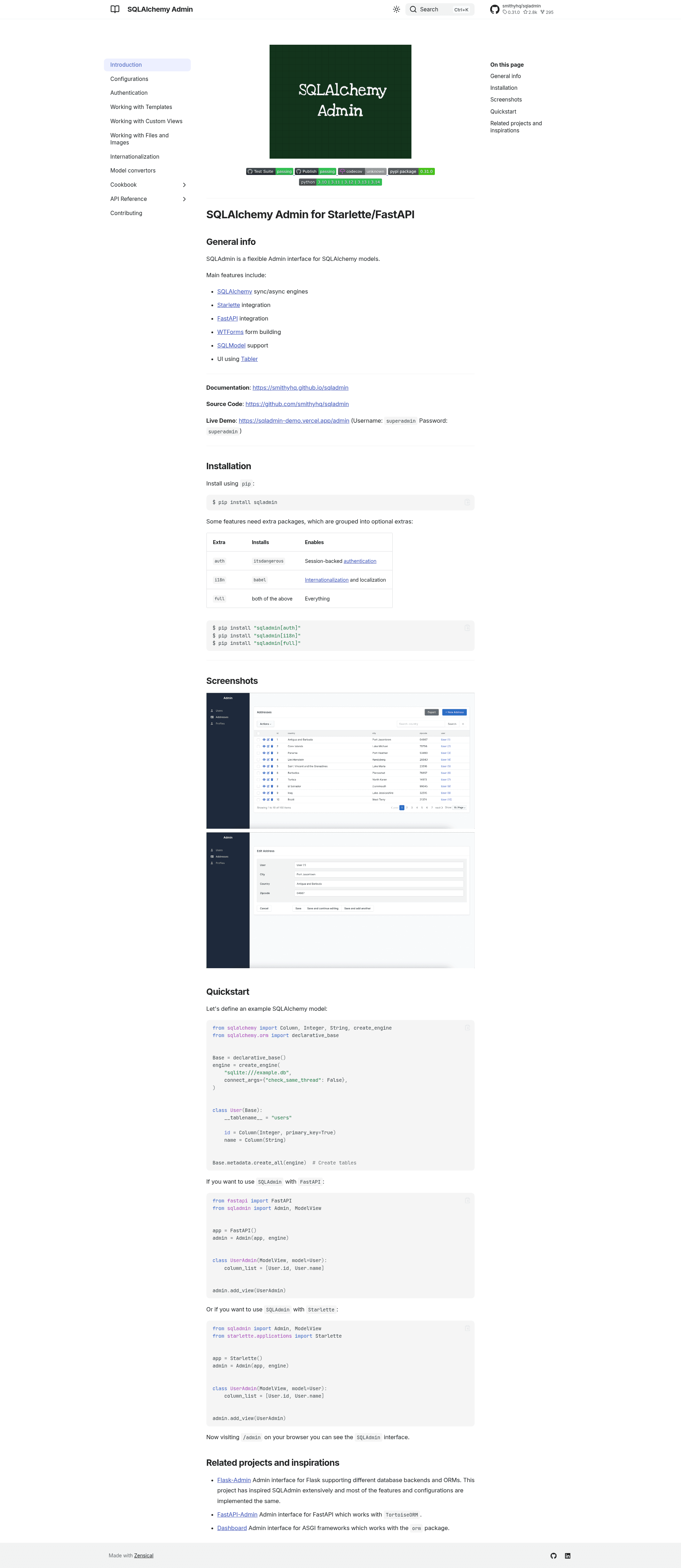
SQLAdmin is an open-source admin interface library for SQLAlchemy models that plugs into Starlette and FastAPI ASGI applications, generating CRUD admin screens from Python model definitions. The project is maintained by the SmithyHQ organization on GitHub, where the repository has more than 2,800 stars.
What is SQLAdmin?
SQLAdmin is a flexible admin interface for SQLAlchemy models that runs on the Starlette and FastAPI ASGI frameworks. It takes SQLAlchemy ORM model definitions plus a database engine and produces a browsable admin UI at the /admin route with list, detail, create, and edit views for each registered model. The rendered interface is styled by the Tabler dashboard kit, and WTForms generates the create and edit forms directly from model column definitions. A working demo is hosted at sqladmin-demo.vercel.app/admin.
Key Features
- Sync and async SQLAlchemy engines — supports both
create_engineand async SQLAlchemy engines, so SQLite, PostgreSQL, MySQL, and other SQLAlchemy backends work in sync or async mode. - FastAPI and Starlette integration — the same
Adminclass attaches to either framework's application instance in two lines; the Quickstart shows identical setup code for both. - WTForms form building — forms for creating and editing records are generated from SQLAlchemy model definitions, removing the need to hand-write HTML forms.
- SQLModel support — models written with SQLModel, the SQLAlchemy-plus-Pydantic ORM from the FastAPI author, are supported.
- Tabler-based UI — the dashboard interface uses the Tabler UI kit, a Bootstrap-based admin theme with ready-made components for tables, forms, and navigation.
- Optional session authentication — installing the
authextra pulls initsdangerousand enables session-backed login for the admin interface. - Optional internationalization — installing the
i18nextra pulls inbabeland enables localization; thefullextra installs both auth and i18n.
Who is it for?
- FastAPI application developers — add an admin panel for existing SQLAlchemy models without writing frontend code, by registering a
ModelViewsubclass for each model. - Starlette developers — teams using Starlette directly get the identical admin interface, since SQLAdmin targets the ASGI layer rather than a specific framework.
- Internal tool builders — small teams that need a simple data-management UI for internal databases can get one in minutes without writing frontend code.
What can you do with SQLAdmin?
- Manage database records through a browser — register a
ModelViewsubclass for any SQLAlchemy model and immediately get list, detail, create, edit, and delete screens at/admin. - Control which columns are shown — set
column_liston aModelView, as in the Quickstart'scolumn_list = [User.id, User.name], to limit which attributes appear in the admin list view. - Prototype an admin panel in minutes — define a model, create an engine, instantiate
Adminwith your app and engine, then add views; the Quickstart fits the whole setup in about twenty lines of Python.
How does SQLAdmin work?
The Quickstart walks through the setup: define SQLAlchemy models and create an engine, instantiate Admin with your FastAPI or Starlette app and that engine, then subclass ModelView with the model and optional column_list, and call admin.add_view(). Visiting /admin on your browser then shows the SQLAdmin interface.
Alternatives
- Flask-Admin — the Flask admin interface that inspired SQLAdmin extensively; the README states most features and configurations are implemented the same way.
- FastAPI-Admin — an admin interface for FastAPI that works with TortoiseORM rather than SQLAlchemy.
- Dashboard — an admin interface for ASGI frameworks from the encode organization that works with the
ormpackage.
FAQ
Is SQLAdmin free?
Yes. SQLAdmin is distributed openly through PyPI via pip install sqladmin and its full source code is public on GitHub at github.com/smithyhq/sqladmin. No paid tiers, accounts, or license keys are mentioned anywhere in the README.
Does SQLAdmin work with async SQLAlchemy engines?
Yes. Support for SQLAlchemy sync and async engines is listed as a main feature, so you can pass an async engine to Admin in FastAPI or Starlette async applications, in addition to traditional sync engines.
How do I add authentication to SQLAdmin?
Authentication is opt-in. Install the auth extra with pip install "sqladmin[auth]", which installs itsdangerous for session-backed authentication. Internationalization works the same way via the i18n extra (using babel), and full installs both extras at once.
Is there a live demo of SQLAdmin?
Yes. The README links to a demo at sqladmin-demo.vercel.app/admin using the username superadmin and password superadmin. The documentation and source code are linked from the same README.
What does column_list do in a ModelView?
column_list controls which model attributes appear in the list screen of the admin interface. The Quickstart defines class UserAdmin(ModelView, model=User) with column_list = [User.id, User.name], so the users list shows only the id and name columns.