Template details
Stellar
A free, responsive HTML5 single-page site template from HTML5 UP with a hero, features, stats, and Twitter widget.
About this template
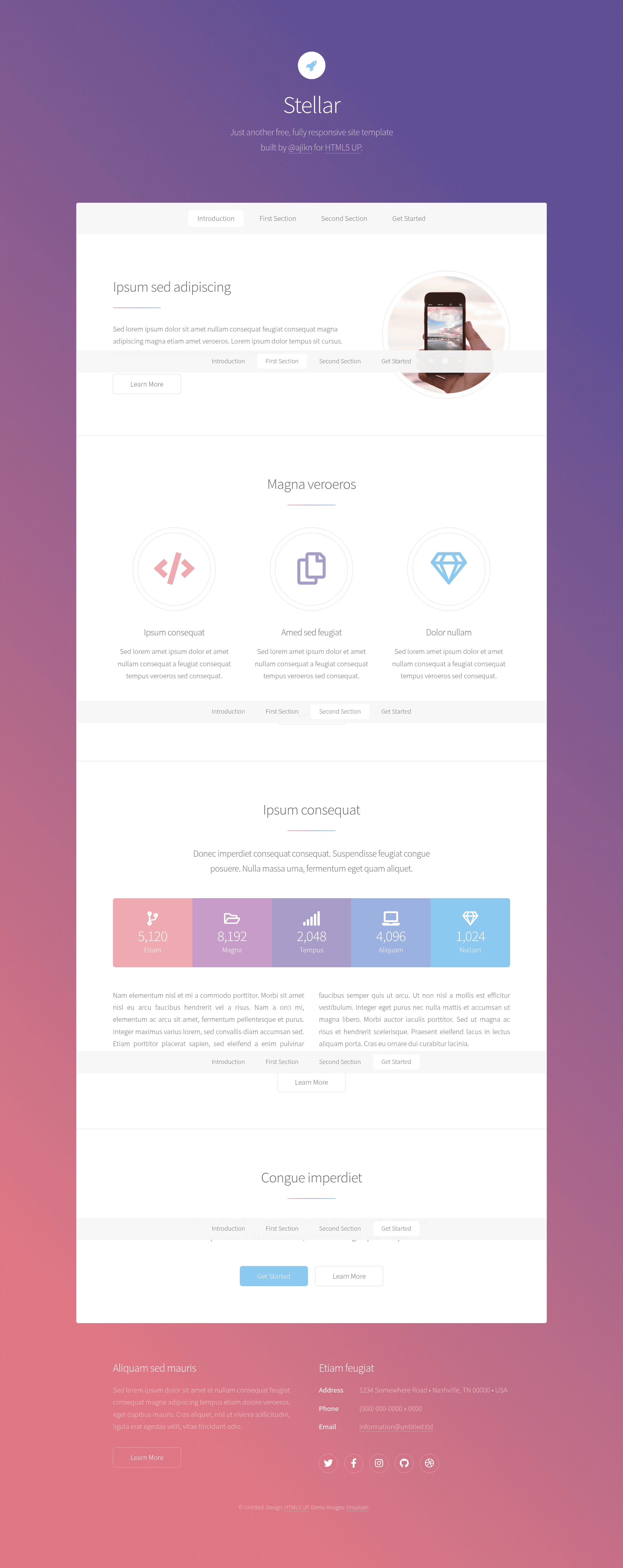
Stellar is a free, responsive HTML5 site template by HTML5 UP, built as a single-page landing layout with a centered hero, an icon feature grid, a stats band, and a Twitter widget placeholder.
What is Stellar?
Stellar is a free, responsive HTML5 site template created by HTML5 UP, designed for building single-page landing sites. The template takes plain content blocks—a hero, three feature items, five statistics, a body paragraph, and an embedded Twitter feed area—and renders them into a clean, mobile-friendly page with a bold accent color scheme. It ships as static HTML and CSS files, so it runs on any web host without a backend or build step. The demo includes a "Learn More" button linking to a generic sub-page, showing how secondary pages can be added.
Key Features
- Hero section — Centered headline and subtext with a button that links to a separate generic page, useful for a primary call-to-action.
- Feature grid — Three columns of icon-and-text blocks (Ipsum consequat, Amed sed feugiat, Dolor nullam) that stack on smaller screens.
- Stats band — Five large numeric figures (5,120, 8,192, 2,048, 4,096, 1,024) with labels, designed to highlight key metrics.
- Twitter widget area — A built-in placeholder for embedding a Twitter timeline, indicating social-media integration support.
- Responsive layout — Like other HTML5 UP productions, Stellar uses a CSS3 layout that adapts from desktop to mobile widths.
- Free and open — The template is available at no cost from HTML5 UP, with no payment tier or licensing fee for usage.
Who is it for?
- Startups and product teams — Present a new product with a hero that explains the value, a feature grid, and a stats section to build credibility.
- Freelance web designers — Use Stellar as a starting point for client landing pages, swapping the placeholder text for real content.
- Developers and tinkerers — Download the clean HTML and CSS files and modify them directly, or integrate Stellar with a static site generator.
What can you do with Stellar?
- Product launches: Showcase a solution with the hero call-to-action and list its main benefits in the three feature columns.
- Event or campaign sites: Display attendance, sessions, or donation numbers using the five-stat band.
- Personal link page: Use the single-page structure to gather your social profiles and updates, including a Twitter feed.
Pricing
Stellar is free to download from HTML5 UP. There are no paid tiers or premium versions; the template can be used for personal and commercial projects without a license fee.
Alternatives
Other HTML5 UP templates, such as Solid State and Dimension, provide different visual styles—Solid State features a more structured, sectioned look, while Dimension uses a full-screen intro with a locked background.
FAQ
Is Stellar free?
Yes, Stellar is a free template from HTML5 UP. You can download it directly from the HTML5 UP website and use it for both personal and commercial projects.
What does Stellar include?
The Stellar package includes a single responsive HTML page with a hero, three feature items, a stats section, a text body, a Twitter widget placeholder, and a footer, along with the associated CSS and image assets.
Does Stellar require a framework?
No, Stellar is built with plain HTML and CSS, so it does not require a JavaScript framework or server-side code. You can host it on any static file server.
Can I use Stellar for my business website?
Yes. HTML5 UP grants free use of its templates, including Stellar, for commercial business sites, as long as you keep the attribution notice unless you choose to remove it after supporting the project.
How do I change the content in Stellar?
Open the index.html file in any text editor, then replace the lorem ipsum headings and paragraphs with your own copy. You can also edit the style.css file to change colors and layout details.