Template details
Tmaize Blog
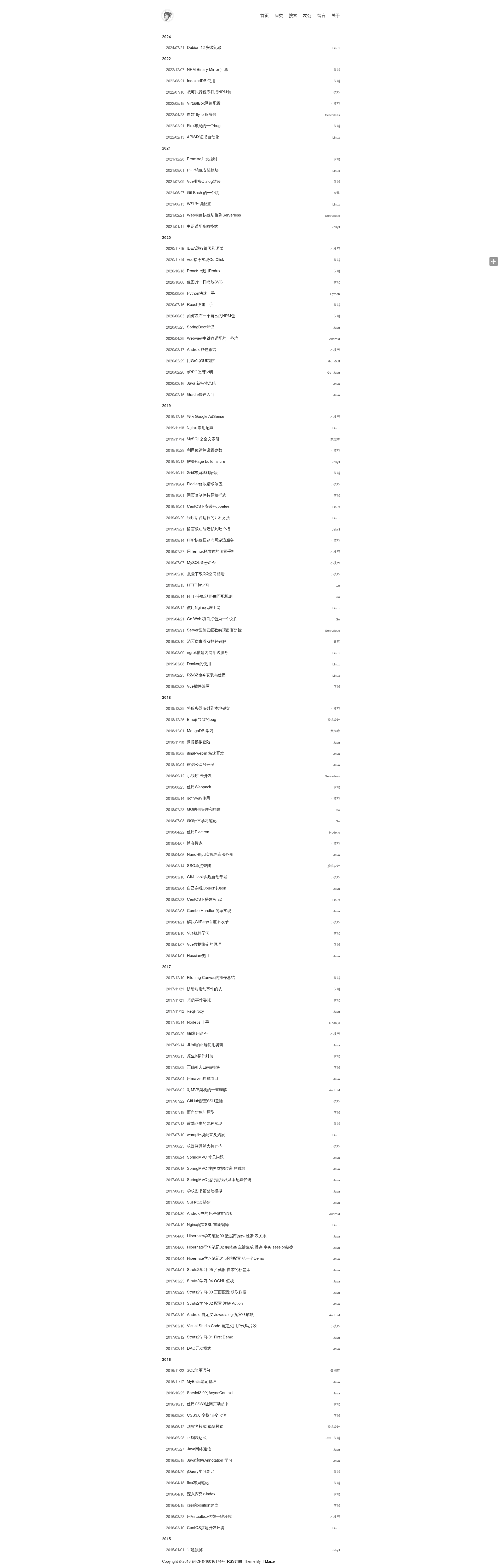
A minimal Jekyll blog theme with full-text search, night mode, responsive design, and sub-20KB page weight.
About this template
Tmaize Blog is a Jekyll theme for building fast, minimalist personal blogs and static websites. It converts Markdown posts into a self-contained static site with full-text search and night mode, while keeping total theme resources under 20KB by avoiding any front-end framework.
What is Tmaize Blog?
Tmaize Blog is an open-source Jekyll theme created by TMaize and distributed through GitHub. It takes Markdown post files with YAML front matter as input and generates a responsive static blog site using the standard Jekyll build pipeline, which runs on any Ruby environment including GitHub Pages. The theme includes no JavaScript or CSS frameworks, relying on plain HTML, CSS, and a small amount of JavaScript for interactivity.
Key Features
- Sub-20KB page weight — The theme's CSS and JavaScript total less than 20KB because it ships with no front-end framework, enabling near-instant page loads even on slow connections.
- Full-text search — A built-in client-side search feature lets readers search all posts by keyword without any external search service or server-side index.
- Night mode — A dark-mode toggle is available, with code highlighting colors adapted from the OneDarkJekyll scheme for comfortable viewing at night.
- Responsive layout — The design auto-adapts to phones, tablets, and desktops, so no separate mobile theme is required.
- Simple post workflow — Posts are stored in the
_postsdirectory asyyyy-MM-dd-slug.mdfiles; each post's images and downloads go in a matchingposts/YYYY/MM/DDfolder and are referenced with normal Markdown syntax. - Easy deployment — The repository includes a
CNAMEfile for custom domains, and the README explains both GitHub Pages hosting and local preview withbundle exec jekyll serve.
The project also provides a live demo at blog.tmaize.net and supports extra configuration through _config.yml, an about page at pages/about.md, and custom logo/favicon files in static/img.
Who is it for?
- Developers who want a fast personal blog — Set up Jekyll on GitHub Pages or locally, write posts in Markdown, and publish a lightweight site without learning a component framework.
- Existing Jekyll users — Migrate a current blog by adding posts to
_postsand specifyinglayout: mypostin the front matter; categories, search, and night mode are handled by the theme. - Readers on limited bandwidth — The sub-20KB asset footprint makes the site usable on slow or metered connections, while the responsive layout keeps reading comfortable on mobile.
What can you do with Tmaize Blog?
- Publish a personal blog or portfolio — Write categorized Markdown posts, add a custom domain through the included
CNAMEfile, and deploy automatically to GitHub Pages. - Host documentation or project notes — Because it's a single-theme static site, you can fill the
_postsfolder with tutorials, changelogs, or internal notes and still get full-text search and night mode. - Learn Jekyll best practices — The README documents the full setup from installing Ruby to generating code-highlight CSS with
rougify, making it a useful reference for Jekyll beginners.
How does Tmaize Blog work?
The theme follows a standard Jekyll workflow. After installing Ruby, run gem install bundler and bundle install to fetch dependencies. Local development uses bundle exec jekyll serve --watch --host=127.0.0.1 --port=8080, and production output is built with bundle exec jekyll build --destination=dist. To deploy on GitHub Pages, push the repository to a username.github.io repo or configure the CNAME file for a custom domain.