Template details
Treviso - Free Responsive One Page Multipurpose Bootstrap Template
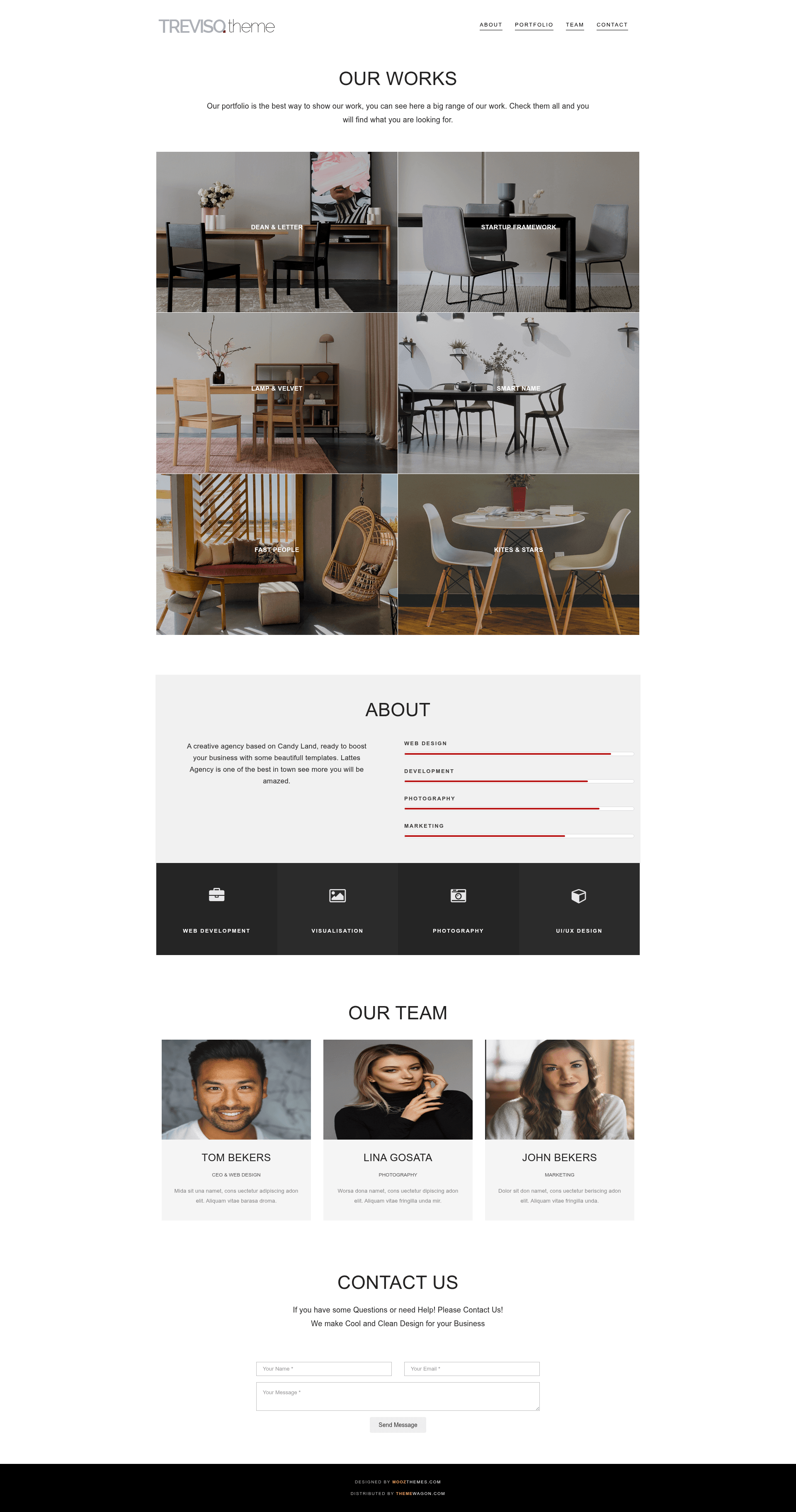
Free one-page multipurpose Bootstrap 3 template with home, about, portfolio, team, and contact sections.
About this template
Treviso is a free one-page multipurpose Bootstrap template from ThemeWagon that lets you build a complete business or personal website in a single scrolling page.
What is Treviso?
Treviso is a responsive one-page HTML5 template built on Bootstrap 3, jQuery, and Font Awesome, designed to present business or personal content in a single scrolling page. It takes your text, images, portfolio items, team member names, and contact details as inputs and renders them into prebuilt home, about, portfolio, team, and contact us sections. The template was released in 2017 by Moz Themes and is distributed for free via ThemeWagon, with a live preview at themewagon.github.io/treviso.
Key Features
- Bootstrap 3 powered — The layout uses the Bootstrap 3 grid and components, giving you a 12-column responsive system and standard UI elements without additional dependencies.
- Mobile-first responsive design — Developed with a mobile-first approach; the template was tested across screen resolutions and works on phones, tablets, and desktops, with support for Chrome, Edge, Firefox, Opera, Safari, and mobile browsers.
- Prebuilt one-page sections — Home, about, portfolio, team, and contact us sections are arranged in a vertical one-page flow so visitors can scroll through content without page reloads.
- Working contact form — The page lists a working contact form as a feature; the download page doesn't specify the email backend, so you'll likely need to attach your own form processing script.
- Font Awesome icons — The template includes Font Awesome for scalable vector icons across sections, eliminating the need to create custom image icons.
- SmoothScroll integration — The SmoothScroll JavaScript library is included to produce smooth transitions when users navigate between sections on the page.
- CSS3 animations and hover effects — CSS3 animation and on-hover effects are listed as features, adding visual feedback without heavy JavaScript libraries.
- W3C-valid markups and SEO meta tags — The template includes valid HTML markups and meta tags in the head section so you can add your own SEO metadata; the vendor states this helps search engine ranking.
- Well-commented and customizable — The source code is commented to make customization easier, and the template is described as fully customizable.
Who is it for?
- Freelancers and creative agencies — Set up a one-page portfolio site that displays projects, introduces team members, and provides a contact form to capture client inquiries.
- Startups and small businesses — Use it as a landing page to explain what you do, highlight services, and let visitors reach out through the contact section.
- Personal brands and job seekers — Build a clean one-page resume site with an about section, a few portfolio samples, and contact information.
- Developers — Use the template as a Bootstrap starter; the commented code and structured sections make it easy to adapt for custom one-page projects.
What can you do with Treviso?
- Business owners: present services, company background, and a team on a single page and invite visitors to get in touch via the contact form.
- Web designers: use the prebuilt sections as a starting point and modify colors, typography, and layout details to match a client's brand.
- Creatives and photographers: display a visual portfolio in the portfolio section and use the about and contact sections to share your story and booking details.
FAQ
Is Treviso free to use?
Yes, Treviso is completely free to download from ThemeWagon. The license allows use in commercial projects and includes lifetime free updates of the template.
What technologies does Treviso use?
Treviso is built with HTML5, CSS3, Bootstrap 3, jQuery, and Font Awesome. It also integrates the SmoothScroll library for smooth anchor navigation between one-page sections.
Does Treviso support mobile devices?
Yes, the template was developed using a mobile-first strategy and tested across screen resolutions. It is fully responsive and works on Chrome, Edge, Firefox, Opera, Safari, and mobile browsers.
Can I customize the template?
Yes, the code is well commented and the template is described as fully customizable. You can replace the sample content in the home, about, portfolio, team, and contact sections with your own text and images.
Does the contact form work immediately?
The product page lists a working contact form as a feature, but no backend details are provided. Depending on how you host the template, you may need to connect the form to an email service or server-side script to receive submissions.