Template details
Vue Material Dashboard 2 Laravel
Free Vue 3 & Bootstrap 5 admin dashboard with Laravel JSON:API backend, Material Design styling, and auth pages.
About this template
Vue Material Dashboard 2 Laravel is a free admin dashboard template from Creative Tim that pairs a Vue 3 and Bootstrap 5 frontend with a Laravel JSON:API backend for full-stack authentication and user management.
What is Vue Material Dashboard 2 Laravel?
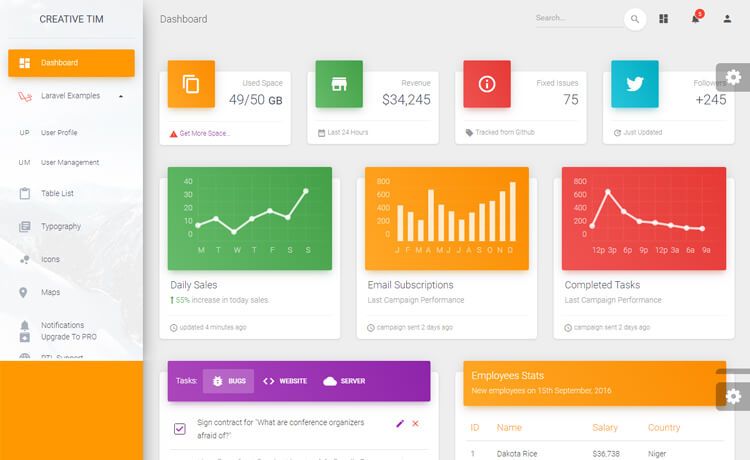
Vue Material Dashboard 2 Laravel is a free admin dashboard template built on Vue 3 and Bootstrap 5, with a design inspired by Google's Material Design. The download contains two separate projects: a Laravel JSON:API backend and a Vue frontend. It ships with prebuilt pages for dashboard, profile, sign in, sign up, and password recovery, plus over 70 frontend elements like buttons, inputs, cards, and alerts. The product is developed and maintained by Creative Tim.
Key Features
- Vue 3 + Bootstrap 5 stack — the frontend runs on Vue 3 with Bootstrap 5 and SASS files for color customization.
- Laravel JSON:API backend — the API project implements the JSON:API specification and uses Laravel Passport for authentication; it requires Apache/Nginx, PHP, Composer, and MySQL.
- Fully functional authentication — login, signup, password forgot, and password reset pages are implemented, with the login handler in
src/views/examples-api/Login.vueand the auth store insrc/store/auth.module.js. - Prebuilt admin pages — includes Dashboard, Profile, Billing, Tables, Notification, Sales, RTL, SignIn, and SignUp views, plus user management under
examples-api. - Profile editing — logged-in users can update name, email, profile picture, and password using components in
src/views/examples-api/profile. - Reusable Material components — components such as MaterialAlert, MaterialButton, MaterialInput, MaterialPagination, MaterialProgress, and MaterialSnackbar are included.
- Third-party libraries — Chart.js provides charts and Popper.js manages poppers.
- Vuex stores — authentication and profile state are managed through
auth.module.jsandprofile.module.js.
Who is it for?
Vue Material Dashboard 2 Laravel is aimed at developers and teams that need a ready-made admin interface with a working backend. Full-stack developers can use it as a starting point for products that need login, registration, and profile editing without building auth from scratch. Vue developers get a set of reusable Material Design components and prebuilt pages for internal tools. Startups and agencies can quickly deliver client-facing dashboards with a modern look and a documented Laravel API. Laravel developers can study how a Vue 3 app integrates with a JSON:API-compliant backend through services and Vuex modules.
What can you do with Vue Material Dashboard 2 Laravel?
- Admin panel builders: assemble a dashboard with analytics, tables, billing, and notifications pages, then restyle them through SASS variables.
- Auth implementation: plug the existing login and registration flows into a custom product; the README includes code examples for login, signup, and profile forms.
- Rapid prototyping: combine the 70+ UI elements and the prebuilt design blocks to go from mockup to working Vue code.
- User management: extend the included user views and the Laravel API to add roles, user lists, or profile photo uploads.
How does Vue Material Dashboard 2 Laravel work?
The download includes two folders: the Laravel API project and the Vue frontend. For the backend, you create a .env file from the example, set MySQL credentials, run php artisan migrate --seed, generate an app key, and run php artisan passport:install to get the OAuth client credentials. For the frontend, you run npm install, copy the .env.example, set VUE_APP_BASE_URL and VUE_APP_API_BASE_URL, then start with npm run dev.
Pricing
The template is free; download the .zip from Creative Tim or clone the GitHub repository.
FAQ
Is Vue Material Dashboard 2 Laravel free?
Yes. The free version is available as a .zip download from Creative Tim and as a public GitHub repository.
What do I need to run the Laravel backend?
The Laravel JSON:API backend requires a multi-threaded web server such as Apache or Nginx with PHP, Composer, and MySQL. The README advises against php artisan serve because it is single-threaded and can stall requests.
What login credentials are included?
You can log in with the email admin@jsonapi.com and the password secret, or register a new user through the signup page.
Does the template support profile editing?
Yes. The user profile page lets a logged-in user change name, email, profile picture, and password. The relevant components are in src/views/examples-api/profile.
Which browsers are supported?
The README states that the project aims to support the last two versions of Chrome, Firefox, Edge, Safari, and Opera.