Template details
Web Design Template
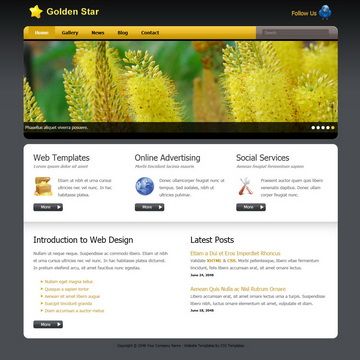
A free multi-purpose HTML CSS website template from TemplateMo with a light green and gray palette, free for commercial use.
About this template
Web Design Template is a free, multi-purpose HTML and CSS website layout from TemplateMo that packs a light green and gray visual style into a single downloadable ZIP package.
What is the Web Design Template?
The Web Design Template is a free HTML and CSS website layout published by TemplateMo on August 6, 2010. It is a multi-purpose design built around light green and light gray colors, intended to be downloaded, edited, and used on any website without licensing restrictions. The package is distributed as a ZIP file containing static HTML and CSS files that can be hosted on any standard web server or opened directly in a browser.
Key Features
- Free for commercial and non-commercial use — TemplateMo states the template is 100% free to download, edit, and use, so you can build client sites or personal projects without paying a license fee.
- Light green and light gray palette — The visual design uses a combination of light green and light gray tones, creating a fresh and neutral look that works across many niches.
- Plain HTML and CSS structure — The layout relies on standard HTML and CSS, with no backend or build step, making it easy to edit with a simple text editor and deploy to any static host.
- Live preview available — TemplateMo provides a live view of the template so you can see the exact design and layout before downloading.
- Single ZIP download — The download page offers a ZIP file with all the necessary files, as indicated by the download button on the template listing.
- Proven popularity — The listing shows over 313,000 views and 83,000 downloads, indicating it has been widely used since its release.
Who is it for?
- Freelance web designers who need a quick, free starting point for client projects and want to customize the HTML and CSS directly.
- Small business owners who want a simple, no-cost website with a clean, light-colored layout that they can edit themselves.
- Students and beginners learning HTML and CSS who can use the template as a study example of a complete static page structure.
- Developers who need a minimal static site for a landing page or micro-site and prefer to avoid a heavy framework.
What can you do with the Web Design Template?
- Small business landing pages: Build a first web presence by editing the text and colors, then upload the files to a shared hosting or static host.
- Personal portfolios: Showcase projects or resume information using the light gray and green sections as a neutral background.
- Web design learning projects: Tear apart the HTML and CSS to understand how a simple layout is assembled, then re-skin it for practice.
Pricing
The Web Design Template is completely free to download and use. TemplateMo asks only that you share the template with others; there is no mention of premium features, hidden costs, or paid upgrades on this listing.
FAQ
Is the Web Design Template free?
Yes. The TemplateMo page explicitly states the template is 100% free to download for anyone, with no charge for editing or using it, including on commercial websites.
Can I edit the template?
Yes. Because it is a plain HTML and CSS layout, you can edit the source files in any code editor and change text, colors, images, and layout without restrictions.
What technology does the Web Design Template use?
It uses standard HTML and CSS only. No JavaScript framework such as React or Vue is mentioned, and no CSS framework like Bootstrap or Tailwind is stated, so the template is appropriate for simple static sites.
How do I deploy the template?
Download the ZIP file, extract it, and upload the HTML and CSS files to any web server or static hosting service. You can also open the HTML file directly in a web browser to preview it locally.
Does the template include a contact form?
The listing page links to a separate "Contact Form PHP Script" from an external site, but the template itself is described as a static layout. You would need to add or integrate a form script separately to have a working contact form.