Template details
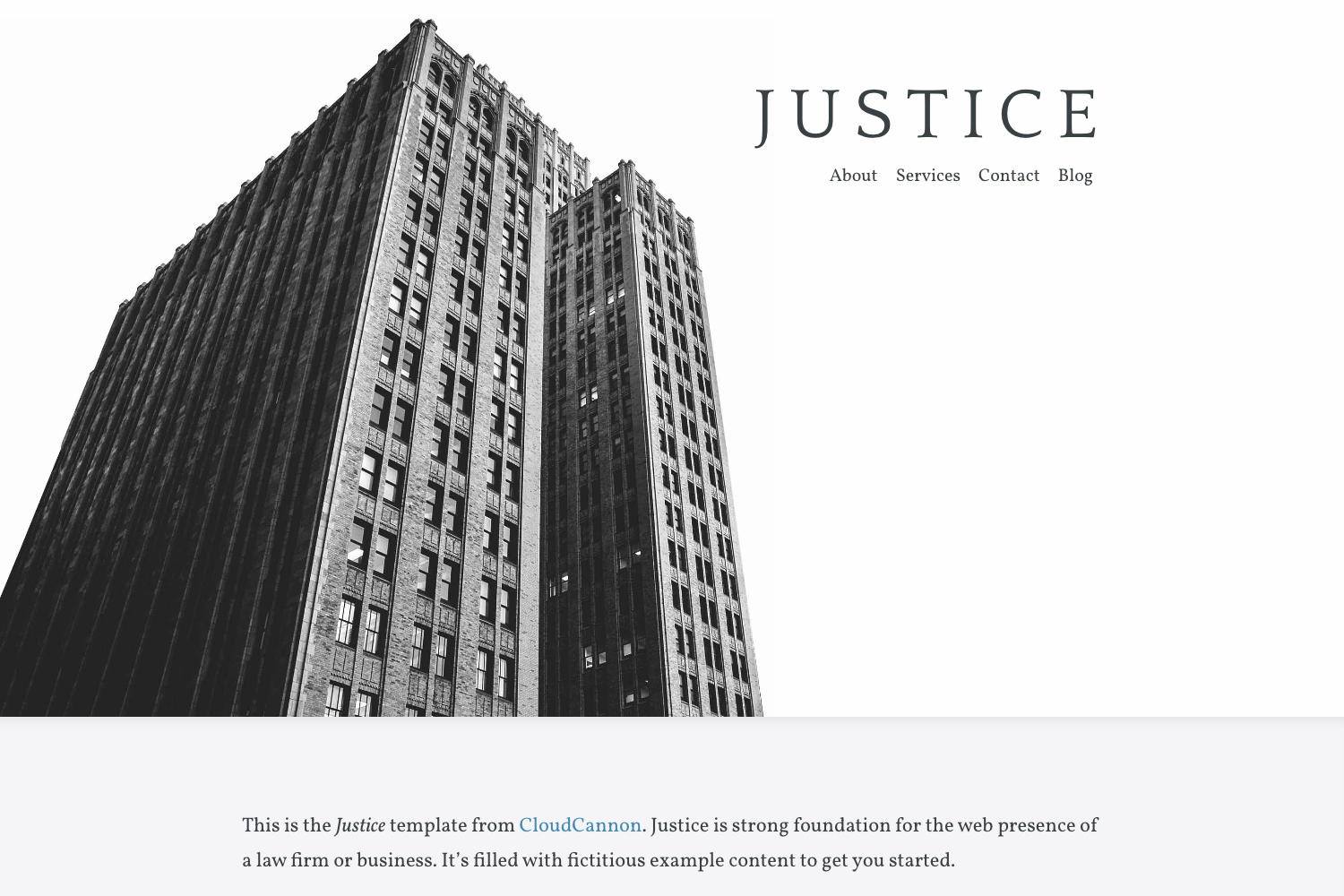
Justice
Law firm themed business template for Jekyll
About this template
Justice is a law-firm themed business template for Jekyll, built by CloudCannon, that pairs a Bookshop component library with pre-built pages for blogs, staff, and contact forms. Although it is no longer actively maintained, the template remains a valuable reference for building Jekyll sites with editable components and live CMS support.
What is Justice?
Justice is a Jekyll template intended for law firms and professional practices, created and released by CloudCannon, the cloud CMS for Jekyll and Hugo. The template takes Jekyll site content — posts, staff members, navigation and footer data files, and global settings — and outputs a complete website styled with configurable themes and a dark mode. It is built with Jekyll 4.2.1 and uses the Bookshop component library for pre-styled, maintainable UI blocks.
Key Features
- Easy theme switching — Switch between multiple built-in visual themes from Website Settings without editing code.
- Customisable themes — Adjust colors and styles through CloudCannon's configurable site settings.
- Live editing with CloudCannon — Because the site is built on the Bookshop component system, content editors can modify pages visually in the CloudCannon CMS.
- Dark mode — The template ships with a dark mode that carries across all pre-built pages.
- Pre-built pages and components — Includes pre-styled pages for a law firm such as home, blog, and category archives, plus reusable components for adding new content sections.
- Blog and staff systems — Posts link to a Staff Members collection, with category pages and an RSS/Atom feed.
- Contact form — Preconfigured to send submissions to an email defined in the component, with easy swapping to FormSpree or another provider.
- Search engine optimisation — The template is set up for SEO best practices out of the box.
Who is it for?
- Law firms and attorney practices — Launch a professional marketing site with attorney bios, practice area pages, and a blog to build authority.
- Jekyll developers — Learn or reuse a Bookshop-based component architecture to speed up Jekyll site builds.
- CloudCannon customers — Deploy the template via the CloudCannon button to get a live visual editor and client-friendly content management.
What can you do with Justice?
- Publish legal blog posts — Write articles, assign a staff author, and let them appear on category archive pages with an RSS feed.
- Manage site content for clients — Update navigation and footer from data files in Website Settings, giving non-technical users control.
- Build custom Jekyll pages — Use the component library to assemble new sections like testimonials or practice-area highlights without hand-coding HTML.
How does Justice work?
Setup is a five-step process: add your website name and live domain in Website Settings, create a Staff Member for the author, build locally using npm and Bundler, then configure remaining options in General Settings. The project separates dependencies — npm install for Bookshop components and bundle install in the site directory for Jekyll gems — and runs with npm start.
Pros and cons
- Pro: Fully open source with a public GitHub repository.
- Pro: Built on Jekyll 4.2.1, a mature static site generator.
- Con: No longer actively maintained, so production sites should consider CloudCannon's modern templates instead.
FAQ
Is Justice free to use?
Justice is an open-source Jekyll template available on GitHub, so it can be freely downloaded and used for both personal and commercial projects. The only external dependency is Jekyll itself, which is free.
How do I install Justice?
Install requires Node.js and Bundler: run npm install for Bookshop dependencies and bundle install inside the site folder, then run npm start to serve the site locally. The template can also be deployed to CloudCannon with one click.
Does Justice support dark mode?
Yes, the template includes a dark mode that works across the pre-built pages. This is controlled through the site's theme settings.
Can I use a different contact form provider?
Yes, the contact form is preconfigured for CloudCannon but can be switched to other providers such as FormSpree by updating the component settings.
Is Justice still updated?
No, the template is no longer actively maintained. CloudCannon suggests using their modern templates for new production projects, but Justice remains available for reference and learning.