Template details
A11y Starter Kit
A free, production-ready accessibility starter kit for building WCAG 2.1 AA compliant interfaces with Next.js 16, Tailwind CSS 4, and shadcn/ui.
About this template
A11y Starter Kit
The A11y Starter Kit is a free, open-source Next.js 16 starter template by thefrontkit that bakes WCAG 2.1 AA accessibility into every component, page, and interaction from the start.
What is the A11y Starter Kit?
The A11y Starter Kit takes a fresh Next.js project and turns it into a codebase with accessible demo pages, custom hooks, and reusable components. It runs on Next.js 16 with the App Router, React 19, Tailwind CSS 4, shadcn/ui, TypeScript, React Hook Form with Zod validation, and TanStack Table. The kit is built and maintained by thefrontkit and can be deployed to Vercel with a single click.
Key Features
- WCAG 2.1 AA compliance baked in — Every component includes keyboard, screen reader, and assistive tech support, with skip links, ARIA landmarks, live regions, and semantic HTML throughout.
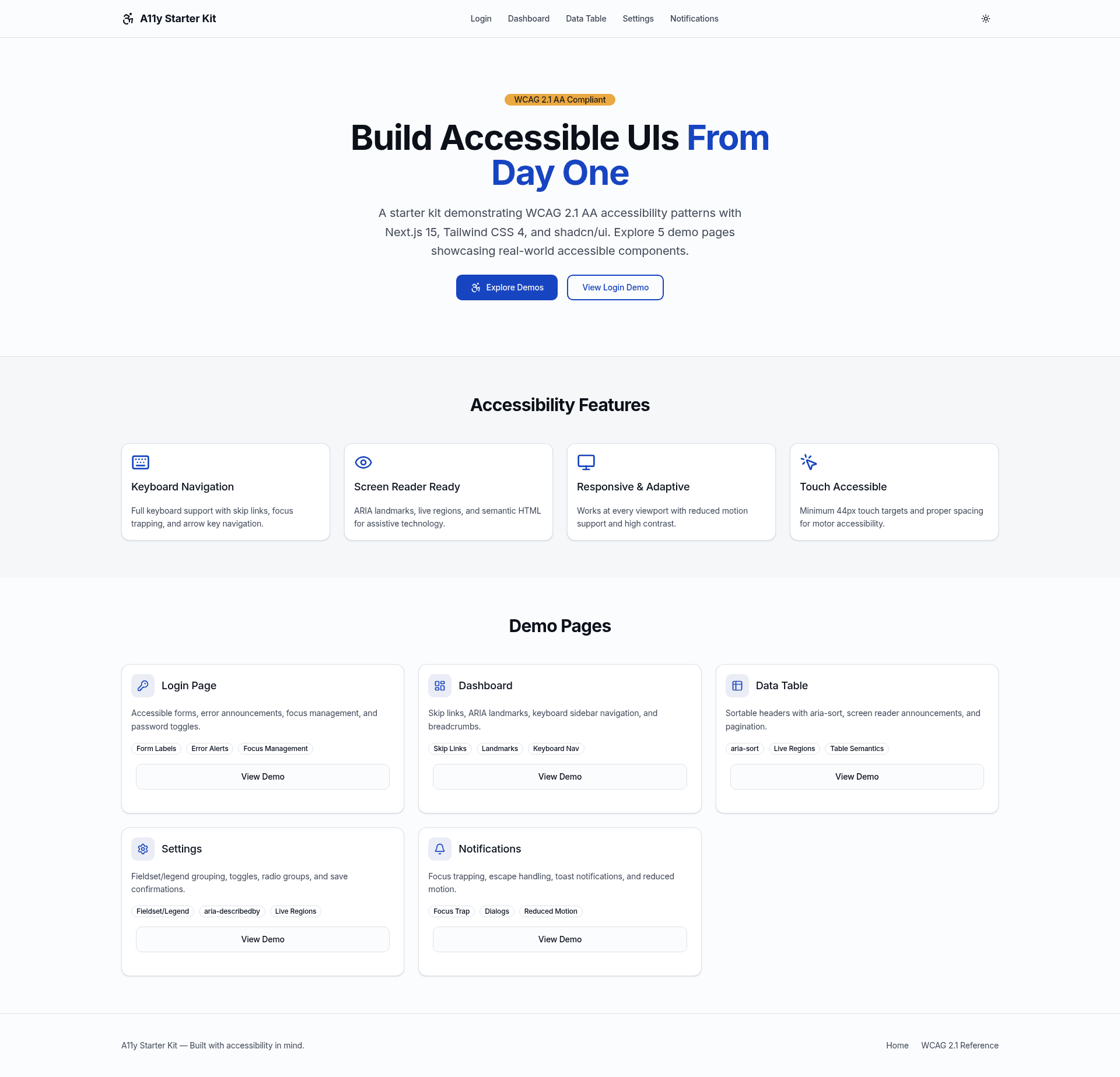
- Five demo pages — Login, dashboard, data table, settings, and notifications pages each demonstrate a distinct accessibility pattern, such as error announcements, focus trapping, aria-sort, and reduced motion support.
- Custom accessibility hooks — useAnnounce for screen reader announcements via ARIA live regions, useFocusTrap for modals, useKeyboardNavigation for arrow key navigation, and useReducedMotion for motion preferences.
- A11y utility components — LiveRegion provides dynamic screen reader announcements, and VisuallyHidden shows content only to assistive technology.
- Full tech stack — Next.js 16 App Router, React 19, Tailwind CSS 4, shadcn/ui, TypeScript, React Hook Form with Zod, and TanStack Table for data tables.
- Dark mode and reduced motion — System-aware theme switching with proper contrast ratios, plus CSS that respects prefers-reduced-motion for motion sensitivities.
- Touch accessibility — Minimum 44px touch targets and proper spacing across interactive elements.
Who is it for?
The kit is for frontend developers building production web applications that must meet WCAG 2.1 AA standards, especially those who want accessibility wired in at the start rather than retrofitted. It also helps accessibility specialists audit or teach patterns like focus management, ARIA, and screen reader announcements. Teams that need to ship quickly can deploy it to Vercel and start from an accessible foundation.
What can you do with it?
- Frontend developers: clone or deploy the starter and use the login, dashboard, data table, settings, and notifications pages as ready-made accessible app screens.
- Accessibility specialists: study the implementation of skip links, focus traps, live regions, and reduced motion handling to reference or train others.
- Product teams: launch an MVP on Vercel from this boilerplate and pass basic accessibility checks without writing every ARIA pattern from scratch.
How does it work?
Install dependencies with npm install, then run npm run dev to open the demo app at http://localhost:3000. The project structure separates code into app/ (pages), components/ (a11y, forms, layout, ui, dashboard, data-table, notifications), and hooks/ for custom accessibility logic.
Pricing
The A11y Starter Kit is free for personal and commercial projects, and no paid tiers are mentioned. It is maintained by thefrontkit.
FAQ
Is the A11y Starter Kit free?
Yes, it is free for personal and commercial projects, with no paid tiers listed. You can deploy it to Vercel directly from the GitHub repository.
What framework does it use?
It uses Next.js 16 with the App Router, React 19, Tailwind CSS 4, shadcn/ui, TypeScript, React Hook Form with Zod validation, and TanStack Table.
Does it include a data table demo?
Yes, the data table page demonstrates sortable headers with aria-sort, screen reader announcements, and pagination.
How do I get started?
Run npm install and then npm run dev to start the development server. The kit includes ready-to-use pages and components you can modify for your own project.