Template details
LaunchDarkly Flags SDK Example
Next.js example demonstrating LaunchDarkly feature flags with the Flags SDK, including experimentation and the Flags Explorer.
About this template
LaunchDarkly Flags SDK Example is a Vercel-deployable Next.js boilerplate that demonstrates how to connect LaunchDarkly feature flags and experiments to the Flags SDK and the Flags Explorer.
What is LaunchDarkly Flags SDK Example?
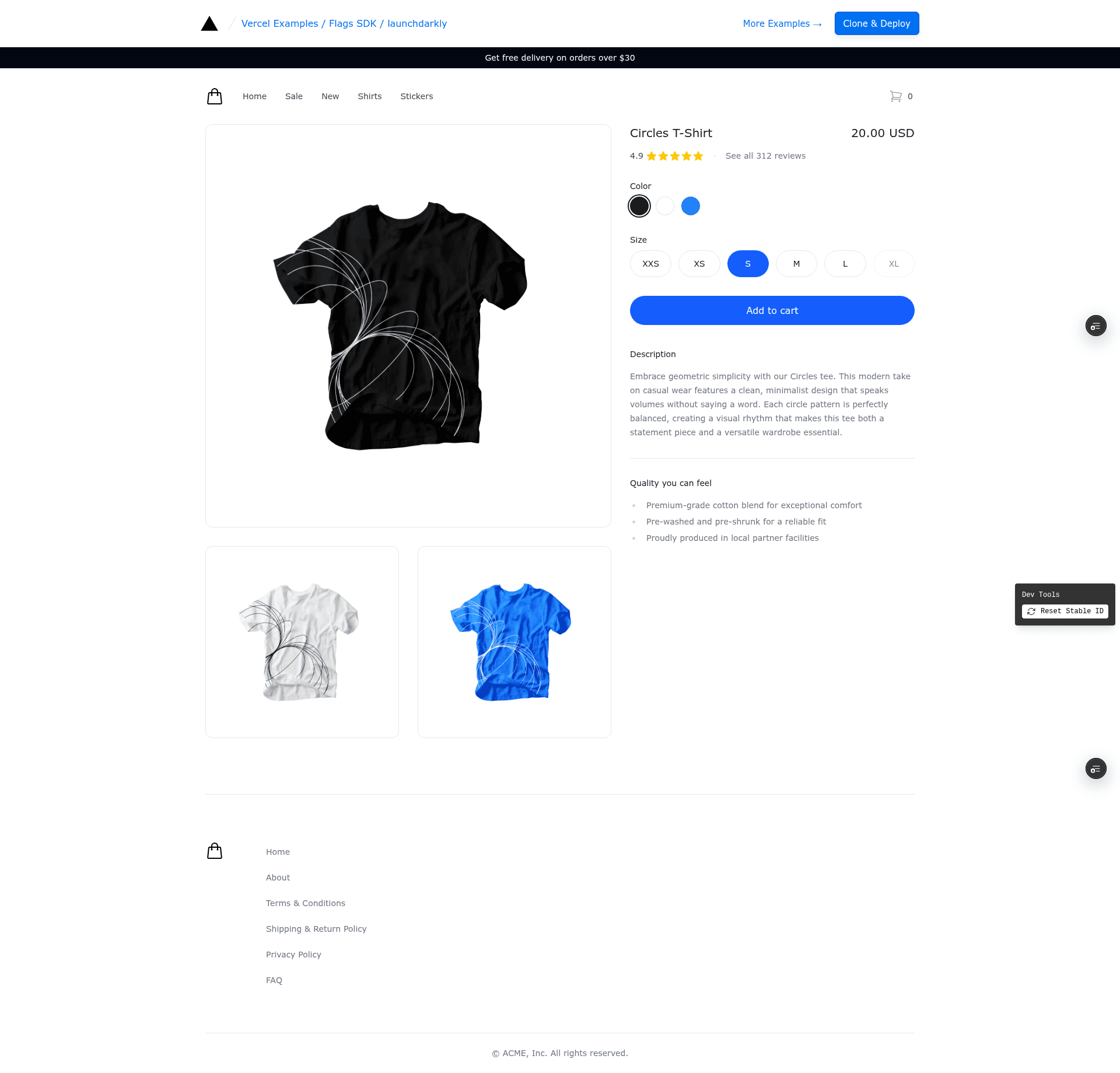
This is a Next.js example from the vercel/examples collection (5146 stars) that wires LaunchDarkly as the provider for the open-source Flags SDK using the @flags-sdk/launchdarkly adapter (v1.0.0+). It takes LaunchDarkly boolean and string flags, evaluates them on a single demo page, and conditionally renders two banners plus a checkout button color. A live demo runs at https://flags-sdk-launchdarkly.vercel.app/.
Key Features
- Flags SDK with LaunchDarkly adapter — Uses
@flags-sdk/launchdarkly, which reads theEXPERIMENTATION_CONFIGEdge Config connection string automatically when the Vercel Marketplace integration has Edge Config Syncing enabled. - Flags Explorer support — The Vercel Toolbar can create flag overrides, and with optional
LAUNCHDARKLY_API_KEY,LAUNCHDARKLY_PROJECT_KEY, andLAUNCHDARKLY_ENVIRONMENTvariables it also fetches flag descriptions and links back to the LaunchDarkly Console. - Percentage-rollout demo flags — Three preconfigured flags:
summer-saleandfree-deliverybooleans served with a 50/50 split byuser.key, plus aproceed-to-checkout-colorstring flag with blue, green, and red variations. - Stable user identity — Users are bucketed by a stable id, so they see the same banner combination until the id is reset with the in-page Dev Tools.
- Guided experiment setup — The README documents creating a "Proceed to Checkout" experiment with the
proceed-to-checkout-clickedcustom conversion event,userrandomization unit, and a 100% audience split. - One-click Vercel deploy — The Deploy with Vercel button clones the repository, sets the
FLAGS_SECRETenvironment variable, and installs the LaunchDarkly integration from the Vercel Marketplace. - Documented environment variables —
.env.examplelistsFLAGS_SECRET(32 random bytes, base64-encoded),LAUNCHDARKLY_PROJECT_SLUG,LAUNCHDARKLY_CLIENT_SIDE_ID, andNEXT_PUBLIC_LAUNCHDARKLY_CLIENT_SIDE_ID, plus the optional API variables.
Who is it for?
- Next.js developers — Learn how the Flags SDK reads LaunchDarkly flags through an adapter and how to test variations locally after running
vercel linkandvercel env pull. - Product engineers adopting feature flags — Configure boolean and string flags with percentage rollouts in the LaunchDarkly Console, then verify stable user bucketing across reloads.
- Teams running experiments on Vercel — Follow the step-by-step experiment creation to measure how a button color change affects checkout conversion using a custom metric.
What can you do with it?
- Deploy a live feature-flag demo — Push the template to Vercel and see two banners appear independently 50% of the time, then use the Dev Tools to reset the stable id and observe new variations.
- Test flag overrides with the Flags Explorer — On your own deployment, create overrides in the Vercel Toolbar to force specific banner or button-color states without changing LaunchDarkly targeting rules.
- Build an A/B test workflow — Use the documented "Proceed to Checkout" experiment as a starting point for tying a custom conversion event to a flag variation.
How does it work?
The page evaluates the summer-sale and free-delivery boolean flags through the Flags SDK and conditionally shows or hides two banners based on the results. A stable per-user id determines which 50% bucket each visitor lands in, and the Dev Tools reset that id to re-bucket on the next reload. For experimentation, the proceed-to-checkout-color flag controls a button color while the app tracks the proceed-to-checkout-clicked custom event as the conversion metric.
FAQ
Do I need a LaunchDarkly account to use this template?
Yes — you create the feature flags and the experiment in the LaunchDarkly Console, and the Vercel Marketplace integration connects LaunchDarkly to your deployment through Edge Config syncing.
What environment variables does this template require?
The required variables are FLAGS_SECRET (32 random bytes, base64-encoded), EXPERIMENTATION_CONFIG (the Edge Config connection string exposed by the LaunchDarkly integration), LAUNCHDARKLY_PROJECT_SLUG, and both LAUNCHDARKLY_CLIENT_SIDE_ID and NEXT_PUBLIC_LAUNCHDARKLY_CLIENT_SIDE_ID.
Is there a way to see flag metadata in the Flags Explorer?
Yes — set the optional LAUNCHDARKLY_API_KEY, LAUNCHDARKLY_PROJECT_KEY, and LAUNCHDARKLY_ENVIRONMENT variables, and the Flags Explorer will display flag descriptions and a link to each flag in the LaunchDarkly Console.
Can I test different variations without creating overrides?
Yes — the demo's Dev Tools reset the stable user id, and because flags are served with a 50/50 rollout by user.key, reloading after a reset can produce a different banner combination.