Template details
AirCV
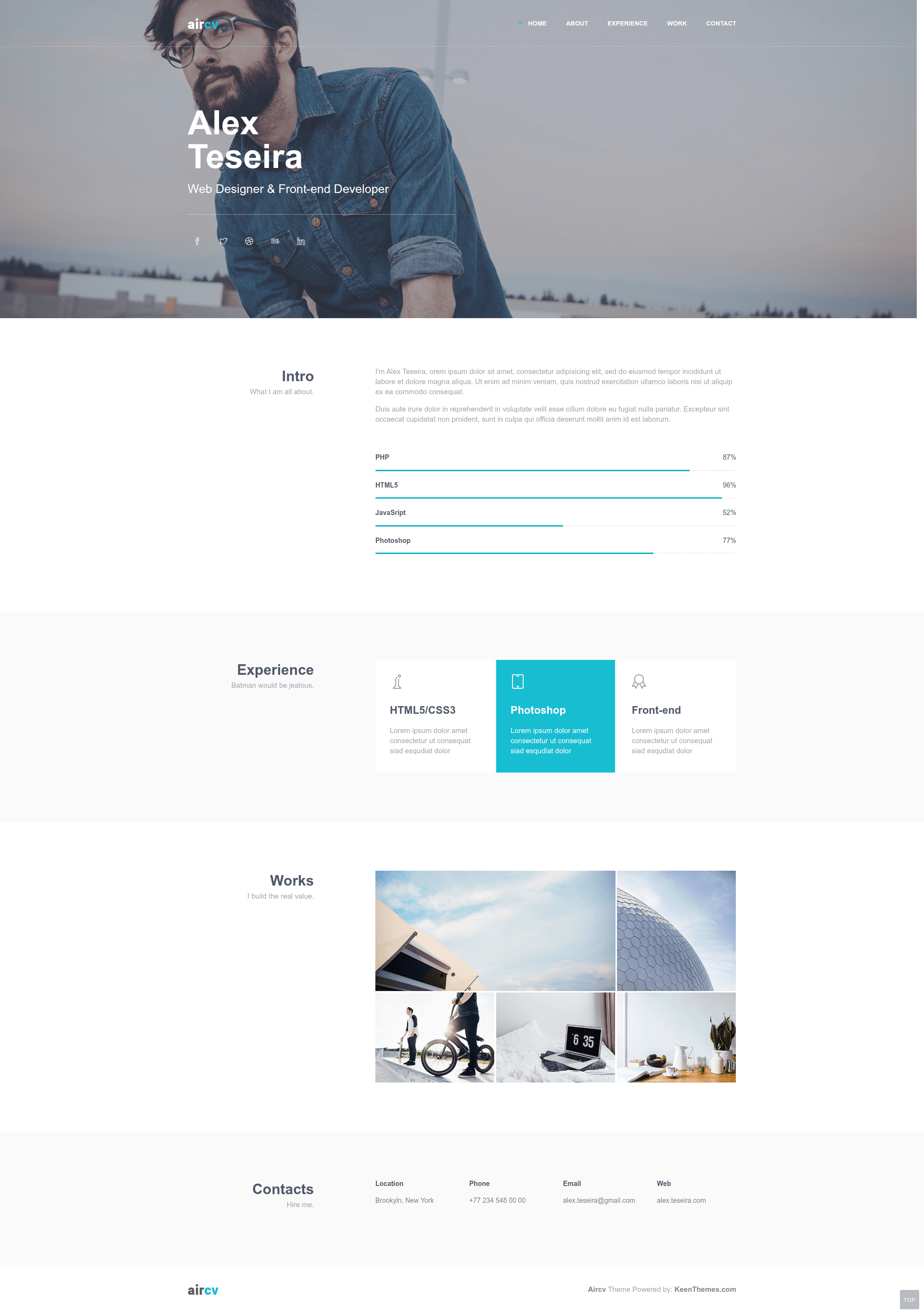
Free Bootstrap 3 personal CV and portfolio template with skills, experience, and contact sections.
About this template
AirCV is a free Bootstrap 3 personal CV and portfolio website template from Themewagon, built for developers and freelancers who need a simple one-page site to display skills, experience, and past work.
What is AirCV?
AirCV is a single-page personal CV and portfolio template built on Bootstrap 3 with HTML5, CSS3, and jQuery. It takes your name, title, social links, skill percentages, work history, and project images as input and produces a responsive, one-page portfolio website. It was designed by Keenthemes, the same developer behind the Metronic admin theme, and is distributed for free through Themewagon.
Key Features
- Responsive layout — The template adapts to mobile, tablet, and desktop screens, and is compatible with Chrome, Edge, Firefox, Safari, Opera, and mobile browsers.
- Hero section with background image — Top section displays a full-width background image with your name, professional title, and social media icons that have hover effects.
- About section with skill progress bars — Add a short bio and show expertise level for each skill using animated progress bars.
- Experience timeline — A visually designed section for listing your work history and education in chronological order.
- Portfolio grid with pop-up previews — Add project images; clicking a project opens a pop-up with details, handled with jQuery.
- Contact section without form — Displays location, email, phone, and website link so visitors can reach you directly; no contact form is included.
- Completely free and open source — Download for free, use in commercial projects, and get lifetime free updates, though no support is guaranteed.
- Built with Bootstrap 3 + jQuery — Structured as clean HTML5 and CSS3 markup, with a single-page layout suitable for personal CV or portfolio sites.
Who is it for?
- New web developers — Use AirCV to create a first portfolio site to show skills and projects without designing from scratch.
- Freelancers — Set up a simple online presence with contact details and social links to attract clients.
- Job seekers — Present work experience and skill levels in a clean CV-style layout that's easy to scan.
- Students — Build a personal homepage to share projects and contact information with recruiters.
What can you do with AirCV?
- Showcase your portfolio: Add project images to the portfolio grid, and visitors can click each one to see a pop-up with details.
- Display your skill levels: Use progress bars in the about section to communicate expertise in different technologies at a glance.
- List experience and education: Organize your work history in the dedicated experience section with a timeline design.
- Provide contact information: Publish your email, phone, location, and website URL in the contact section, simply and without a form.
How does AirCV work?
AirCV is a static HTML template. Download the files, open the HTML folder, edit the markup and CSS to replace placeholder content with your own background image, name, skills, projects, and contact details, then upload the folder to any web host. Because it uses Bootstrap 3 and jQuery, all interactivity like the portfolio pop-ups and progress bars works without a build process or backend.
Pros and cons
- Pros: Free to download and use commercially; no build tools or server required; responsive across modern browsers; clean and simple design suited for personal branding.
- Cons: No contact form built-in, only direct contact details; no support guaranteed by the author; based on Bootstrap 3, an older major version compared to newer Bootstrap 5 templates.
Pricing
AirCV is completely free to download and use, including in commercial projects. Lifetime free updates are offered, with no paid tier mentioned on the page.
FAQ
Is AirCV free?
Yes, AirCV is a free open-source template. You can download it from Themewagon and use it in personal or commercial projects without paying, and it comes with lifetime free updates.
Does AirCV include a contact form?
No. The contact section shows your location, email, phone number, and website address but does not include a form. Visitors reach you through the displayed details rather than submitting a message on the page.
What frameworks does AirCV use?
AirCV is built on Bootstrap 3, HTML5, CSS3, and jQuery. It doesn't require Node.js, a build step, or a backend — just edit the static files and host them anywhere.
Is support available for AirCV?
The Themewagon page states that no support is guaranteed for this template. Users are directed to contact Keenthemes' developers for help, or to leave comments on the download page if they find errors.
How do I customize AirCV?
Open the HTML folder from the downloaded files, then edit the HTML and CSS. You'll replace the hero background image, name, title, social links, skill percentages, experience items, portfolio images, and contact details with your own content, then upload the folder to a web server.