Template details
astro-photo-folio
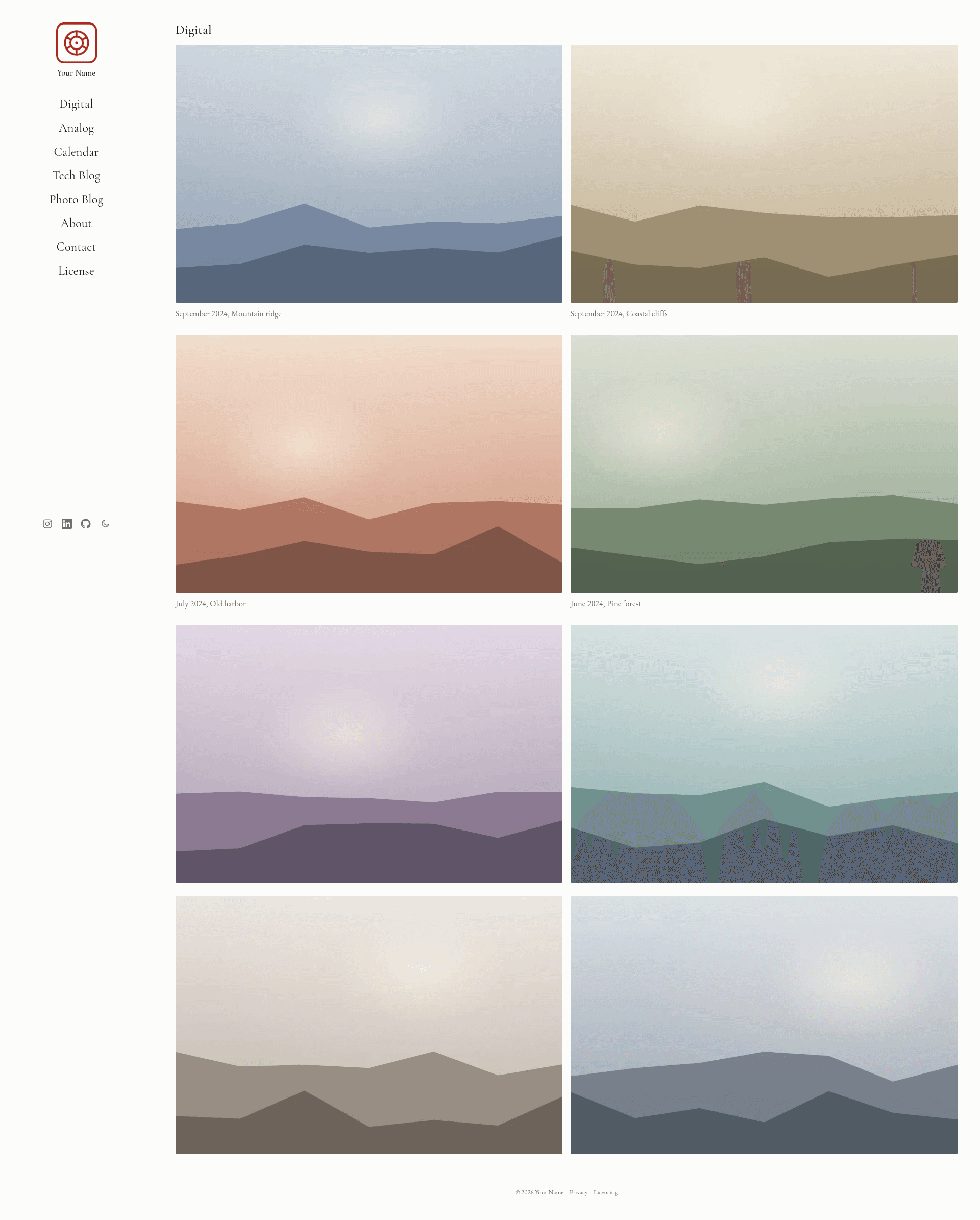
A minimal photography portfolio and blog template built with Astro: responsive galleries, a photo-a-month calendar, two blogs, light/dark mode, and SEO.
About this template
astro-photo-folio is a minimal, static photography portfolio and blog template built with Astro 7 that generates a fully static site with two photo galleries, a photo-a-month calendar, and two Markdown/MDX blogs.
What is astro-photo-folio?
astro-photo-folio is an Astro template that takes photos you drop into src/assets/digital and src/assets/analog plus Markdown/MDX posts in src/content/tech and src/content/photography, and outputs a static website with responsive galleries, a calendar, blogs, a lightbox, and SEO metadata. It requires Node ≥ 22.12, builds to a dist/ directory, and deploys to any static host. The template was created by XD-QIN and is licensed under MIT.
Key features
- Two auto-populating galleries — Drop
.jpg,.png, or.webpfiles intosrc/assets/digitalfor the home page andsrc/assets/analogfor the film section; filenames control sort order and captions. - Photo-a-month calendar — A calendar page lists one photo per month, newest first, from entries in
src/data/calendar.tsand images insrc/assets/calendar. - Dual Markdown/MDX blogs — The Tech Blog and Photo Blog read from
src/content/techandsrc/content/photography; posts are newest-first, use the filename as the URL slug, and support optional frontmatter fields like cover image, tags, and draft status. - Responsive WebP pipeline — Every photo is converted to WebP at build time and capped at 3840px on the long edge via
MAX_WEBinsrc/lib/photos.ts, so full-resolution originals never ship to the browser. - Privacy-friendly crawler control —
robots.txtallows search and citation crawlers but blocks AI training crawlers like GPTBot, CCBot, and ClaudeBot; anllms.txtindex and JSON-LD Person/WebSite/ImageGallery schema support discoverability. - Zero third-party scripts by default — The site ships cookieless with a native share-sheet share button, a light/dark theme toggle, and a full-screen lightbox with keyboard and swipe navigation.
- Placeholder regeneration scripts —
npm run setuprunsgen:brand,gen:icons, andgen:placeholdersto regenerate the logo seal, favicons, placeholder photos, and the OG share image locally using sharp.
Who should use astro-photo-folio?
Photographers who want a clean, fast portfolio with separate galleries for digital and film work can use it by dropping images into two folders. Photo bloggers who want a technical blog and a photo essay section with code highlighting and share buttons can add Markdown or MDX files. Developers looking for a well-structured Astro template with an AI-crawler-blocking robots.txt, security headers, and an llms.txt reference can study or adapt the code. Anyone who wants a free, no-database site that deploys to Netlify, Vercel, Cloudflare Pages, or GitHub Pages can maintain it entirely through file drops and simple config edits.
Use cases
- Photographers: upload full-resolution exports to
src/assets/digitalorsrc/assets/analog, and the build serves downscaled WebP at 4K max. - Film photographers: keep analog work separate in the Analog gallery and add per-photo captions with month/year/location in
src/data/galleries.ts. - Bloggers: create a
.mdor.mdxfile insrc/content/techorsrc/content/photographyand get a new post with the filename as the URL slug. - Privacy-conscious site owners: ship a cookieless site with a default privacy policy, anti-hotlinking headers, and a CSP locked to the same origin.
How does it work?
The workflow is in the README's top-to-bottom customization guide. You clone the template, run npm install and npm run dev, then edit src/config.ts for name and social links. After dropping in photos and posts, run npm run build and deploy the resulting dist/ directory; hosts like Netlify and Cloudflare Pages can build from Git with the command npm run build and output dist.
Pricing
The template is free and open source under the MIT License. Your own photographs and writing remain yours; the included image-licensing page defaults to all rights reserved.
FAQ
What Node version is required?
Node ≥ 22.12 is required because the template uses Astro 7; the repo includes an .nvmrc pinned to major version 22.
How are my photos served to visitors?
At build time every photo is converted to responsive WebP and capped at 3840px on the long edge, so full-resolution originals are never published. A post-build script also strips unreferenced originals from the output directory.
Does the site load third-party scripts?
By default, no. The share button uses the device's native share sheet or copies the link to the clipboard. Comments are an optional placeholder slot you can wire to Giscus, utterances, Cusdis, or Cactus Comments — those would add third-party scripts and you would need to update the Content-Security-Policy in public/_headers.
Can I add a custom domain?
Yes, set the site value in astro.config.mjs to your domain, then point your static host to it. After deploying, submit sitemap-index.xml to Google Search Console and Bing Webmaster Tools.
Is the template free?
Yes, the template code is MIT-licensed and free to use, including for commercial projects. Your own photos and writing are yours; the visitor-facing image-licensing page defaults to all rights reserved.