Template details
Alime
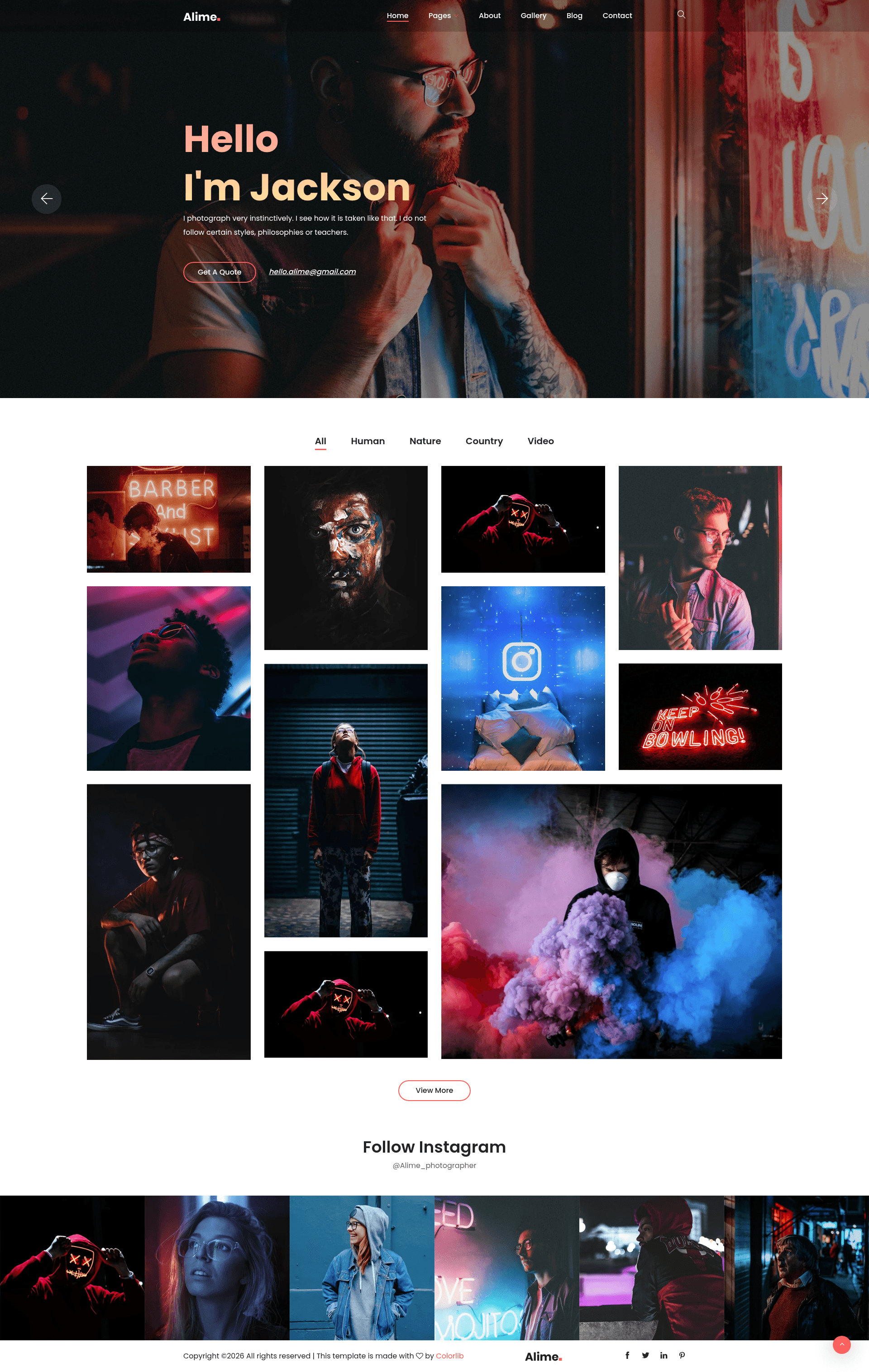
Free Bootstrap 4 HTML5 responsive photography website template with hero slider, modal gallery, and contact form.
About this template
Alime is a free, multi-page Bootstrap 4 HTML5 responsive website template built specifically for photography portfolios, distributed by ThemeWagon and created by Colorlib. It ships with six HTML files, SCSS and CSS sources, a Gulp build setup, and the FontAwesome and Themify icon sets, giving photographers a complete site structure to customize and deploy.
What is Alime?
Alime is a free Bootstrap 4 HTML5 responsive photography website template from ThemeWagon, created by Colorlib. It is a static multi-page template that includes 6 HTML files, CSS and SCSS source files, a Gulp file, font icons, JavaScript source files, and all demo images. The template's core function is to provide photographers with a ready-made, visually clean website featuring a hero header, image slider, sortable gallery with modal view, and a contact form.
The template runs entirely in the browser with no backend, so all pages are plain HTML that you can edit directly or process through Gulp. It is fully responsive and cross-browser compatible, working on Chrome, Edge, Firefox, Mobile, Opera, and Safari.
Key Features
- Bootstrap 4 foundation — Mobile-first responsive grid and components ensure the site adapts to phones, tablets, and desktops, and is tested across major browsers.
- Hero header with slider — The landing page opens with an image carousel and a call-to-action button to drive user engagement.
- Sorted gallery with modal view — Uses Magnific Pop-Up to display photos in a lightbox overlay, with sorting options and hover effects on thumbnails.
- Off-canvas search and drop-down menu — Keeps navigation tidy on small screens while providing multi-level menus on desktop.
- Multimedia and effects — Includes a modal video player for showreels, parallax scrolling effects, and load-on-scroll animations for visual appeal.
- Lead generation tools — A contact form, Google Maps embed, comment form UI, and calls to action help convert visitors into clients.
- Convenience extras — CSS3 preloader, back-to-top button, breadcrumbs, Instagram feeds, and toggleable hover effects are included out of the box.
Who is it for?
- Professional photographers who want a clean, modern portfolio to showcase their best work and attract new clients.
- Amateur photographers and hobbyists who need a free, mobile-friendly website without paying for a custom design.
- Photography studios and agencies that require a multi-page site with gallery, map, and contact sections for their services.
- Web designers and developers who want a well-commented, SCSS-based starting point to build bespoke photography websites for clients.
What can you do with Alime?
- Showcase a photo gallery — Arrange images in a sortable, filterable grid with modal pop-ups and hover effects for an immersive browsing experience.
- Add a video showreel — Insert a modal video player on a page to present a portfolio reel or behind-the-scenes footage without leaving the site.
- Run a photography blog — Use the multi-page structure and included comment form UI to publish articles and collect reader feedback.
- Collect client inquiries — Place the contact form and embedded Google Map on your site to make it easy for clients to reach your studio.
FAQ
Is Alime free to use?
Yes, Alime is free to download from ThemeWagon. It can be used in commercial projects and includes lifetime free updates, subject to ThemeWagon's license terms.
What files are included in Alime?
The download contains 6 HTML files, CSS and SCSS source files, a Gulp file, FontAwesome and Themify icons, JavaScript source files, library and plugin files (such as Bootstrap and Owl Carousel), and all demo images.
Which browsers does Alime support?
Alime is cross-browser compatible and has been tested with Chrome, Edge, Firefox, Mobile, Opera, and Safari.
What libraries and plugins does Alime use?
Alime integrates Bootstrap 4, Owl Carousel for sliders, FontAwesome and Themify Icons, and Magnific Pop-Up for the modal gallery and video players.
Is Alime a multi-page template?
Yes, Alime ships with 6 HTML files, so it can be used as a multi-page website with separate pages instead of a single-scroll layout.