Template details
Astrogency
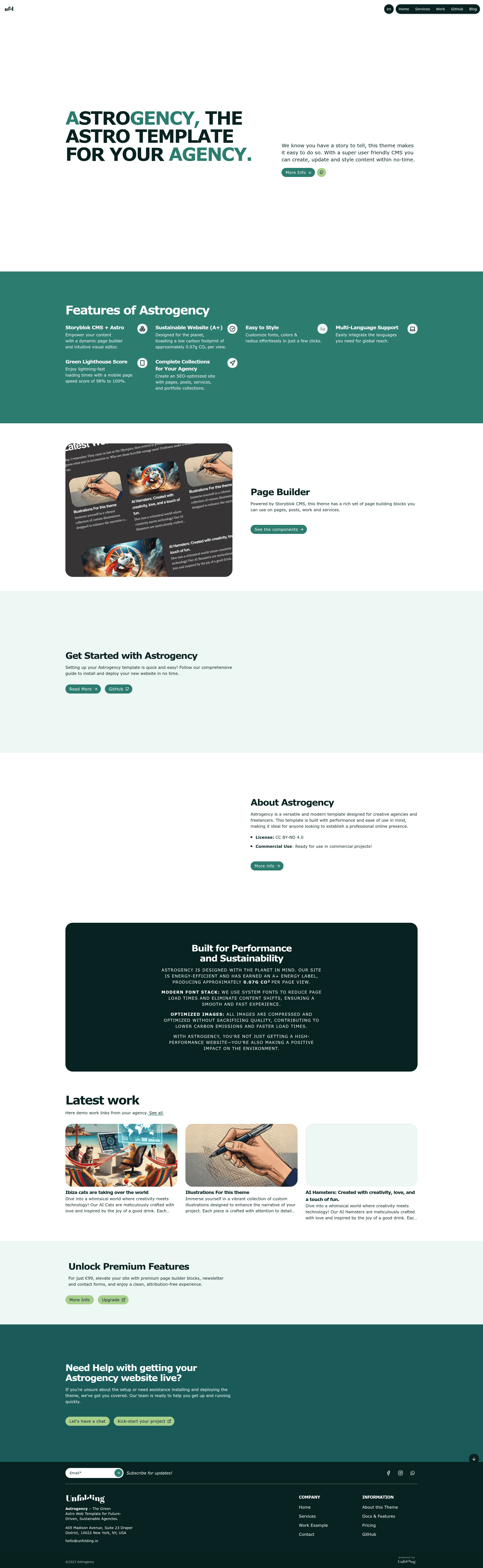
Free Astro agency template powered by Storyblok CMS, Vue, and Tailwind CSS with premium components.
About this template
Astrogency is a free Astro template that builds agency websites on the Storyblok headless CMS, with Vue and Tailwind CSS under the hood and a one-command setup to sync your content.
What is Astrogency?
Astrogency is an open-source Astro theme from unfolding.io that pairs the Astro static-site generator with Storyblok as a headless CMS. It takes Storyblok content as input—datasources, components, and stories—and produces a hybrid-rendered agency site that can deploy to Vercel or Netlify. The template is written in Vue and styled with Tailwind CSS, and it includes a /setup route that lets you sync your Storyblok space directly from the browser.
Key Features
- Tech stack — Built on Astro with Vue and Tailwind CSS, and uses Storyblok as the content backend; output mode is hybrid (static + server-side) with adapters for Vercel and Netlify.
- One-command Storyblok sync — A
/setuppage in the browser syncs Datasources, Components, and Stories into your Storyblok space, with the recommendation to delete before syncing to avoid conflicts. - Premium components included for free — Carousels, accordions, pricing tables, and more are now bundled in the latest free version, along with page builder blocks for custom layouts.
- Contact form and newsletter integrations — Supports Mailgun, Postmark, or Slack for contact form delivery, plus Mailchimp for newsletter signups (listed among premium features).
- Free and open-source license — Released under CC BY-ND 4.0, so you can use and modify the template; premium support is available via email at hello@unfolding.io.
- Deployment ready — Includes commands for install, dev, build, and preview, and the astro.config file is set to accept either
vercel()ornetlify()adapters. - Local development workflow — Start with
npm install, runnpm run devon localhost:4321, and sync content before building; the project also supports add-ons viaastro add.
Who is it for?
Digital agencies that want a pre-built marketing site they can manage through Storyblok instead of editing code. Freelance developers who need a fast Astro-based starter with headless CMS and Tailwind styling. Content teams that rely on Storyblok's visual editor and need a front-end that matches their component model. Deploy-minded developers who want to ship to Vercel or Netlify with a hybrid output and minimal config.
What can you do with Astrogency?
- Agency teams: Launch a client-ready agency website with a blog, pricing tables, testimonials, and carousels managed by non-technical editors in Storyblok.
- Developers: Scaffold a new Astro project with Storyblok integration already wired up, then sync the sample stories and components with one visit to
/setup. - Content managers: Update site copy, datasources, and component content directly in Storyblok, and see changes reflected after the next build or preview.
- Product teams: Use the premium Mailchimp and Mailgun/Postmark/Slack integrations to capture leads and route contact-form submissions to the right channels.
How does Astrogency work?
Setup takes five steps: rename env.txt to .env and add your Storyblok preview token, personal token, space ID, region, locale, and currency; run npm install; start the dev server with npm run dev; open localhost:4321/setup to sync your datasources, components, and stories; then adjust astro.config with your site URL and choice of vercel() or netlify() adapter. The sync endpoint can be re-run whenever content structure changes, and it warns you to delete existing data first to avoid errors.
Pricing
Astrogency is free under a Creative Commons CC BY-ND 4.0 license. The latest version also unlocks all premium components at no cost. Optional paid upgrades include premium support and additional features from the unfolding.io shop; no price points are listed on the repository page.
FAQ
Is Astrogency really free?
Yes, the template is free under CC BY-ND 4.0, and all premium components (carousel, accordion, pricing tables, etc.) have been made available in the latest free version. The makers offer optional paid support and extra features through their shop, but the core template costs nothing.
What stack does Astrogency use?
Astrogency runs on Astro with Vue components and Tailwind CSS for styling. Storyblok is the headless CMS, and content sync happens through a /setup page. The output mode is 'hybrid', meaning you can mix static pages with server-rendered routes, and it ships with adapters for Vercel and Netlify.
How do I connect my Storyblok space?
After installing dependencies, rename env.txt to .env and fill in your Storyblok preview token, personal token, space ID, and region. Then open localhost:4321/setup in the browser to sync Datasources, Components, and Stories automatically. The template warns to delete existing content before syncing to prevent conflicts.
Can I deploy Astrogency to Vercel or Netlify?
Yes, the astro.config file expects you to set your site URL and choose either the vercel() or netlify() adapter. Deployment settings should also include the environment variables from the .env file. The repository provides separate commands for building and previewing the site before deployment.
What integrations are available for forms and newsletters?
Contact forms can be routed through Mailgun, Postmark, or Slack, and newsletter signups can be connected to Mailchimp. These integrations are described among the premium features, but the repository notes that premium components are now included in the free version, so check the current feature set before upgrading.