Template details
AstroPie
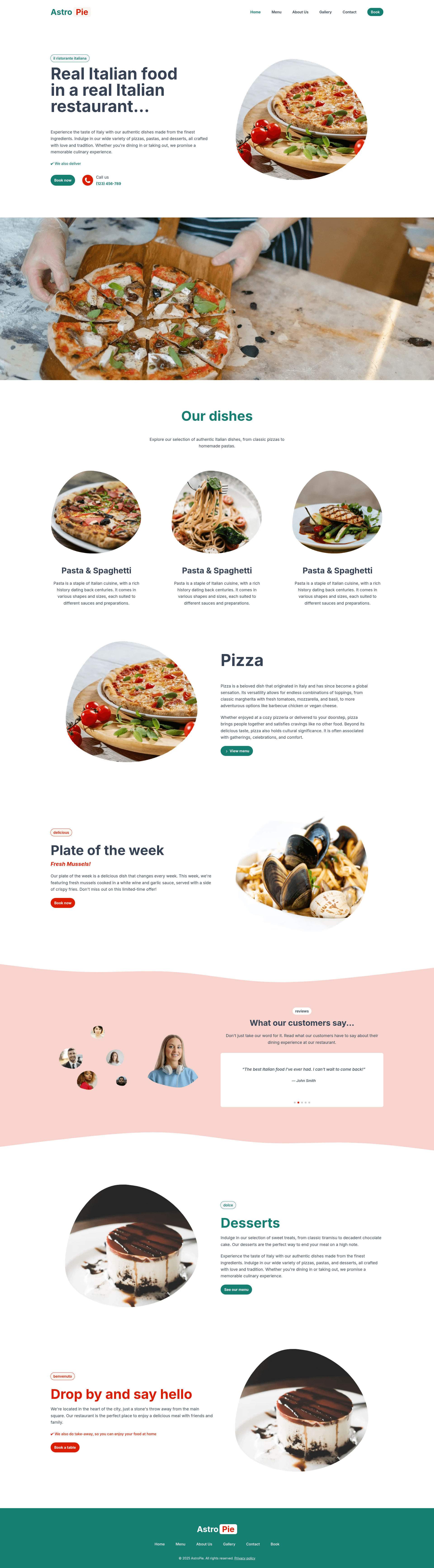
Free Astro restaurant theme with premade menu, gallery, contact, and booking pages.
About this template
AstroPie is a free, open-source Astro theme for restaurant and bistro websites, shipping six premade pages and 16 reusable components out of the box.
What is AstroPie?
AstroPie is a website template built on the Astro framework, deployed as a static site. It uses TailwindCSS for styling, Alpine.js for interactivity, Swiper for responsive sliders, and GLightbox for image and video lightboxes. The template accepts content through page files and components, and the output is a fast, content-focused website. It was created by wpinfusion and distributed on GitHub, where the repository currently lists 44 stars.
Key Features
- Premade pages — Six ready-to-use pages: Home, About Us, Menu, Gallery, Contact, and Book a Table, each stored as an .astro file in the src/pages directory.
- Reusable components — 16 components, including Hero, Menu, ReviewSlider, FormBook, FormContact, Header, Footer, and WideImage, each with documented usage examples in the README.
- Tech stack — Built with Astro, styled with TailwindCSS, and enhanced with Alpine.js, Swiper, and GLightbox for a modern, lightweight front end.
- Booking and contact forms — FormBook and FormContact components provide ready-to-use reservation and contact form markup that can be connected to a backend.
- Component slots — Layout components such as Grid and Hero accept named slots (for example, grid-content-1 or hero-content-left) so developers can place content flexibly.
- Responsive design — Tailwind's utility classes and Astro's static output help produce pages that work across screen sizes.
- Simple setup — Get running with three commands: git clone, npm install, and npm run dev.
Who is it for?
AstroPie suits restaurant owners who need a professional website without building from scratch, developers who want a Tailwind and Alpine.js base for client projects, and designers creating menus or galleries for dining establishments.
What can you do with AstroPie?
- Restaurant owners — Assemble a complete site with an appetizing menu page and a reserve-a-table form to capture bookings.
- Freelance developers — Use the documented components and named slots to customize layouts quickly for bistro and cafe clients.
- Bistro operators — Showcase interior photos and dish images on the Gallery page with GLightbox lightbox behavior.
How does AstroPie work?
AstroPie is a static-site template. You clone the repository from GitHub, install dependencies with npm, run the development server with npm run dev, and build a production-ready static site with npm run build.
FAQ
Is AstroPie free?
Yes, AstroPie is a free theme. The full source code is available publicly on GitHub.
What pages are included?
AstroPie includes six premade pages: Home, About Us, Menu, Gallery, Contact, and Book a Table.
Which technologies does AstroPie rely on?
AstroPie uses Astro as its core framework, TailwindCSS for utility-first styling, Alpine.js for interactive behavior, Swiper for sliders, and GLightbox for lightbox media.
How do I install AstroPie?
Clone the repository, run npm install, then use npm run dev for local preview or npm run build to compile the static site.