Template details
Audiophile Ecommerce Website
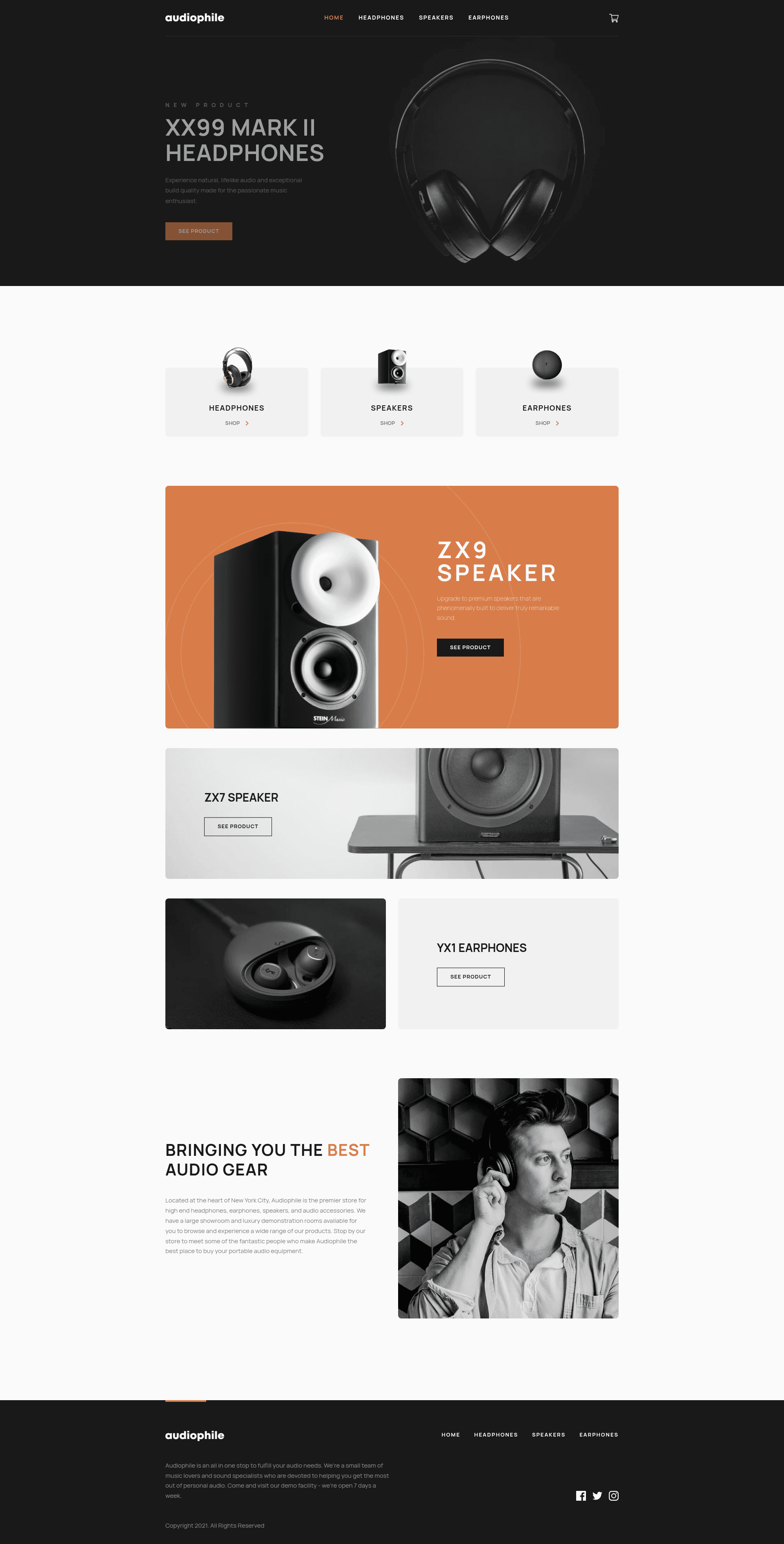
Next.js solution to the Frontend Mentor Audiophile e-commerce challenge with cart management and checkout validation.
About this template
Audiophile Ecommerce Website is a Next.js and TypeScript solution to the Frontend Mentor Audiophile e-commerce guru challenge, implementing a complete audio equipment store with product categories, cart management, and checkout with validation.
What is Audiophile Ecommerce Website?
Audiophile Ecommerce Website is a front-end project that recreates the Audiophile online store concept from a Frontend Mentor design challenge. It takes product data from a local products.json file and renders homepage, category pages for headphones, speakers, and earphones, product detail pages, a cart, and a checkout flow. The project runs on Next.js with TypeScript, uses Chakra UI for styling, Redux Toolkit for state management, React-Hook-Form for form validation, and Framer Motion for animations. It was built by front-end developer mbart13 and is live at audiophile-ecommerce-mbart13.vercel.app.
Key Features
- Tech stack — Built with Next.js, Chakra UI, Redux Toolkit, React-Hook-Form, Framer Motion, React-Intersection-Observer, and TypeScript, following an atomic design system and mobile-first workflow.
- Shopping cart — Users can add and remove products, edit quantities, and see the cart persist after refreshing the browser via localStorage.
- Checkout with validation — All checkout fields are validated with React-Hook-Form; missing or incorrect fields trigger error messages.
- Accurate totals — The order total automatically updates based on cart contents, with a flat $50 shipping fee and VAT calculated as 20% of the product total excluding shipping.
- Order confirmation modal — After submitting checkout, a modal displays an order summary of the purchased items.
- Accessibility features — Includes a 'Skip to content' link for keyboard and screen reader users, and uses aria-disabled on the submit button when the cart is empty.
- Responsive design — Chakra UI's default breakpoints (base, sm, md, lg) enable mobile-first responsive styles with min-width media queries.
Who is it for?
- Frontend developers — who want to study a real-world e-commerce implementation using Next.js, TypeScript, and Chakra UI, including patterns like getStaticProps for data fetching and Redux Toolkit for state persistence.
- Frontend Mentor learners — who are working on the Audiophile e-commerce guru challenge and want to compare a community solution with their own work.
- Developers exploring accessibility — who want to see concrete examples of skip links, aria-disabled, and accessible navigation styling in a React app.
Use cases
- Building a product catalog — Use the category pages and product listing structure as a starting point for any store that groups items by type.
- Learning cart state persistence — Observe how Redux Toolkit and localStorage are combined to keep cart contents across page reloads.
- Testing form validation flows — See how React-Hook-Form handles required fields, validation rules, and error display on a multi-field checkout form.
How does it work?
To run the project locally, clone the repository and execute yarn && yarn dev (or npm install && npm run dev). Next.js uses getStaticProps to pre-render pages at build time with product data from a products.json file prepared by Frontend Mentor and slightly modified by the author. The cart state lives in Redux Toolkit and is persisted to localStorage, then retrieved when the app loads.
FAQ
Is this a full-stack application?
No, this is a front-end solution. Product data is static from products.json, and cart persistence relies on localStorage rather than a backend or database. Checkout does not process real payments.
How do I run the project locally?
Clone the repository and run yarn && yarn dev for Yarn users, or npm install && npm run dev for npm users. The dev server will start with the Next.js app.
What data powers the products?
All product details come from a products.json file supplied by Frontend Mentor and slightly modified by the solution author. Next.js fetches it at build time using getStaticProps.
Does the cart survive a page refresh?
Yes. The cart state is stored in localStorage via Redux Toolkit, and on app load it is retrieved and restored. This is the bonus requirement of the challenge.
Why is aria-disabled used instead of the disabled attribute?
The author chose aria-disabled to keep the checkout submit button focusable and screen-reader friendly, following the inclusive disabled-button pattern described by CSS-Tricks. This prevents form submission while still allowing accessibility tools to announce the button.