Template details
Automatic App Landing Page
A Jekyll theme that generates and publishes an iOS app landing page on GitHub Pages from a simple config file.
About this template
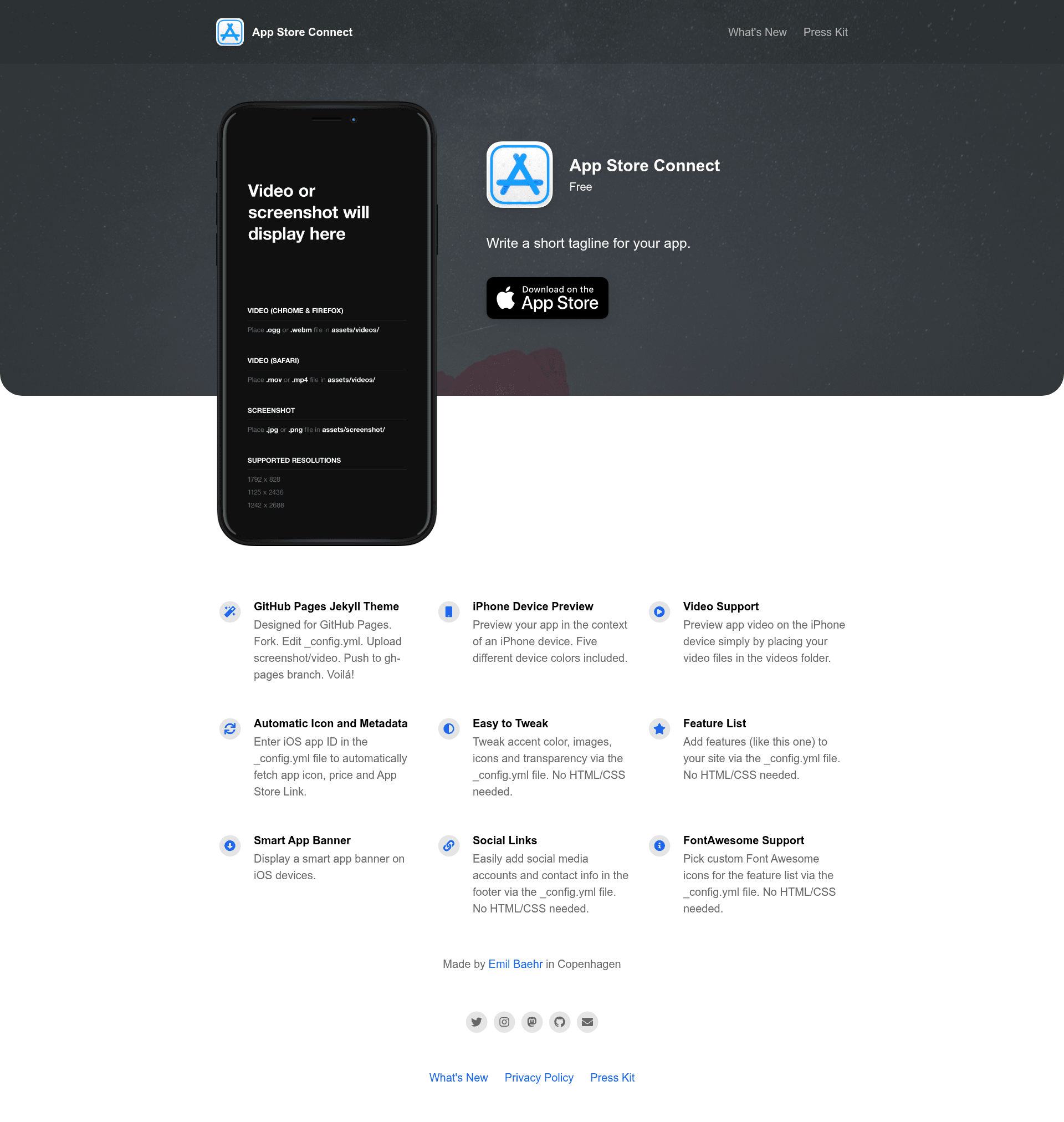
Automatic App Landing Page is a Jekyll theme for GitHub Pages that converts a forked repository into a live iOS app landing page in roughly five minutes.
What is Automatic App Landing Page?
Automatic App Landing Page is a static-site theme built on Jekyll and designed to be hosted on GitHub Pages. It takes an iOS App ID and a set of configuration values in _config.yml as input and produces a styled landing page with an app icon, name, price, App Store link, cover image, feature list, social links, a privacy policy page, and a changelog page. The theme is created by Emil Baehr, distributed under the MIT License, and has over 3,600 stars on GitHub.
Key Features
- Single-file configuration — Edit
_config.ymlto set the app name, icon, description, price, App Store and Play Store links, cover image, overlay color, background color, text colors, iPhone device color, company name, website link, social links, and feature list items; no HTML or CSS editing is needed. - Automatic App Store metadata — Enter your iOS App ID in the
ios_app_idfield and the site rebuilds using your app's icon, name, price, and App Store link automatically. - Screenshot and video previews — Add a
.pngor.jpgscreenshot toassets/screenshot/, or videos toassets/videos/; supported video formats are.webmand.oggfor Chrome/Firefox and.mp4and.movfor Safari, at resolutions 828x1792, 1125x2436, or 1242x2688. - Built-in Privacy Policy and Changelog pages — Edit
privacypolicy.mdandCHANGELOG.mdin the_pagesdirectory, and control whether each appears in the top navigation via theinclude_in_headerfront matter value. - Markdown-based extra pages — Create additional static pages by dropping a
.mdfile into_pagesthat mirrors the structure of the supplied examples. - Instant GitHub Pages deployment — After forking and enabling GitHub Pages, the site goes live at
https://your-username.github.io/your-repo-name/without any build steps. - Jekyll and FontAwesome — The theme is powered by Jekyll and uses FontAwesome icons for the feature list and social links.
Who is it for?
Automatic App Landing Page is for iOS developers who need a clean marketing page but don't want to write front-end code. Indie app makers can fork the repo, add their App ID, and publish a free landing page on GitHub Pages. Developers who prefer Markdown and config files can maintain all site content, privacy policy, and changelog as plain text in a repository.
What can you do with Automatic App Landing Page?
- Launch a pre-release app: Publish a landing page with a video preview, screenshot, and App Store link before the app is available to generate interest and collect email or social signals.
- Keep users updated with a changelog: Edit
CHANGELOG.mdto announce new versions, and the page's navigation link appears automatically ifinclude_in_headeris set totrue. - Link both app stores: The config accepts both App Store and Play Store links, so you can point visitors to either platform from a single page.
- Add custom legal pages: Write a privacy policy in Markdown and control whether it shows in the header without touching the theme's HTML.
How does it work?
Fork the repository, then edit _config.yml to enter your iOS App ID, app details, colors, and links. Add a screenshot or video files to the designated asset folders, then modify or delete the privacypolicy.md and CHANGELOG.md files. Commit the changes and GitHub Pages rebuilds the site; each new commit to _config.yml triggers an automatic rebuild.
FAQ
Is Automatic App Landing Page free?
Yes. The theme is open source with an MIT License, and hosting it on GitHub Pages is free. There are no paid plans or feature restrictions mentioned in the repository.
Do I need to know HTML or CSS?
No. All customization is done through _config.yml and Markdown files. The theme handles the HTML, CSS, and layout automatically.
What video formats are supported for the preview?
Chrome and Firefox support .webm and .ogg; Safari supports .mp4 and .mov. You must include video files for both browser groups, and each must match one of the listed resolutions: 828x1792, 1125x2436, or 1242x2688.
Can I add more pages than the Privacy Policy and Changelog?
Yes. Create a new .md file in the _pages directory that follows the same front-matter format, including include_in_header and title values, and the theme will render it as a page.
How long does it take to set up?
The quick start guide outlines four steps: fork the repo, enter your iOS App ID, add a screenshot or video, and edit the markdown pages. Most users can complete the process in about five minutes, not counting propagation time for GitHub Pages.