Template details
Bootstrap-BP
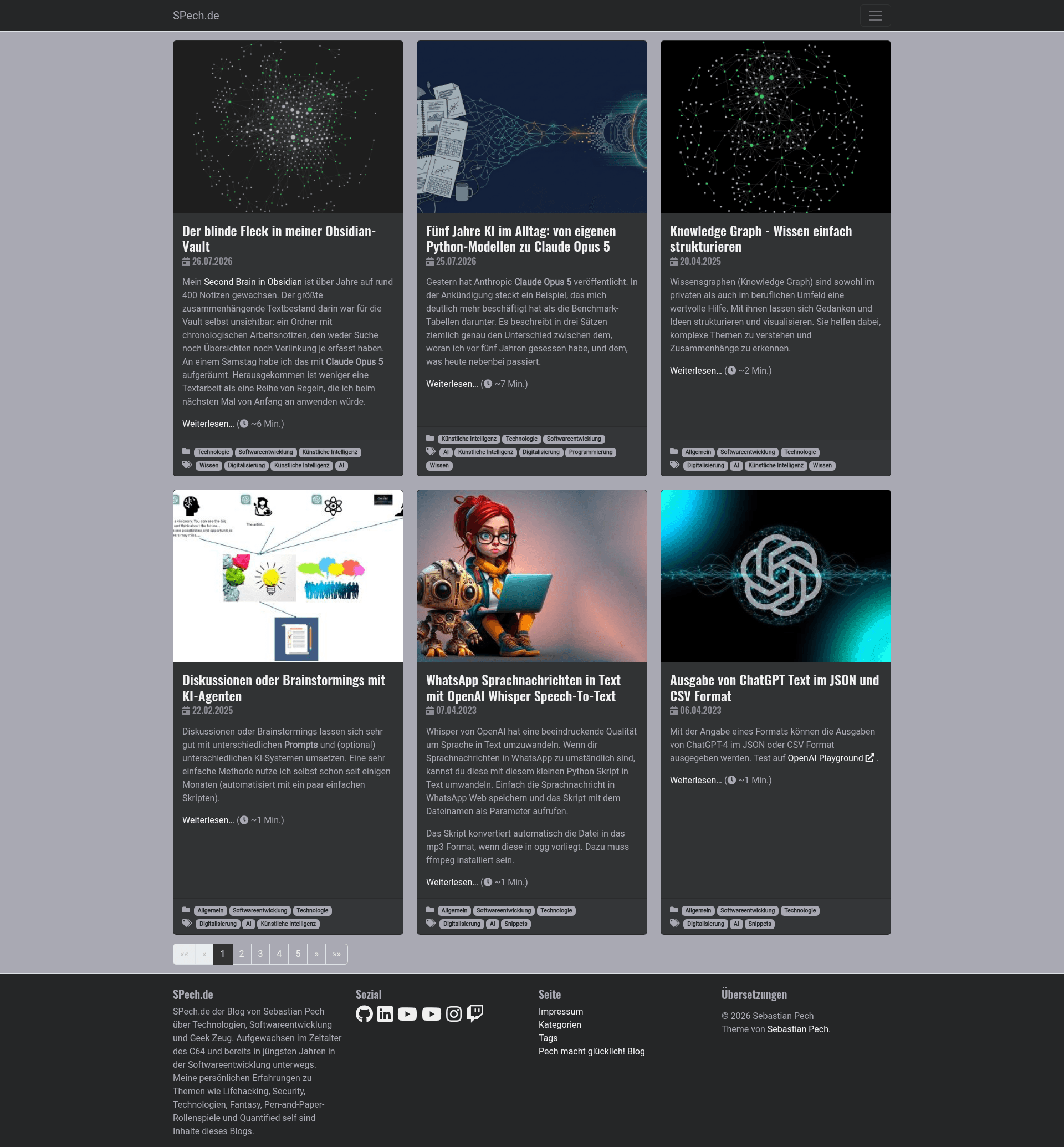
Bootstrap v5-based Hugo theme with SEO best practices, automatic image resizing, four color themes, and multiple archetypes.
About this template
Bootstrap-BP is a Hugo theme built on Bootstrap v5 that delivers a performance- and SEO-ready static website with automatic image resizing and four color themes.
What is Bootstrap-BP?
Bootstrap-BP is an open-source Hugo theme created by Sebastian Pech that renders Markdown content into a static HTML site styled with Bootstrap v5. It takes Hugo site content and configuration as input and outputs a static website with one minified CSS file and one minified JS file per resource. The theme includes built-in SEO support through Schema.org, Open Graph, and Twitter Card metadata, and it automatically resizes featured images named with feature or cover. It is distributed on GitHub and draws on the Hugo documentation, the hugo-best-practices project, the Front-End Checklist, and the Front-End Performance Checklist.
Key Features
- Four color themes — Switch between default Bootstrap, dark, light, and blue palettes using the
themeColorconfiguration parameter. - Automatic image resizing — Images whose filenames contain
featureorcoverare automatically resized and reused in featured image slots, Open Graph tags, and Twitter Cards. - SEO best practices — Includes Schema.org markup (enabled by adding an author to
params.author), Open Graph, and Twitter Card metadata, plus a configurable meta description. - Performance-focused asset pipeline — All theme and custom CSS/JS are merged into one minified file per resource type, with optional CDN loading for fonts and scripts.
- Multiple page archetypes — Provides Page, Post, Audio (Spotify embed in header), Video (YouTube embed in header), Quote, and Link templates.
- Multilingual and i18n support — The theme includes translation strings to build sites in multiple languages.
- Customizable layouts — Options such as
startPageColumnsfor a masonry-like startpage,showPostSummaryfor summaries,showListsGroupedfor yearly headers, andhideReadingTimeto hide reading time. - Social icons — Built-in icon links for GitHub, GitLab, LinkedIn, Twitter, Instagram, YouTube, and more, configured through
params.social.
Who is it for?
- Bloggers and content writers — Use the Post and Quote archetypes to publish articles with automatic Open Graph and Twitter Card images.
- Developers building Hugo sites — The config-driven layout (menus, social icons, custom CSS/JS) and archetypes speed up building a static site without writing templates from scratch.
- Small businesses or personal sites — The Page template and four color themes allow a clean company or portfolio site, while i18n support makes multilingual sites possible.
- Podcasters and video creators — The Audio and Video archetypes embed Spotify and YouTube players directly in the page header.
What can you do with Bootstrap-BP?
- Showcase a portfolio: Use the Page archetype and the masonry-like startpage option (
startPageColumns = true) to display project cards in a grid layout. - Publish a multi-language blog: Combine the i18n support with the Post archetype and
showListsGroupedto organize posts by year across languages. - Build a media-rich post: Drop a file named with
featureorcoverinto a post's folder, and Bootstrap-BP automatically resizes it and adds it to the header, Open Graph, and Twitter Cards. - Add a custom design layer: Drop your own styles into
/assets/css/custom.cssand scripts into/assets/js/custom.js; the theme merges and minifies them with its own files, or you can include per-page CSS/JS via config parameters.
How does Bootstrap-BP work?
Install the theme by cloning the repository into the themes directory, then run the example site with hugo server --themesDir ../.. from the exampleSite folder. Configure the site through config.toml using Hugo's standard variables and the theme's optional params settings. To update the theme, run git pull inside the theme folder.
FAQ
How do I install Bootstrap-BP?
Clone the repository into your Hugo site's themes folder using git clone https://github.com/spech66/bootstrap-bp-hugo-theme.git, or download the zip from the GitHub home page. Then run the example site from the exampleSite folder with hugo server --themesDir ../...
Does Bootstrap-BP resize my images automatically?
Yes. Any image with feature or cover in its filename is automatically resized and used as the post's featured image, as well as in Open Graph and Twitter Card metadata. If there are multiple matches, the first one is preferred.
What page types does Bootstrap-BP support?
The theme ships with archetypes for Page, Post, Audio, Video, Quote, and Link. Audio pages embed a Spotify player in the header, Video pages embed YouTube, and Quote pages highlight a quote and its author.
Can I change the colors of the theme?
Yes. Bootstrap-BP includes four color themes: default Bootstrap, dark, light, and blue. Set the themeColor parameter in your site configuration to select one.
Does Bootstrap-BP support multiple languages?
Yes, the theme has built-in multilingual and i18n support, so you can translate interface strings and publish content in multiple languages.