Template details
Scrolling Nav
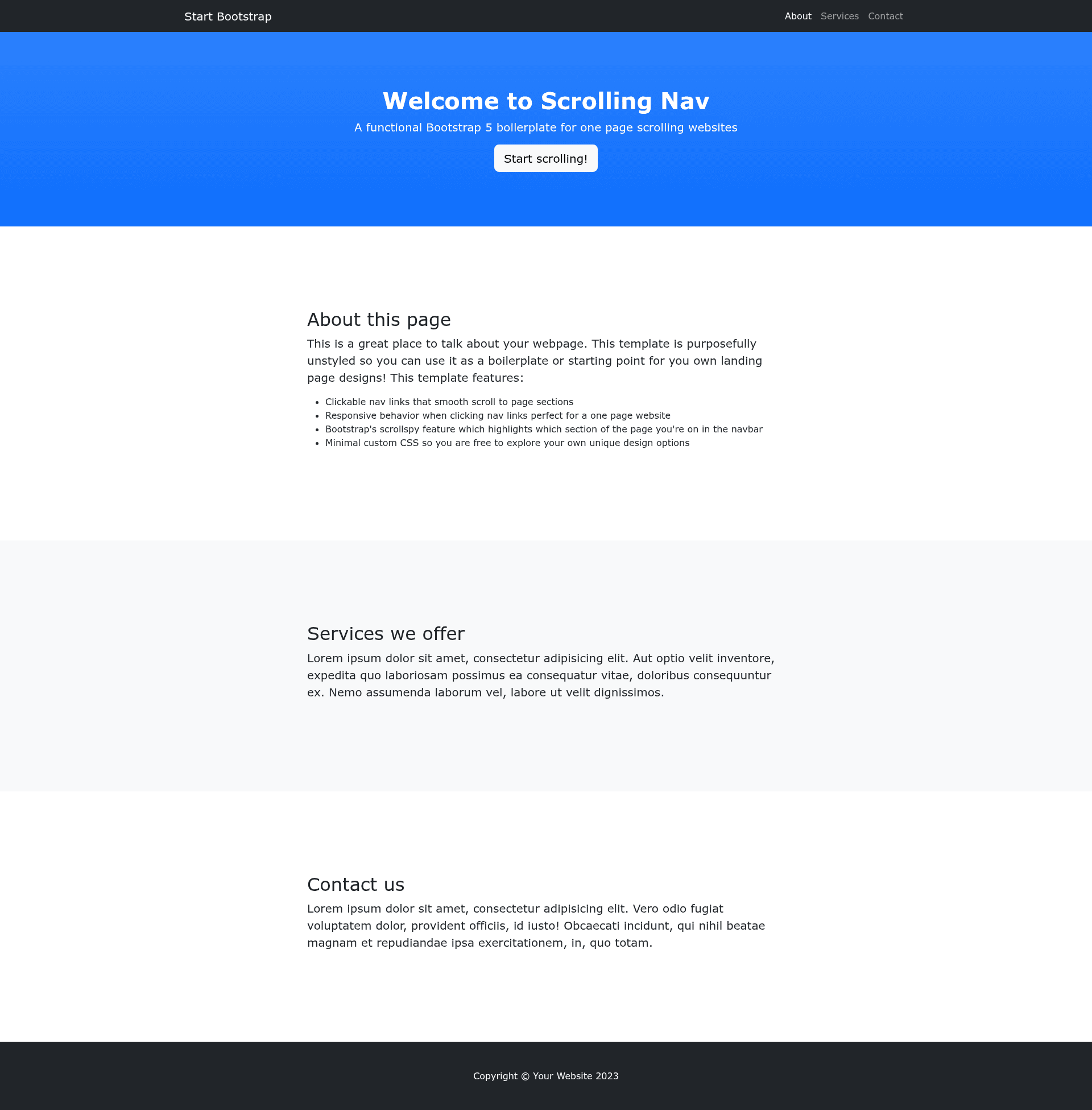
An unstyled Bootstrap HTML template for creating smooth scrolling, one page websites - created by Start Bootstrap.
About this template
Scrolling Nav is a free and open-source Bootstrap starter template that provides a collapsing, smooth-scrolling navigation bar for one-page websites, created and maintained by Start Bootstrap.
What is Scrolling Nav?
Scrolling Nav is an unstyled Bootstrap HTML template that scaffolds a single-page site with an anchored navigation menu. As input it takes plain HTML files from the dist directory (or Pug and SCSS source files in src), and as output it produces a static one-page layout where clicking a navbar link smoothly scrolls to the corresponding page section. The template runs entirely in the browser with no server-side dependencies, and it is distributed under the MIT license by Start Bootstrap, the open-source library founded by David Miller.
What makes Scrolling Nav stand out?
- Smooth scrolling navbar — The fixed, collapsible Bootstrap navbar uses smooth scrolling to move visitors to section anchors, a behavior implemented without any custom JavaScript beyond Bootstrap's core.
- Unstyled by design — The template deliberately ships without custom design styling, so developers get a clean structural base to add their own theme on top of Bootstrap.
- Pug and SCSS source files — Advanced users can edit the Pug templates in src/pug and the SCSS styles in src/scss, then run
npm run buildto compile them into the dist folder. - Complete npm build system — Eight npm scripts handle asset copying, Pug compilation, SCSS compilation, script bundling, cleaning, and live-reload preview, letting developers automate the build.
- Multiple installation options — You can download the latest release, install via npm with
npm i startbootstrap-scrolling-nav, clone the GitHub repository, or fork it directly on GitHub. - MIT-licensed for any project — The license permits free use in personal and commercial projects, with no attribution or payment required.
Who should use Scrolling Nav?
- Front-end developers building a quick one-page Bootstrap site who want a reliable collapsing navbar and smooth-scroll behavior without writing it from scratch.
- Designers who need an unstyled scaffold to create a custom theme, free from pre-built design opinions that would need to be overridden.
- Bootstrap learners seeking a simple, working example of a navbar that links to page sections and scrolls smoothly, useful for studying how the pieces fit together.
- Rapid prototypers who want to spin up a linear one-page structure for a client pitch or internal demo, then replace the placeholder content with real copy.
What can you do with Scrolling Nav?
- Build a one-page marketing site: Add sections such as About, Services, and Contact, then link them from the navbar to get immediate smooth scrolling navigation.
- Create an event landing page: Present schedule, speakers, and venue details as anchored sections, letting attendees jump between them with a single click.
- Showcase a portfolio or résumé: Structure your work history and projects as separate sections, with the fixed navbar keeping users oriented while they scroll.
How does Scrolling Nav work?
In basic usage, you download the template, edit the HTML and CSS files inside the dist directory, and open index.html in a browser to see changes. In advanced usage, you clone the source, run npm install and npm start, which compiles assets, opens a live preview in your default browser, and automatically reloads whenever files in src change. The included package.json defines build scripts for producing the distribution files.
FAQ
Is Scrolling Nav free?
Yes, Scrolling Nav is completely free. It is released under the MIT license, so you can use it for personal or commercial projects without paying a fee or providing attribution, though attribution is appreciated.
What does Scrolling Nav do?
It is a Bootstrap starter template that creates a one-page website with a collapsing, fixed navigation bar. When a visitor clicks a link in that bar, the page smoothly scrolls to the matching HTML section anchor, which is useful for landing pages, portfolios, and event pages.
How do I install Scrolling Nav?
There are three main ways: download the latest release from the Start Bootstrap website, install it via npm using npm i startbootstrap-scrolling-nav, or clone the GitHub repository with git clone https://github.com/StartBootstrap/startbootstrap-scrolling-nav.git.
Do I need to compile anything to use the basic template?
No. The dist directory contains ready-made HTML and CSS files. You can open index.html directly in your browser, and edit those files to customize the page. The compilation workflow is only needed if you want to use the Pug and SCSS source files in the src directory.
What are the npm scripts included?
The package.json includes build, build:assets, build:pug, build:scripts, build:scss, clean, start:debug, and start. Together they compile Pug, SCSS, and JavaScript into dist, clean that folder, and run a live-reloading development server.