Template details
Crawler-website
A Go web-crawler course project that scrapes a dating site into Elasticsearch with singleton, concurrent, and distributed architectures.
About this template
Crawler-website is a Go web-crawler project, built as the hands-on companion to the Imooc course 'Google资深工程师深度讲解Go语言' (coding.imooc.com/class/180.html), that scrapes profile records from the dating site zhenai.com, stores them in Docker-run Elasticsearch, and serves a searchable HTML frontend on localhost:8888.
What is Crawler-website?
Crawler-website is a web crawler written entirely in Go that demonstrates three successive architectures — singleton, concurrent, and distributed — for collecting structured user profiles from a seed website (http://www.zhenai.com/zhenghun). It takes HTML pages from the seed site as input, parses them with golang.org/x/net/html, and produces indexed records in Elasticsearch (run via docker run -d -p 9200:9200 elasticsearch) that are then queryable through a web frontend. The project was created for the Chinese Go course taught by a Google senior engineer on Imooc, and the repository is public on GitHub with 62 stars.
Key Features
- Three architecture stages — the codebase is organized around Singleton -> Concurrent -> Distribute, showing how a crawler scales from one goroutine to multiple workers.
- Elasticsearch storage — all extracted profile records are indexed in Elasticsearch running in Docker on port 9200, using the
gopkg.in/olivere/elastic.v5client. - Distributed microservices — the distributed variant splits the system into an item-saver service (
ItemSaver.go --port=1234), worker services (worker.go --port=9000and--port=9001), and a coordinatingmain.gothat accepts--itemsaver_hostand--worker_hostsflags. - MVC frontend —
src/crawler/frontend/starter.golaunches an HTML search page on port 8888 implementing the MVC pattern. - REST-style query language — users type conditions such as
女 && Age>20or男 && 已购车to filter crawled profiles by gender and other attributes. - Go package dependencies — relies on
golang.org/x/text,golang.org/x/net/html, and the gopm package manager to fetch them.
Who is it for?
- Students of the Imooc Go course — users following 'Google资深工程师深度讲解Go语言' can run the exact project the instructor builds, from singleton to distributed modes.
- Go developers learning crawler design — the repo shows a complete crawl pipeline (fetch, parse with x/net/html, store with olivere/elastic, and query via a web UI).
- Engineers exploring Go microservices — the distributed mode demonstrates service separation, port-based worker deployment, and flag-driven configuration.
- Learners of Elasticsearch integration in Go — the project is a working example of indexing and querying Chinese-language text data.
What can you do with Crawler-website?
- Run a concurrent crawler: start Docker, launch the Elasticsearch container, run
src/crawler/main.goandsrc/crawler/frontend/starter.go, then browse tohttp://localhost:8888/. - Scale to a distributed crawl: start
ItemSaver.goon port 1234, twoworker.goinstances on ports 9000 and 9001, and runmain.gowith--itemsaver_host=":1234" --worker_hosts=":9000,:9001". - Query crawled data: type REST-style queries like
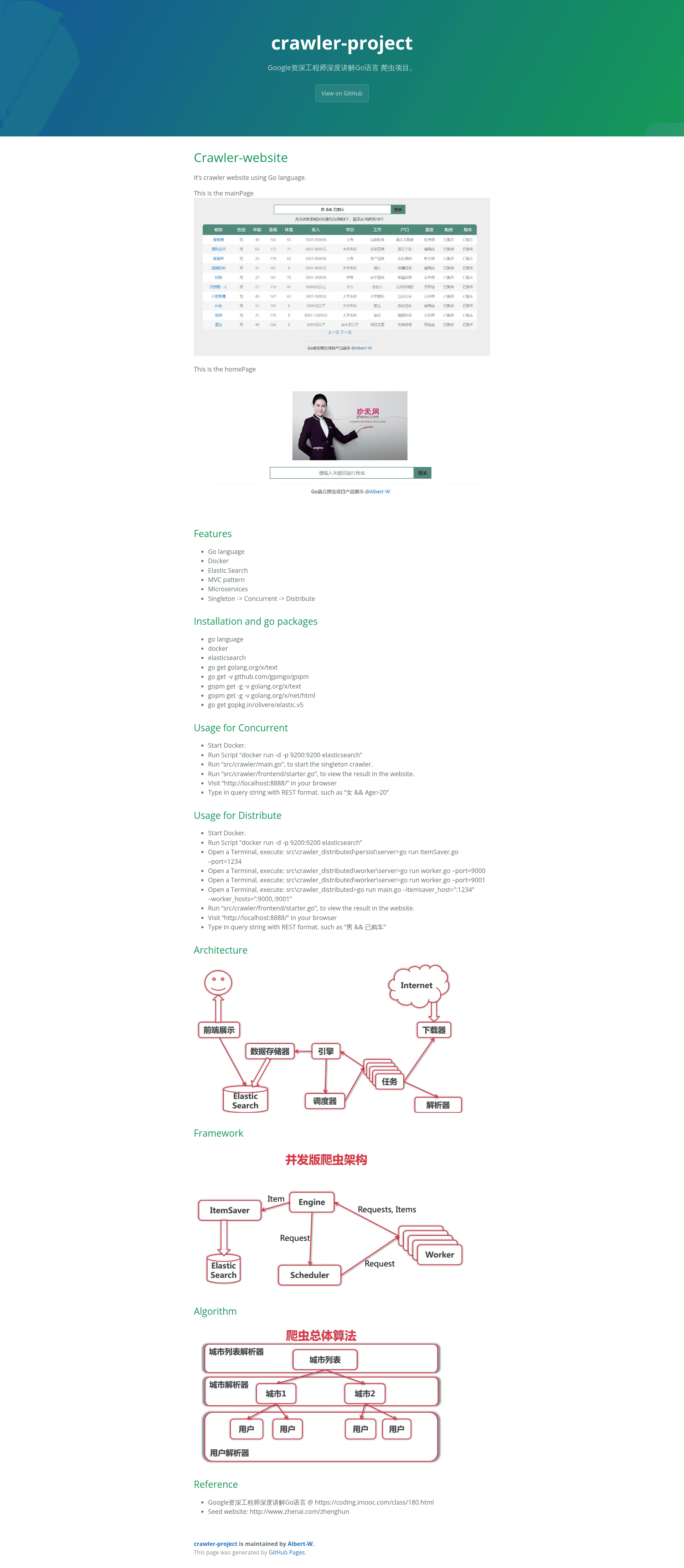
女 && Age>20or男 && 已购车in the frontend to filter profiles by demographics and purchase status. - Study the architecture: the README includes architecture, framework, and algorithm diagrams describing how the crawler is organized.
How does Crawler-website work?
The crawl pipeline follows the README's runbook. First, start Docker and execute docker run -d -p 9200:9200 elasticsearch to get a search instance. Then, in concurrent mode, run src/crawler/main.go to crawl the seed website and src/crawler/frontend/starter.go to serve the results; in distributed mode, launch the item-saver and two worker services before running the coordinating main.go. Finally, open http://localhost:8888/ and enter a query string.
Pros and cons
- Pros: documents three architectural levels (singleton, concurrent, distributed) in one codebase; embeds Elasticsearch setup in Docker for reproducible runs; provides step-by-step terminal commands for both modes.
- Cons: the target seed site (zhenai.com) is a fixed Chinese dating website, so the parsing logic is site-specific and would need rewriting to crawl a different source.
FAQ
Is Crawler-website free to use?
The repository is a public GitHub project associated with a paid Imooc course ('Google资深工程师深度讲解Go语言'). The code itself is free to browse and run if you have Go, Docker, and the listed dependencies installed.
What query syntax does the frontend accept?
The frontend accepts REST-style query strings that combine field conditions with the && operator, for example 女 && Age>20 and 男 && 已购车. Conditions are evaluated against the indexed profile fields stored in Elasticsearch.
What ports does Crawler-website use?
The Elasticsearch container listens on port 9200, the web frontend on port 8888, the distributed item-saver on port 1234, and the distributed worker services on ports 9000 and 9001.
Which Go packages does the project require?
The README lists golang.org/x/text, golang.org/x/net/html, github.com/gpmgo/gopm, and gopkg.in/olivere/elastic.v5. Packages are fetched with go get and the gopm tool (gopm get -g -v golang.org/x/text).
Does Crawler-website need Docker?
Only Elasticsearch is run inside Docker (docker run -d -p 9200:9200 elasticsearch); the crawler, worker, item-saver, and frontend programs are Go binaries you run directly from a terminal.