Template details
Creative Theme for Jekyll
A Jekyll theme that ports Start Bootstrap's Creative Theme to a one-page portfolio site built with markdown and YAML.
About this template
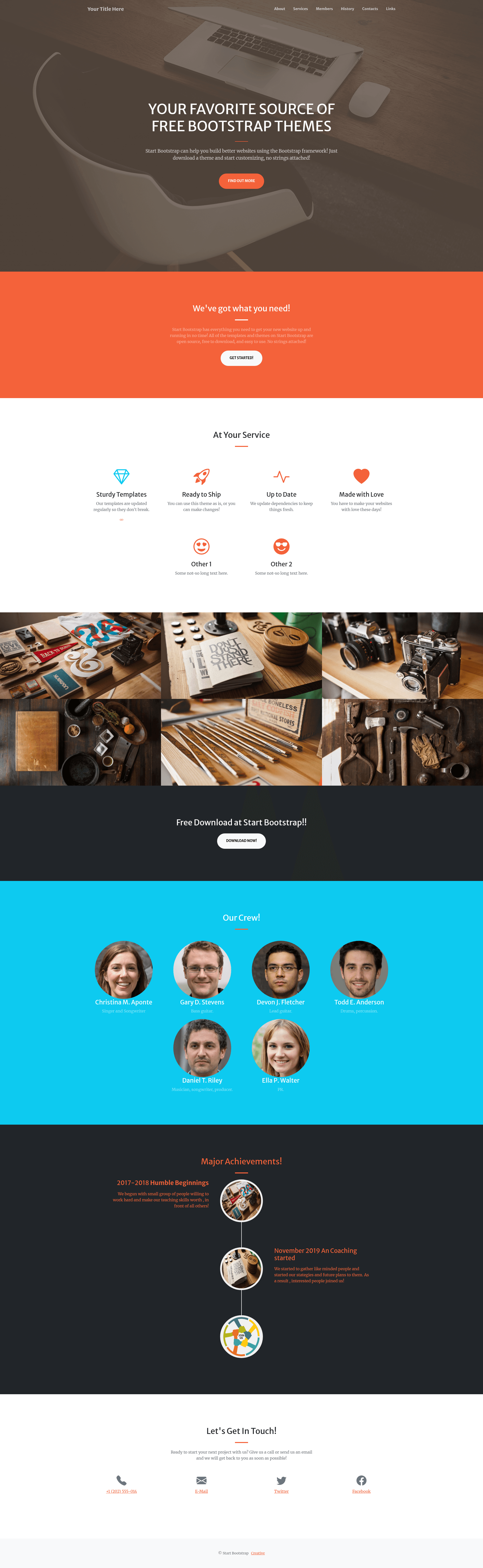
Creative Theme for Jekyll is an open-source Jekyll theme that ports Start Bootstrap's Creative Theme into a static one-page site you can edit entirely through markdown and YAML files.
What is Creative Theme for Jekyll?
Creative Theme for Jekyll is a Jekyll implementation of the Creative Theme design from Start Bootstrap, built on Creative Theme v7.0.7 and Bootstrap v5.2.3. It takes markdown content and YAML configuration as input and produces a one-page static website for creative portfolios or business landing pages. The repository is an updated version of the earlier creative-theme-jekyll project and adds pure markdown site creation, meaning you can reorder or remove sections by editing index.md instead of touching HTML.
Key Features
- Pure markdown site creation — edit
index.mdand optional pages likelinks.mdin markdown; the layout renders them through the Creative Theme design. - YAML-driven configuration — set site-wide info in
_config.yml, update the footer copyright in_data/footer.yml, and control navigation links in_data/menus.yml. - One-page Bootstrap design — based on Creative Theme v7.0.7 and Bootstrap v5.2.3, with a timeline section for your story and a distinct links page background from rawpixel.
- Docker development workflow — run
./build-in-docker.shand preview locally athttp://localhost:4000/without installing Ruby or Jekyll. - GitHub Pages compatibility — only uses safe plugins from the GitHub Pages allowlist, so the theme builds directly on GitHub Pages.
- Sample extensions — the README points to a contact form implementation and a table-of-contents example to add those features to your site.
Who is it for?
- Creative professionals — designers, photographers, and illustrators who want a clean one-page portfolio that is fast to set up and easy to update.
- Freelancers and small agencies — use the one-page structure to show services, a timeline, and contact details without running a CMS.
- Jekyll users — developers who already know Jekyll, markdown, and YAML and want a polished Bootstrap theme with minimal configuration.
What can you do with it?
- Portfolio sites: Showcase projects and a personal timeline; the timeline component is adapted from the pickmeup template.
- Business landing pages: Use the single-page layout with call-to-action and contact sections to establish an online presence quickly.
- Link-in-bio pages: Create a simple
links.mdpage that shares the same styling, useful for directing followers to multiple destinations.
How does it work?
The build process is standard Jekyll: it reads the markdown files and YAML data files, applies the Creative Theme layout, and generates a static site. You configure global settings in _config.yml, the footer in _data/footer.yml, and navigation in _data/menus.yml. For local development, the included Docker script builds the site and serves it at http://localhost:4000/.
FAQ
Is Creative Theme for Jekyll free?
Yes, the theme is open source and available on GitHub. The repository does not include pricing or licensing details, but it is free to use as an open-source template.
Does it work with GitHub Pages?
Yes, it relies only on the safe plugins that GitHub Pages supports, so you can deploy it as a project page or user page without custom build steps.
Do I need to know HTML to use it?
No, the core workflow is markdown and YAML. You only need to edit content and configuration files; the HTML templates are part of the theme.
Can I run it locally without installing Ruby?
Yes, the provided ./build-in-docker.sh script runs the Jekyll build inside a Docker container, avoiding a local Ruby setup.