Template details
Cromwell CMS
Free open-source headless TypeScript CMS for React/Next.js with a WordPress-like admin panel and drag-and-drop theming.
About this template
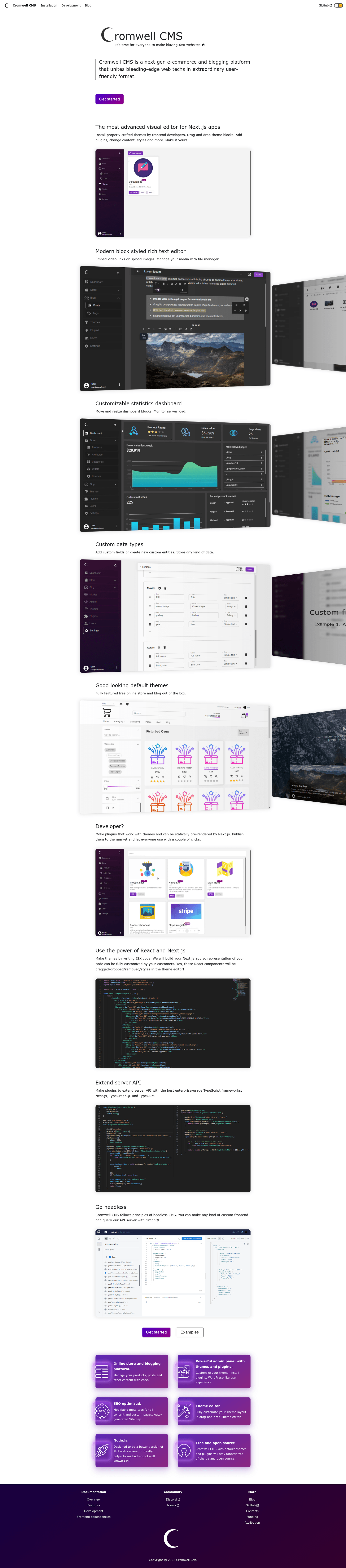
Cromwell CMS is a free open-source headless TypeScript CMS for building lightning-fast websites with React and Next.js, combining a WordPress-like admin panel with a developer-friendly API.
What is Cromwell CMS?
Cromwell CMS is a headless content management system that decouples content management from the frontend rendering layer. It is built with TypeScript on a stack of Next.js, Nest.js, TypeORM, and TypeGraphQL, and exposes content to clients through a CMS API that supports GraphQL and Apollo. The project runs as a Node.js application and is developed openly on GitHub under the CromwellCMS organization (with over 750 stars). The CMS accepts content entered through an admin panel GUI and delivers it to React or Next.js frontends.
Key Features
- Admin panel GUI — Provides a WordPress-like interface with drag-and-drop controls that let non-programmers manage content, themes, and plugins.
- Drag-and-drop theme editor — Customize online store and blog themes visually without touching code.
- Plugin and theme system — Install themes and plugins from the official store, or manage them locally.
- E-commerce and blogging management — Built-in management systems for online stores and blogs.
- Free themes and plugins — Full-featured free online store and blog themes with multiple plugins included.
- Multiple database support — Works with SQLite, MySQL, MariaDB, and PostgreSQL.
- Developer stack — Built for developers using Next.js, Nest.js, TypeORM, TypeGraphQL, and the CMS API to build any type of website.
- GraphQL API — Repository topics include Apollo and GraphQL, indicating a GraphQL-based API for querying content.
Who is it for?
- Content creators without coding skills — Use the admin panel and drag-and-drop editor to build and manage websites.
- E-commerce store owners — Launch an online store using the built-in store management and free store themes.
- Bloggers — Create a blog with the provided blog themes and manage posts through a GUI.
- Developers — Extend the CMS with custom plugins, consume the CMS API from a Next.js or React frontend, and leverage TypeScript, Nest.js, TypeORM, and TypeGraphQL.
What can you do with Cromwell CMS?
- Store owners: Set up an online store with cart and shopping functionality using built-in e-commerce management and free store themes.
- Bloggers: Publish and manage a blog through the WordPress-like admin panel with drag-and-drop design control.
- Developers: Build a headless website by connecting a React or Next.js frontend to the CMS API, and use the plugin system to add custom functionality.
Pricing
Cromwell CMS is free and open source. There are no paid tiers listed; the source code is available on GitHub under the CromwellCMS organization.
FAQ
Is Cromwell CMS free?
Yes, Cromwell CMS is free open-source software. The project is publicly available on GitHub, and all core features, including the admin panel and theme editor, are included without cost.
What databases does Cromwell CMS support?
Cromwell CMS supports SQLite, MySQL, MariaDB, and PostgreSQL. The integrated database layer uses TypeORM, so you can switch between these database engines based on your hosting environment.
Does Cromwell CMS work with Next.js?
Yes, Cromwell CMS is specifically built for React and Next.js. It provides a CMS API that Next.js applications can query, and it is developed on a stack that includes Next.js, Nest.js, TypeORM, and TypeGraphQL.
Can I use Cromwell CMS without programming knowledge?
Yes, the WordPress-like admin panel GUI and drag-and-drop theme editor are designed for people with no programming background. You can install themes, manage content, and run a store or blog without writing code.
Where can I get themes and plugins for Cromwell CMS?
Themes and plugins are available through the official store, which can be accessed from the admin panel. You can install them with a simple click and manage them locally within the CMS.