Template details
DevPortfolio Template
A modern, minimalist single-page portfolio template built with Astro and Tailwind CSS for developers to showcase skills, experience, and projects.
About this template
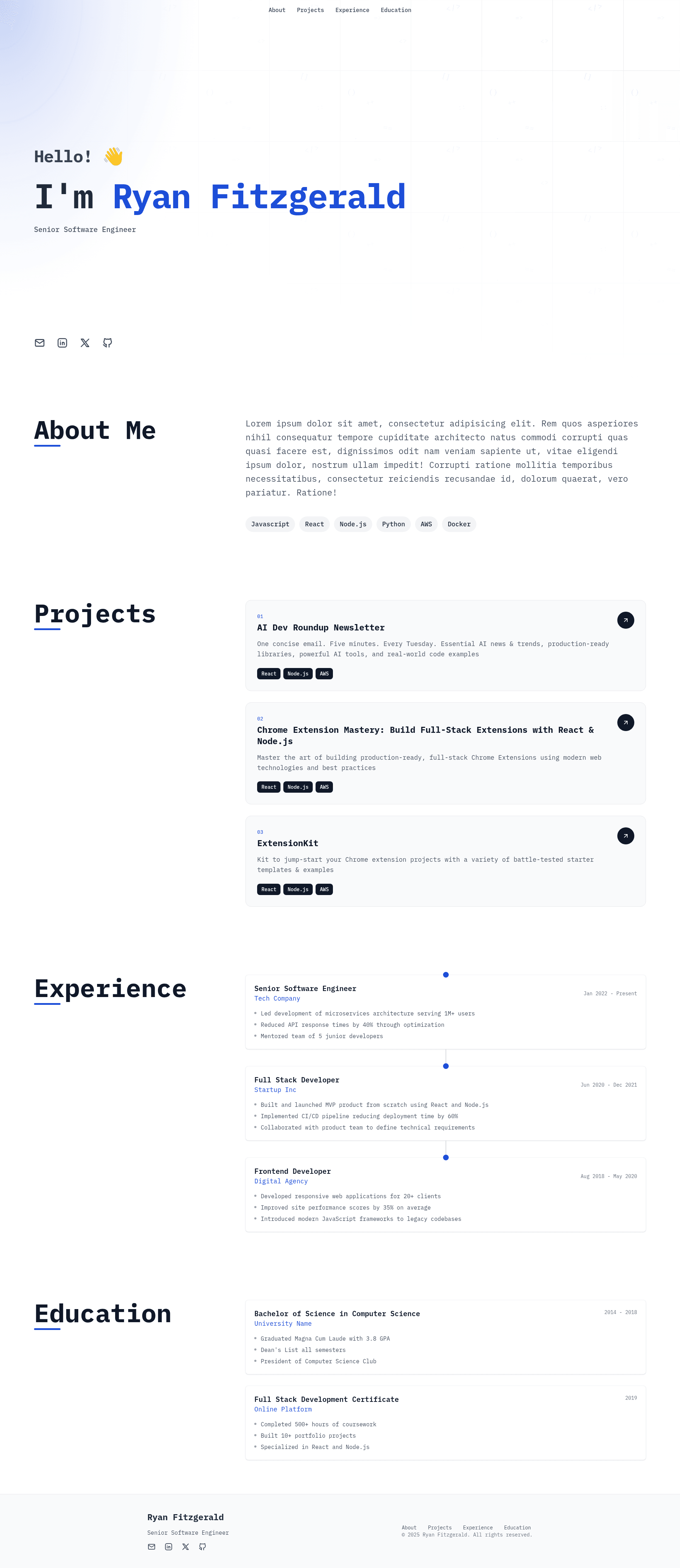
DevPortfolio Template is an open-source, single-page portfolio website template built with Astro and Tailwind CSS v4 that turns a single TypeScript config file into a complete developer portfolio site. The template takes the content from src/config.ts — personal info, social links, about text, skills, projects, experience, and education — and renders it into a static, responsive page with a hero, about, projects, experience, education, and footer sections. It was created by developer Ryan Fitzgerald, is released under the MIT license, and includes a live preview deployed at https://ryanfitzgerald.github.io/devportfolio/.
Key Features
- Config-driven content — Edit only
src/config.tsto update your name, title, description, accent color (as a hex value), social links (email, LinkedIn, Twitter, GitHub, all optional), about text, skills list, project entries, work history with bullet points, and education details; removing any of the latter four hides that section automatically. - Astro + Tailwind CSS v4 stack — Built on Astro as a static site generator with Tailwind CSS v4 for utility-first styling, TypeScript for type-safe configuration, and Tabler Icons for the icon set.
- Modular component structure — The project is organized into Astro components in
src/components/(About, Education, Experience, Footer, Header, Hero, Projects) plus a global stylesheet and a single-page layout atsrc/pages/index.astro. - AI workflow integration — Ships with
CLAUDE.mdand.cursor/rulesfiles so you can extend or modify the template using Claude or Cursor AI coding assistants. - Easy local development — Clone the repo, run
npm install, thennpm run devto start the Astro dev server; production builds usenpm run build. - Free static deployment — The README links to step-by-step Astro deployment guides for Netlify, Vercel, GitHub Pages, Cloudflare Pages, and Render, all of which can host the built site for free.
- MIT licensed — The template is fully and completely MIT (see LICENSE.md), so you can use it commercially without restrictions.
Who is it for?
- Software developers who want a clean, professional portfolio without designing from scratch — they can fill in the config and deploy the same day.
- Job seekers and freelancers who need to showcase projects, skills, and work history in a single scrollable page to send to recruiters or clients.
- Computer science students and new graduates who want a minimal site featuring their education, achievements, and personal projects; the Education section supports achievements like GPA and honors.
- Developers experimenting with Astro who want a real-world starter with Tailwind v4 and TypeScript to learn static site generation.
What can you do with DevPortfolio Template?
- Showcase a professional portfolio — Replace the sample content in the config with your own name, bio, skills, and project links to generate a complete portfolio page with no HTML editing required.
- Customize the visual theme — Change the site-wide accent color by editing the
accentColorhex value insrc/config.ts, and swap icons by browsing Tabler Icons' library for consistent replacements. - Deploy a live site quickly — Use the provided guide links to publish to GitHub Pages, Netlify, Vercel, Cloudflare Pages, or Render, and share the resulting URL.
- Extend the template with AI assistance — Use the bundled CLAUDE.md and .cursor/rules files to ask an AI coding assistant to add new sections or modify styling.
How does DevPortfolio Template work?
The workflow is straightforward: clone the repository (or use it as a template on GitHub), run npm install to fetch dependencies, edit src/config.ts with your personal and professional details, then run npm run dev to preview locally. When you're ready, build the static site and deploy the output to any static host — the README links to official Astro guides for five popular platforms.
Pros and cons
- Pros: Fast static output with no backend; everything customizable from one config file; optional social links and sections; free deployment on mainstream static hosts; permissive MIT license.
- Cons: It is a single-page template, so it does not include multi-page structures like a blog, documentation, or separate project detail pages out of the box.
FAQ
Is DevPortfolio Template free to use?
Yes. The project is released under the MIT license, so you can use, modify, and deploy it for personal or commercial projects without paying a fee or including attribution.
How do I change the accent color?
Open src/config.ts and edit the accentColor field with any hex color value, for example #1d4ed8. This one value updates the accent color across the whole site.
Can I deploy this template to GitHub Pages?
Yes. The README links to the official Astro deployment guide for GitHub Pages, and the live preview example is itself hosted on GitHub Pages at https://ryanfitzgerald.github.io/devportfolio/.
Does this template include a blog?
No. It is designed as a single-page portfolio with hero, about, skills, projects, experience, education, and footer sections. Blog or multi-page layouts are not part of the current template.