Template details
Dark Brown Template
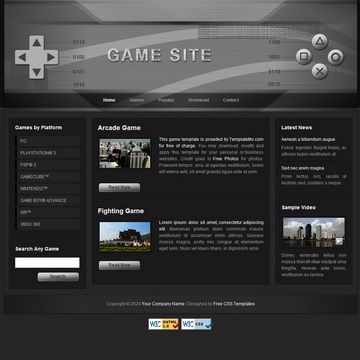
Free HTML/CSS website template with top menu, 2-column content area, and 3-column footer.
About this template
Dark Brown Template is a free HTML/CSS website template from Templatemo, designed as a static page with a top navigation menu, a 2-column content area, and a 3-column footer area. Released on 20 July 2009, it is one of the older templates in Templatemo's catalog, with 59,522 views and 15,397 downloads at the time of this writing. The template is 100% free to download, edit, and use for both commercial and non-commercial projects, and requires no server-side processing, making it suitable for static hosting or shared web servers.
What is Dark Brown Template?
Dark Brown Template is a static HTML/CSS website layout built by Templatemo, a free template provider. The layout is characterized by a dark brown color scheme, a horizontal top menu, a central content area split into two columns, and a footer arranged in three columns. It is delivered as a downloadable ZIP file that contains the HTML and CSS files. Because it is plain HTML/CSS, you can run it directly in a browser without a backend, and edit it with any text editor or web authoring tool.
Key Features
- Free for personal and commercial use — Templatemo grants permission to download, edit, and use the template on commercial or non-commercial websites without a license fee.
- Top menu navigation — The layout includes a horizontal menu bar at the top, which you can customize with your own links for pages like Home, About, Services, and Contact.
- 2-column content area — The main body is divided into two columns, giving you a primary content column and a sidebar for supplementary information.
- 3-column footer area — The footer is split into three columns, providing space for additional links, contact details, and other widgets.
- Dark brown color theme — The template's visual identity uses a dark brown palette, which you can see in the official screenshot and adjust via CSS variables or direct style edits.
- Static HTML/CSS — No JavaScript frameworks, build tools, or content management system are required; the template works as plain files.
- Dated design — Since the template was created in 2009, its layout reflects early web design patterns, with a fixed width and table-free CSS structure.
Who is Dark Brown Template for?
- Beginners learning HTML/CSS — The simple, well-structured code gives a small, approachable project for practicing layout techniques and CSS styling.
- Small business owners — The template offers a quick way to put up a basic business page with contact information in the columns and footer.
- Students working on web assignments — The 2-column and 3-column structure is a classic layout to modify for class projects.
What can you do with Dark Brown Template?
- Launch a simple personal website — Replace the placeholder text with your biography and list your projects in the main 2-column area.
- Create a brochure-style business page — Use the top menu to present sections and the 3-column footer for operating hours, address, and quick links.
- Build a portfolio of creative work — Adapt the dark brown theme to match your brand and showcase images and descriptions in the columns.
How does Dark Brown Template work?
Download the ZIP file from the Templatemo page, extract the files, open the HTML file in your browser to preview the design, then edit the CSS and HTML in a text editor to change colors, text, and structure. Upload the edited files to any web host to go live.
Pricing
Dark Brown Template is 100% free. Templatemo also offers a separate Contact Form PHP Script download that can be integrated to add a working contact form to the template.
FAQ
Is Dark Brown Template free?
Yes, the template is 100% free to download and use for both commercial and non-commercial websites. Templatemo's terms on the page state you may download, edit, and use it without charge.
What does Dark Brown Template include?
The template is a static HTML/CSS layout with a top menu, a 2-column content area, and a 3-column footer. It includes the HTML and CSS files packaged in a ZIP archive for download.
Can I edit and reuse the template?
Templatemo allows you to edit and reuse the template freely. You can change colors, text, and layout for your own projects, whether personal or commercial.
When was Dark Brown Template added?
The template was added to Templatemo on 20 July 2009, making it a legacy design from the late 2000s.
Does the template work on mobile devices?
The page does not mention responsive design for this template. Because it was created in 2009, it likely uses a fixed-width layout that may not adapt to small screens.