Template details
Dev Dark Theme
A dark, developer-focused blog theme for the Hexo static site generator.
About this template
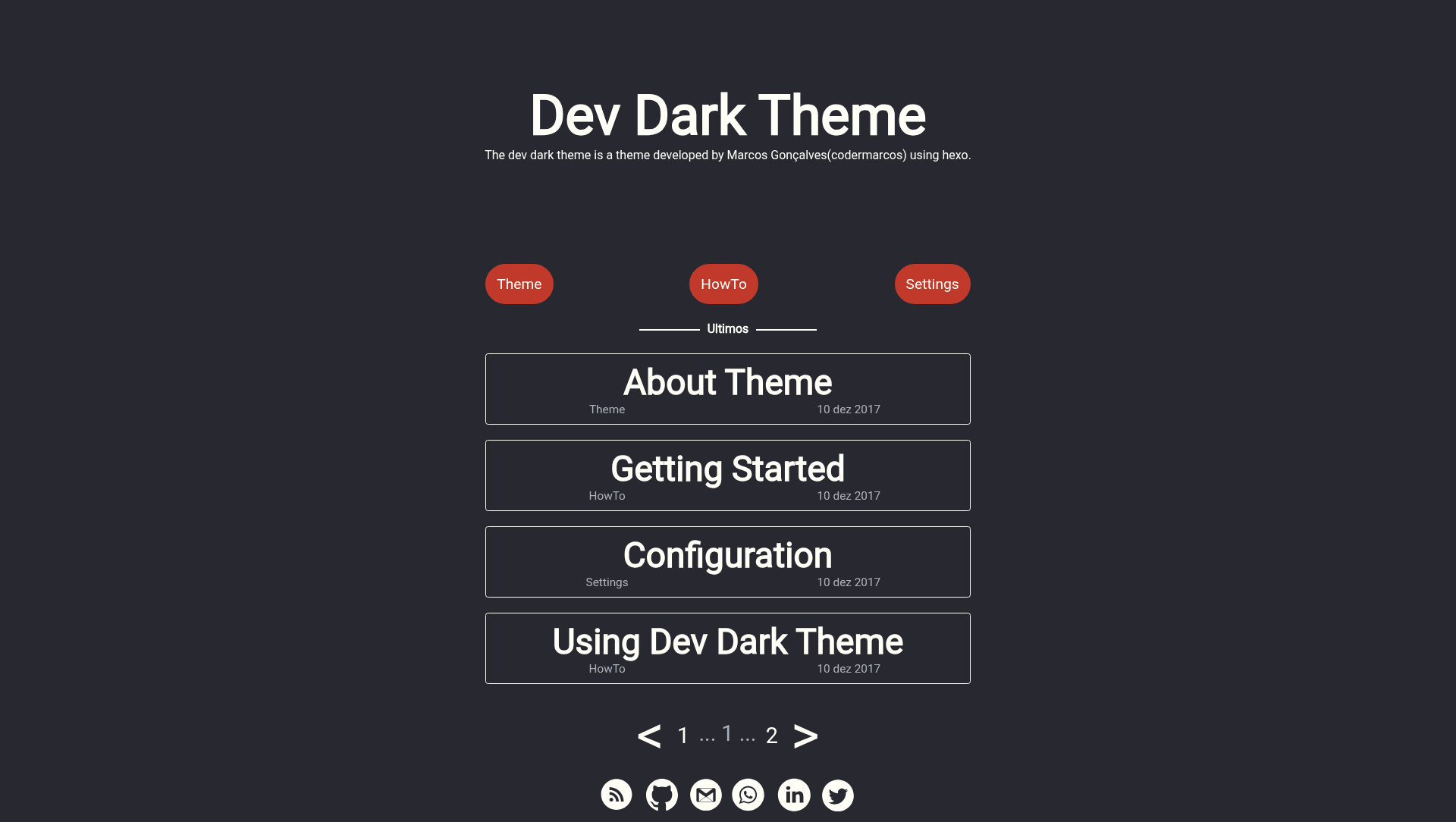
Dev Dark Theme is a free open-source Hexo theme that gives developers a dark, code-friendly blog design out of the box. It takes Hexo Markdown posts as input and generates a static HTML site with a dark UI, and it is maintained by codermarcos on GitHub.
What is Dev Dark Theme?
Dev Dark Theme is a dark-colored theme built for the Hexo static site generator, used to turn Markdown content into a blog. It ships with a minimal, developer-oriented design and includes a live demo at codermarcos.github.io/dev-dark-theme. The theme is created by codermarcos and is open source, with the repository available on GitHub.
Key Features
- Dark UI — A dark color scheme designed for code-heavy blogs, with a focus on readability for developers.
- Hexo integration — Built as a Hexo theme, so it drops into any Hexo site and works with standard
hexo serverandhexo generatecommands. - Markdown content — Uses Hexo's Markdown pipeline, so posts, pages, and drafts are written in Markdown and rendered to static HTML.
- Stylus styling — The theme's stylesheets are written in Stylus, a CSS preprocessor that ships with Hexo, making customization straightforward for developers.
- Local preview — Run
hexo serverto preview the site locally at http://localhost:4000 during development. - Static output —
hexo generateproduces a fully static site that can be deployed to any static host.
Who is it for?
- Developers who blog — Set up a personal blog with a dark theme that matches their coding environment, with content written in Markdown.
- Hexo users — Switch from a default theme to a dark alternative by cloning the repo and running
hexo generate. - Technical writers — Publish tutorials or documentation as static pages with a code-focused aesthetic.
What can you do with Dev Dark Theme?
- Personal blogs: Write posts in Markdown and generate a static dark-themed site using
hexo generate. - Local development: Run
hexo serverto preview changes instantly at http://localhost:4000 before publishing. - Custom projects: Modify the Stylus stylesheets to change colors, fonts, and layout to fit your brand.
How does Dev Dark Theme work?
To use Dev Dark Theme, install Hexo CLI globally with npm i hexo-cli -g, then clone the theme repository into your Hexo site's themes directory. Run hexo server to preview the site locally at http://localhost:4000, make changes by following the configuration docs at dev-dark-theme.codermarcos.com, and publish with hexo generate to build static files.
FAQ
Is Dev Dark Theme free?
Yes, the theme is open source and hosted publicly on GitHub. No pricing or license fee is mentioned, so you can use it freely for personal or commercial projects.
What does Dev Dark Theme do?
It is a dark theme for the Hexo static site generator. It takes Markdown content and renders it into a static, dark-styled blog that is fast to load and easy to host anywhere.
How do I install Dev Dark Theme?
First install Hexo CLI globally with npm i hexo-cli -g, then clone the repository from GitHub into your Hexo site's themes folder. After that, run hexo server to start a local preview at http://localhost:4000.
How do I publish a site with Dev Dark Theme?
Use the hexo generate command to produce static HTML files from your Markdown content. The generated files can then be deployed to any static hosting service like GitHub Pages or Netlify.