Template details
Astro Starter Kit: Blog
Official Astro blog template with Markdown/MDX, SEO, sitemap, RSS, and 100/100 Lighthouse performance.
About this template
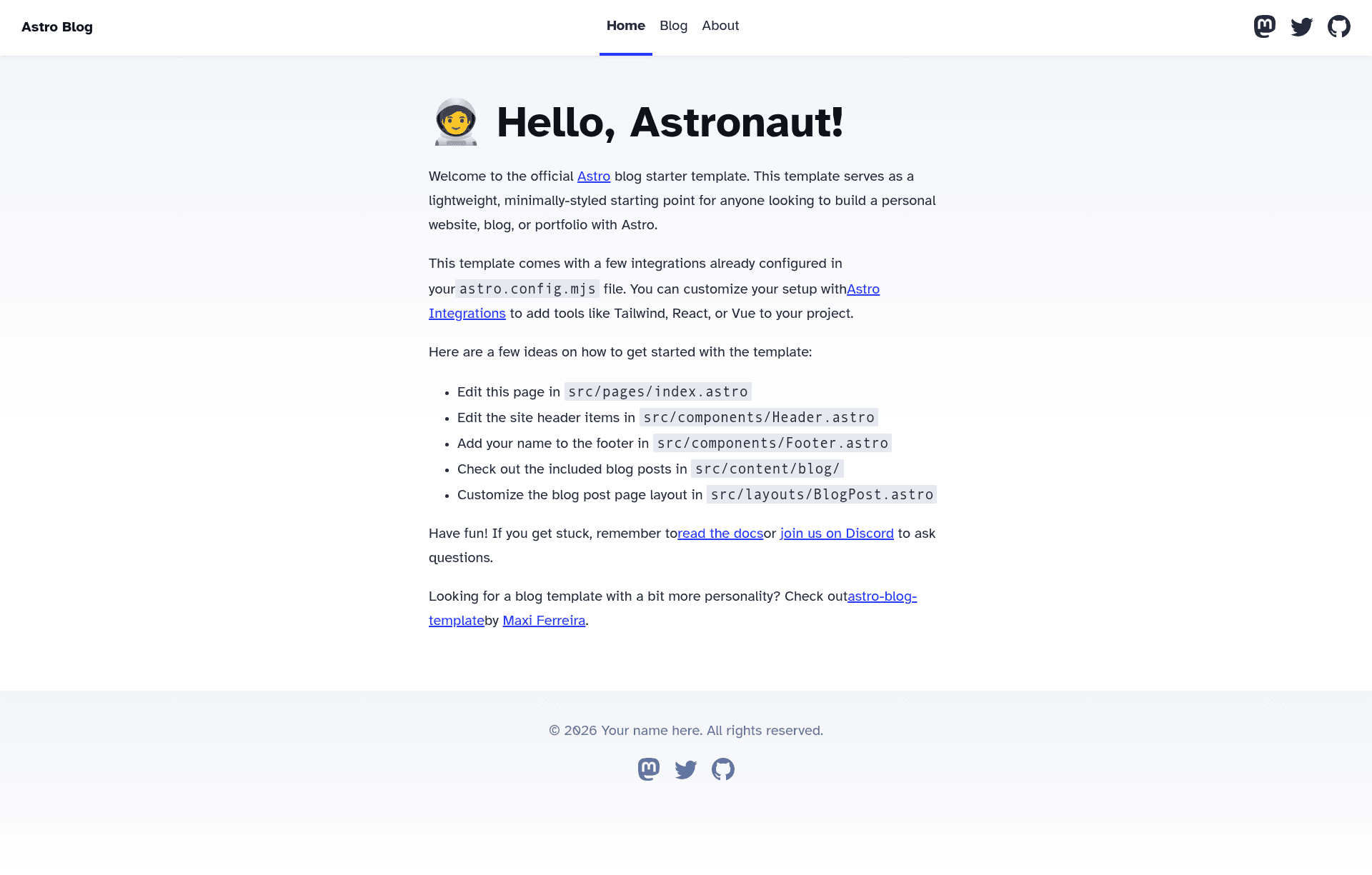
The Astro Starter Kit: Blog is the official blog template for the Astro framework, used to create static, SEO-friendly blogging sites from Markdown and MDX content. It is maintained as part of the withastro/astro repository and can be scaffolded with the command npm create astro@latest -- --template blog.
What is the Astro Starter Kit: Blog?
The Astro Starter Kit: Blog is the default blog starter shipped by the Astro project. It takes Markdown and MDX files placed in the src/content/blog/ content collection and builds them into a statically generated blog with routes, a sitemap, and an RSS feed. The template runs on Astro and includes configuration for TypeScript via tsconfig.json and Astro's build settings in astro.config.mjs.
Key Features
- Minimal styling — The template ships with intentionally minimal CSS so you can replace it with your own design without fighting framework styles.
- Markdown & MDX support — Blog posts are authored as Markdown or MDX in
src/content/blog/, with optional frontmatter schema validation through Astro's content collections and thegetCollection()API. - SEO-friendly defaults — Every page includes canonical URLs and Open Graph data for social sharing.
- Lighthouse 100/100 — The template reports a perfect Lighthouse score, indicating strong performance and accessibility.
- Sitemap and RSS — A sitemap and an RSS feed are generated automatically, with support for reading subscriptions.
- Official project structure — The scaffold includes
public/,src/assets/,src/components/,src/content/,src/layouts/, andsrc/pages/directories, plusastro.config.mjs,package.json, andtsconfig.json. - Component framework support — The README notes that Astro, React, Vue, Svelte, and Preact components can all be placed in
src/components/.
Who is it for?
- Developers starting a personal blog — You get a working blog scaffold in seconds, with Markdown editing and automatic sitemap/RSS generation.
- Astro learners — The template's README documents the project structure, CLI commands, and content collections, making it a clear reference for learning Astro.
- Design-oriented developers — Because styling is minimal, you can apply your own CSS framework or design tokens without removing a pre-built theme.
What can you do with the Astro Starter Kit: Blog?
- Publish posts quickly — Write a Markdown or MDX file in
src/content/blog/, and the template generates a new route, with a sitemap and RSS feed updated on build. - Preview locally — Run
npm run devto start a dev server atlocalhost:4321, with hot reload. - Build and deploy — Run
npm run buildto output a production-ready static site to./dist/, thennpm run previewto test the build locally. - Extend with UI components — Drop in React, Vue, Svelte, or Preact components as islands to add interactivity to pages.
How does the Astro Starter Kit: Blog work?
You create a new project by running npm create astro@latest -- --template blog. Instead of using a database or CMS, you author posts as Markdown or MDX in src/content/blog/, which Astro's content collections retrieve with getCollection(). The default routes under src/pages/ use those collections to render the blog listing and individual post pages, and the build step produces a fully static site.
FAQ
How do I start a new blog with this template?
Run npm create astro@latest -- --template blog in your terminal. Astro will scaffold the project structure, then you can install dependencies with npm install and start the dev server with npm run dev.
Does this template include a CMS?
No. The template uses Astro's content collections with Markdown and MDX files, so you manage posts as files in the src/content/blog/ directory instead of a third-party CMS. You can optionally add a headless CMS later.
Can I use React or Vue components in this blog?
Yes. The README explicitly states that Astro, React, Vue, Svelte, and Preact components can be placed in src/components/. Astro's islands architecture lets you render them on the page as needed.
What command produces the final site?
npm run build compiles the site to a static ./dist/ folder. You can then run npm run preview to serve that build locally before deploying.
Does the template include an RSS feed?
Yes, the feature list mentions RSS Feed support. The feed is generated automatically from the posts in the content collection.