Template details
Jekyll Theme Simple Blog
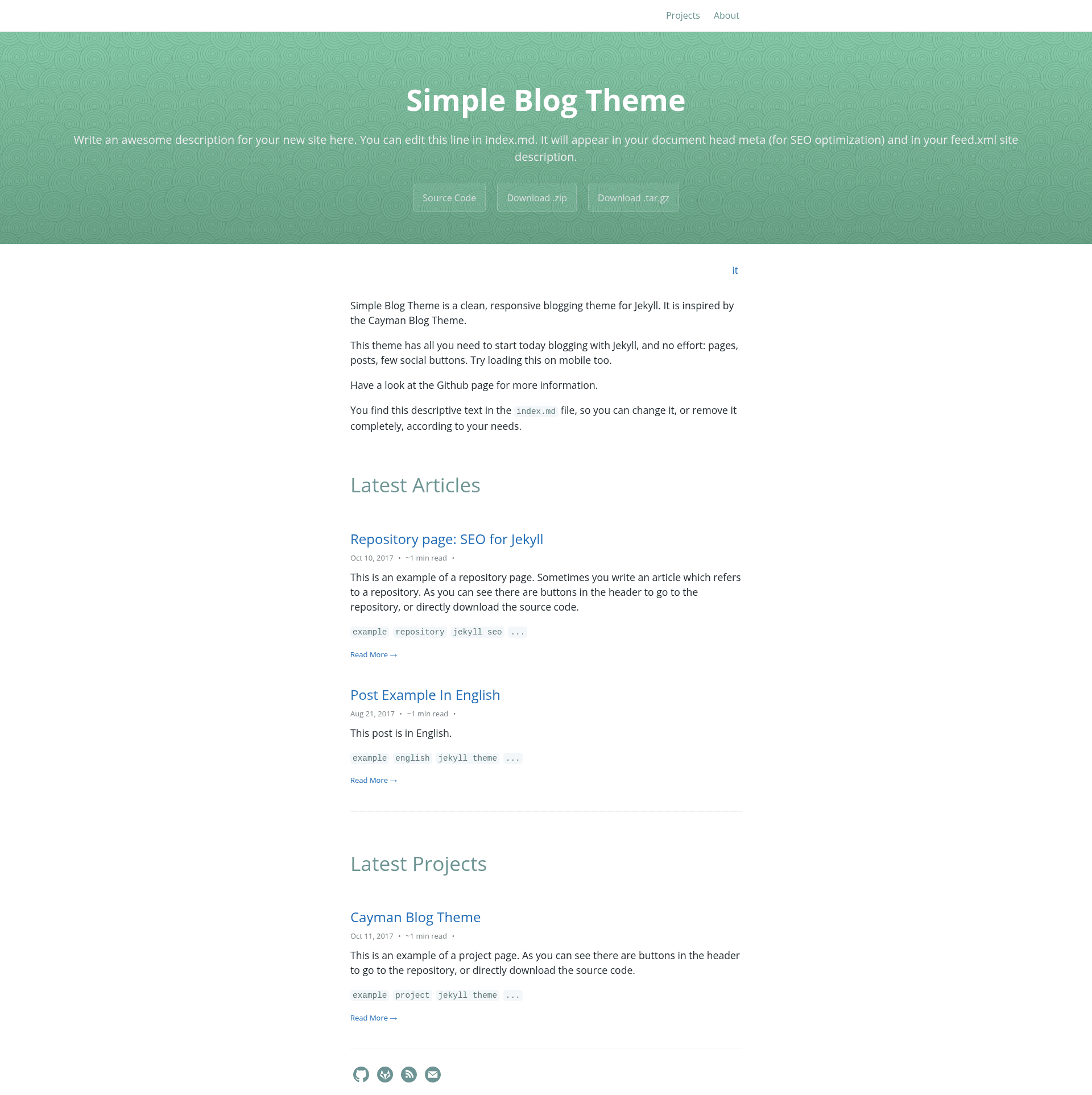
Simple Blog Theme is a clean, responsive blogging theme for Jekyll and GitLab/GitHub Pages.
About this template
Simple Blog is a free, open-source Jekyll theme for publishing multilingual blogs on GitLab Pages or GitHub Pages, created as a fork of the Cayman Blog theme. It produces a responsive, minimal blog from Markdown posts and runs on Jekyll 3.1.2. The theme is 100% compatible with both GitLab and GitHub Pages, and a live demo is available at https://lorepirri.gitlab.io/jekyll-theme-simple-blog/.
What is Jekyll Theme Simple Blog?
Jekyll Theme Simple Blog is a Jekyll theme that turns Markdown blog posts into a static, responsive website designed for GitLab Pages and GitHub Pages. It takes posts written in standard Markdown, stores them in language-specific folders, and generates a clean blog with SEO tags, social buttons, and RSS feeds. The theme is maintained by lorepirri and includes a badge indicating Jekyll version 3.1.2. The project philosophy is to provide quick setup for Pages users, erring on the side of simplicity rather than flexibility, while allowing opt-in customization.
Key Features
- Multi-language blogging — Organize posts in folders per language (for example,
_posts/enand_posts/other-language) and get a separate RSS feed for each language. - SEO optimization — Includes simple SEO tags via the jekyll-social-metatags plugin, and can be swapped for the more full-featured Jekyll SEO Tag plugin.
- Social buttons — Links for Instagram, LinkedIn, Twitter, GitHub, and GitLab are built in.
- Responsive and minimal design — The layout adapts to mobile screens and keeps visual clutter low, following the Cayman Blog design.
- Easy customization with Sass — Override theme colors by setting Sass variables such as
$section-headings-colorbefore the@importline in your stylesheet. - Custom layouts and styles — Copy the default layout to
_layouts/default.htmlto change HTML, or add your own CSS via/assets/css/style.scss. - Local preview environment — Includes
script/bootstrapandscript/servercommands to install dependencies and run a local server atlocalhost:4000.
Who is it for?
Jekyll Theme Simple Blog is for bloggers and developers who publish on GitLab Pages or GitHub Pages and want a minimal, responsive blog without building a site from scratch. It suits writers who publish in multiple languages, developers who like to customize via Sass and HTML, and anyone who wants a free, open-source theme that opts for simplicity over configuration.
What can you do with Jekyll Theme Simple Blog?
- Personal bloggers — Set up a clean blog on GitHub Pages in a few steps: fork the repo, empty the
_postsfolder, and runscript/serverto preview locally. - Multilingual writers — Maintain separate post folders for each language and serve readers a dedicated RSS feed for each language.
- Developers wanting a custom look — Change the theme's colors by editing Sass variables, override the HTML layout by copying
_layouts/default.html, or add custom CSS in/assets/css/style.scss.
How does Jekyll Theme Simple Blog work?
Start by forking the repository, cloning it, and emptying the _posts folder. Then run script/bootstrap to install Bundler and required gems, and script/server to start Jekyll at localhost:4000. Customize _config.yml and the about and contact pages, then write posts in language-specific folders under _posts. The theme builds these into a static site when you push to GitHub or GitLab.
FAQ
Is Jekyll Theme Simple Blog free?
Yes, it is an open-source project released on GitLab, and you can use it on both GitLab Pages and GitHub Pages at no cost.
Does it support GitHub Pages?
If you are using GitHub Pages, go to the theme's GitLab repository and fork it into your GitHub account. The theme works with GitHub Pages' Jekyll setup.
How do I change the colors of the theme?
Create or edit /assets/css/style.scss and set Sass variables like $section-headings-color before the Jekyll import statement, as shown in the theme's documentation. After changing the variables, the site rebuilds with the new colors.
What languages are supported?
The theme supports any number of languages. You simply keep a separate folder under _posts for each language, and the theme generates multi-language RSS feeds automatically. The demo site is in English, but the structure is language-agnostic.
Does it include SEO tags?
Yes, it bundles simple SEO tags from jekyll-social-metatags. You can also replace them with the Jekyll SEO Tag plugin by adding the gem to your Gemfile and including the SEO tag in your default.html layout.