Template details
DEV.LOG
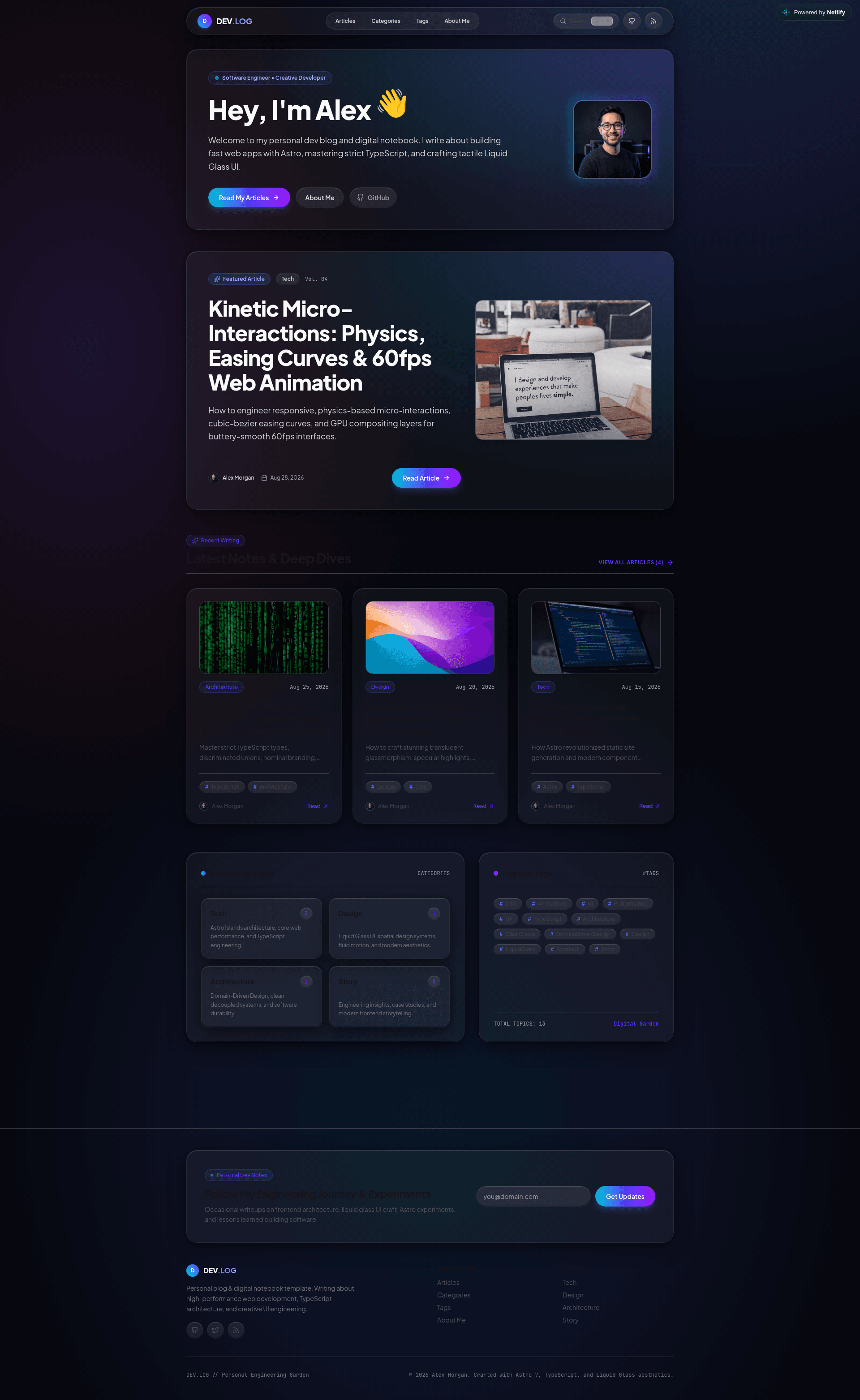
Personal developer blog, digital notebook, and portfolio template built with Astro 7, Tailwind CSS 4, and strict TypeScript.
About this template
DEV.LOG is an MIT-licensed Astro blog template that packs a personal developer blog, digital notebook, and portfolio into one static site, configured from a single file and themed with a Liquid Glass dark UI.
What is DEV.LOG?
DEV.LOG is a personal developer blog, digital notebook, and portfolio template built on Astro 7.2, Tailwind CSS 4, and strict TypeScript, published on GitHub by nivinvysakh and listed on the official Astro Themes directory. Authors write Markdown or MDX files into src/content/blog/, fill in one configuration file at src/config/site.ts, and the build outputs a static site containing a home hero, article index, dynamic article routes, category and tag pages, an About page, a custom 404, an RSS 2.0 feed, and an XML sitemap. Deployment targets include Netlify, Vercel, GitHub Pages, Cloudflare Pages, Render, and Docker.
What makes DEV.LOG stand out?
- Astro 7.2 islands architecture — zero-JS baseline by default with optional isolated component hydration, SSR/SSG support, and static delivery reported under 50ms.
- Liquid Glass UI on Tailwind CSS 4 — translucent frosted glass cards, dynamic ambient glow meshes, and spring-physics micro-interactions, with design tokens and typography defined in
src/styles/global.css. - Single-file configuration —
src/config/site.ts(root aliassite.config.ts) holds site metadata, favicon, author bio and social links, hero copy, nav links, four preset categories, About page content, newsletter card, 404 text, search modal labels, and footer text. - Pagefind static search — full-text client-side search built during
npm run build, exposed through a modal dialog withCmd+K/Ctrl+Kkeyboard navigation. - Four interactive MDX components —
Callout(tip, technique, warning, secret variants),ArchitecturePanel(1-3 comparison columns),SpeechBubble(left/right, normal/shout/thought), andCharacterAsidefor inline author notes. - Astro Expressive Code highlighting — file-title headers, line highlighting, and
ins/deldiff markers inside fenced code blocks. - Taxonomy and navigation — dynamic
/categories/*showcases, a/tags/*tag explorer, table of contents with scroll spy, reading time estimation, and an optionalfeaturedfrontmatter flag that pins an article to the homepage hero. - Production tooling — multi-stage Dockerfile and docker-compose (port 3000), GitHub Actions CI running
astro checkandastro build, weekly Dependabot updates for npm, GitHub Actions, and Docker base images, plus config files for Netlify, Vercel, Cloudflare, and Render.
Who should use DEV.LOG?
- Working developers who want a personal blog and digital notebook that publishes MDX articles with code diffs and callouts instead of a database-backed CMS.
- Frontend engineers who want a portfolio site whose About page renders a bio, engineering philosophy paragraphs, highlight cards, and a tech arsenal list from config values.
- Job-seeking engineers who need an About Me and articles directory they can deploy to Netlify, Vercel, or GitHub Pages within minutes.
- Technical writers on MDX who need reusable story components such as side-by-side architecture comparisons and interview-style speech bubbles.
What can you do with DEV.LOG?
- Blog authors: drop
.mdxfiles withtitle,description,pubDate,category,tags,heroImage, andissueNumberfrontmatter intosrc/content/blog/and get validated collection entries via a Zod schema insrc/content/config.ts. - Portfolio builders: fill in the author block, About philosophy, quote, highlights, and tech arsenal to turn the same template into a personal portfolio with an articles feed.
- Self-hosters: run
docker compose up --buildor the multi-stage Docker image to serve the built site from Nginx on port 3000. - Content marketers running a newsletter: the config includes a subscription card with badge, title, placeholder email, button text, and success message fields.
How does DEV.LOG work?
Clone the repository, run npm install, then npm run dev to start the local server on port 4321 with hot module replacement. Edit src/config/site.ts for branding and write articles as Markdown/MDX; npm run build runs astro build && pagefind to compile the static bundle and search index, and npm run preview serves the compiled dist/ folder locally.
Pricing
DEV.LOG is free and open source under the MIT License. There are no paid tiers, and the license explicitly permits use, modification, customization, and deployment for personal blogs, digital gardens, or portfolio sites.
FAQ
Is DEV.LOG free to use?
Yes. The template ships under the MIT License, so you can use, modify, and deploy it for personal blogs, digital gardens, or portfolios without paying for a tier. There is no paid version, watermark, or usage quota mentioned in the repository.
What Node.js version does DEV.LOG require?
Node.js v22.12.0 or higher is required, and the project works with npm, pnpm, yarn, or bun as the package manager. The Docker setup builds on node:20-alpine in a multi-stage image that serves the output through nginx:alpine.
How do I customize the site name, social links, and hero text?
Every branding value lives in one file, src/config/site.ts, with a root alias at site.config.ts. That single source of truth covers the site title, logo monogram letter, favicon, default Open Graph image, author name and social links, hero greeting and buttons, navigation, categories, and footer copy.
Does DEV.LOG include search and an RSS feed?
Yes. Pagefind generates a static full-text index during npm run build, surfaced in a modal with a Cmd+K / Ctrl+K shortcut, and the template outputs an RSS 2.0 feed at /rss.xml plus a sitemap at /sitemap-index.xml with OpenGraph and Twitter meta tags.
Which article frontmatter fields are required?
title, description, pubDate, and category are required; category is an enum limited to Tech, Design, Architecture, Story, and Culture. tags, heroImage, heroImageAlt, issueNumber, and the boolean featured flag are optional.