Template details
Elementary
Minimal Jekyll theme optimized for performance, accessibility, usability and readability.
About this template
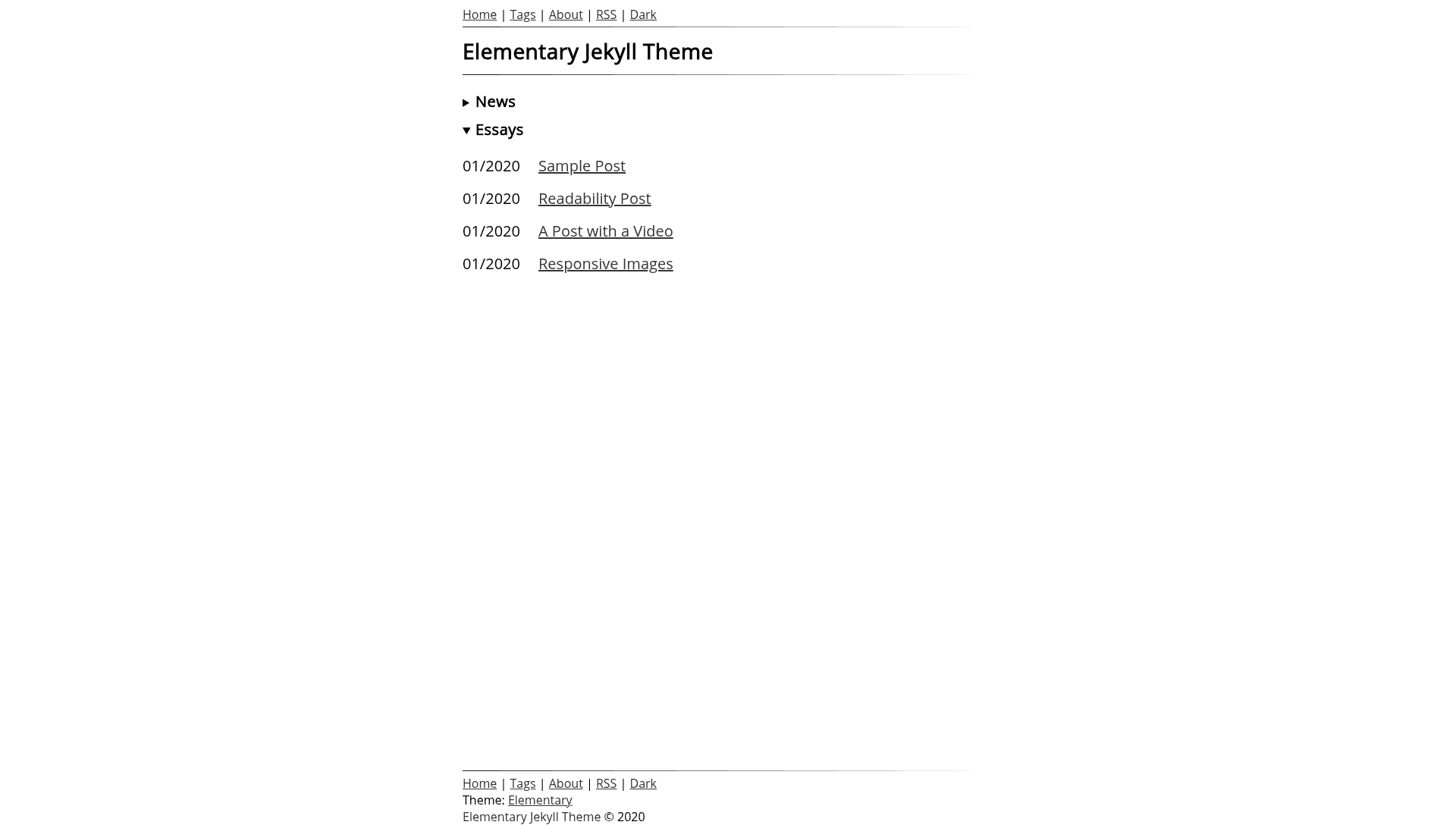
Elementary is a minimal Jekyll theme for personal blogs, built around performance, accessibility, and a no-tracker policy, producing static HTML pages with optional JavaScript enhancements.
What is Elementary?
Elementary is a Jekyll theme created by the author of nagekar.com as the template for their own personal blog. It takes Jekyll content written in Markdown or HTML and generates a static website with semantic HTML, structured data for blog posts, and a total weight of under 10KB of CSS plus under 3KB of optional JavaScript, with a 15KB Open Sans font file. The theme runs on any standard Jekyll installation and is distributed as a GitHub repository that can be added as a submodule.
Key Features
- Lightweight assets — CSS is under 10KB, optional JavaScript is under 3KB, and the built-in font is a 15KB Open Sans file; no other assets are loaded.
- Perfect PageSpeed score — The author reports a 100 Google PageSpeed score on both mobile and desktop for their own site using this theme.
- Dark mode — A dark theme toggle that saves the user's preference in a cookie; it requires JavaScript to switch the class.
- Reading progress bar — A scroll progress slider at the top of the page that shows how far the reader has scrolled; requires JavaScript.
- JavaScript is optional — You can turn off JavaScript entirely in the Jekyll configuration file, and the site still works.
- No third-party requests — The theme makes zero requests to any third-party service, so no trackers or analytics are loaded.
- Structured data — Schema.org markup is pre-added for blog posts to help search engines understand the content.
- Accessible and semantic HTML — The template uses semantic HTML5 elements and is designed for high accessibility.
Who is it for?
- Personal bloggers who want a fast, minimal blog without the bloat of trackers and analytics code.
- Jekyll developers who want a ready-made theme that scores 100 on PageSpeed out of the box.
- Privacy-conscious writers who want a blog that never contacts third-party servers.
- Students learning Jekyll who can install the theme via
git submodule addand explore a clean, readable codebase.
What can you do with Elementary?
- Privacy-first bloggers: Run a personal blog with no third-party requests, keeping all data on your own server.
- Performance enthusiasts: Host a site that loads in under a second on a Cloudflare CDN with 100% cache hit rate, as measured by the author.
- Accessibility-focused writers: Publish content using semantic HTML5 and pre-added schema.org structured data for posts.
- Jekyll hobbyists: Use the theme as a submodule in your own Jekyll project and customize it freely; you can also pull updates from the repository.
How does Elementary work?
Elementary is installed as a git submodule and activated by setting theme: elementary in your Jekyll _config.yml, then adding gem 'elementary', path: 'elementary' to your Gemfile and running bundle install. After that, you run bundle exec jekyll serve for a local preview or bundle exec jekyll build to generate the production site in the _site directory.
Pros and cons
- Pro: Extremely lightweight CSS and JavaScript contribute to top PageSpeed scores.
- Pro: The theme makes no third-party network requests, eliminating tracker and analytics bloat.
- Con: Dark mode and the reading progress bar require JavaScript; with JavaScript disabled, those features won't work.
- Con: The original repository is marked as unmaintained because the author moved their blog to WordPress, so future updates are not guaranteed.
Pricing
Elementary is open source and licensed under the GNU General Public License v3, so it is free to use and modify.
FAQ
Is Elementary free?
Yes, Elementary is released under the GNU General Public License v3, which means you can use, modify, and distribute it freely, even for commercial purposes, as long as you keep the same license and make source changes available.
Does Elementary need JavaScript to work?
The core theme works without JavaScript; you can disable it in the configuration file. However, the dark mode toggle and the reading progress bar are JavaScript-dependent features and will not function when scripts are turned off.
How do I install Elementary on my Jekyll site?
Add the Elementary repository as a submodule with git submodule add git@github.com:abhn/Elementary.git elementary, set theme: elementary in your _config.yml, add the gem to your Gemfile, run bundle install, and then build with bundle exec jekyll build.
Is the Elementary theme still maintained?
The GitHub README states the project is unmaintained because the author moved their blog to WordPress and ported the theme to a WordPress version. Updates to the Jekyll theme may happen sporadically, but you can check the WordPress theme repository for continued work.