Template details
Felmdrav
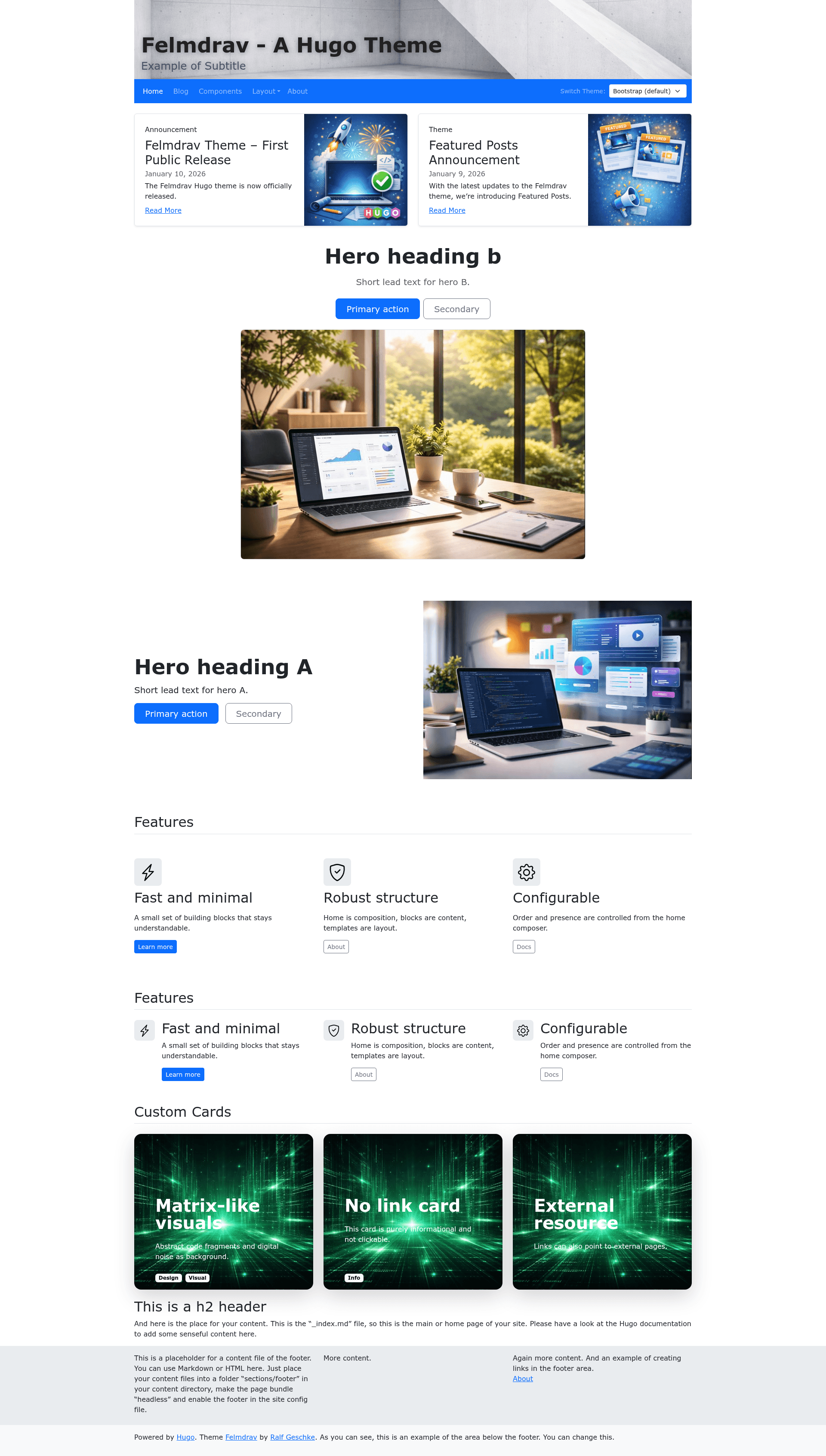
A clean, minimal Hugo theme built on Bootstrap 5 with flexible layouts, configurable sidebars, and content blocks.
About this template
Felmdrav is a clean, minimal Hugo theme built on the Bootstrap 5 CSS framework, designed for creating flexible static websites with configurable sidebars, reusable content blocks, and multiple layout options.
What is Felmdrav?
Felmdrav is a Hugo theme that takes site content written in Markdown and other formats and produces a responsive static website. It runs on the Hugo static site generator and requires Hugo version 0.146.0 or newer. The theme is the Bootstrap 5–based successor to the deprecated Tikva theme, also by the same author, and is open-sourced under the MIT license. A live demo based on the included exampleSite is available at https://geschke.github.io/hugo-felmdrav/.
Key Features
- Bootstrap 5 foundation — Responsive, mobile-first design using the Bootstrap 5 CSS framework with a 12-column grid system.
- Flexible grid layouts — Support for one-, two-, and three-column layouts with global defaults and per-page overrides for sidebars.
- Bootstrap Icons integration — Built-in use of Bootstrap Icons, eliminating the need for Font Awesome.
- Multiple visual styles — Includes several selected Bootswatch themes for quick aesthetic changes.
- Reusable content blocks — Includes hero sections, feature/icon blocks, and other components defined through configuration.
- Context-aware content listing — A listing system with recursive sections, sorting, and aggregation via front matter.
- Custom typography — Google Fonts support and customizable typography settings.
- Footer and subfooter — Flexible footer areas with optional subfooter sections.
- Analytics integration — Optional Google Analytics and Matomo support.
- Custom CSS/JS — Placeholder partials allow attaching custom CSS and JavaScript.
Who is it for?
- Hugo users who want a clean, flexible theme with Bootstrap 5 without building from scratch.
- Developers building content-focused sites such as blogs, portfolios, or documentation who need configurable sidebars and layouts.
- Designers who prefer a minimal structural baseline and want to customize the look with Bootswatch themes or custom CSS.
What can you do with Felmdrav?
- Launch a blog: Configure a two- or three-column blog with sidebars, content blocks, and Bootstrap Icons.
- Create a portfolio: Use the flexible grid and content blocks to showcase projects and pages.
- Build a documentation site: The context-aware content listing and recursive sections work well for organized documentation.
How does Felmdrav work?
Installation is straightforward: clone the repository into your Hugo site's themes directory (or add it as a Git submodule), set theme = "hugo-felmdrav" in your configuration file, and run Hugo with the included exampleSite to preview. The theme requires Hugo version 0.146.0 or newer due to its use of the new directory and template structure.
FAQ
What version of Hugo does Felmdrav require?
Felmdrav requires Hugo 0.146.0 or later, as it relies on the new directory and template structure introduced in recent Hugo versions.
Is Felmdrav free to use?
Yes, Felmdrav is open-sourced under the MIT license, so it is free to use, modify, and distribute.
How do I customize the theme?
Most layout behavior is controlled through configuration options in the site's config file, including sidebars, typography, analytics, and content blocks. Custom CSS and JavaScript can be added via placeholder partials.