Template details
tailwind-flask-starter
Open-source and free Flask starter project with Tailwind CSS and Flowbite UI components
About this template
tailwind-flask-starter is a free and open-source boilerplate that pairs the Python Flask micro-web-framework with Tailwind CSS and the Flowbite component library, giving developers a pre-configured stack for building styled websites.
What is tailwind-flask-starter?
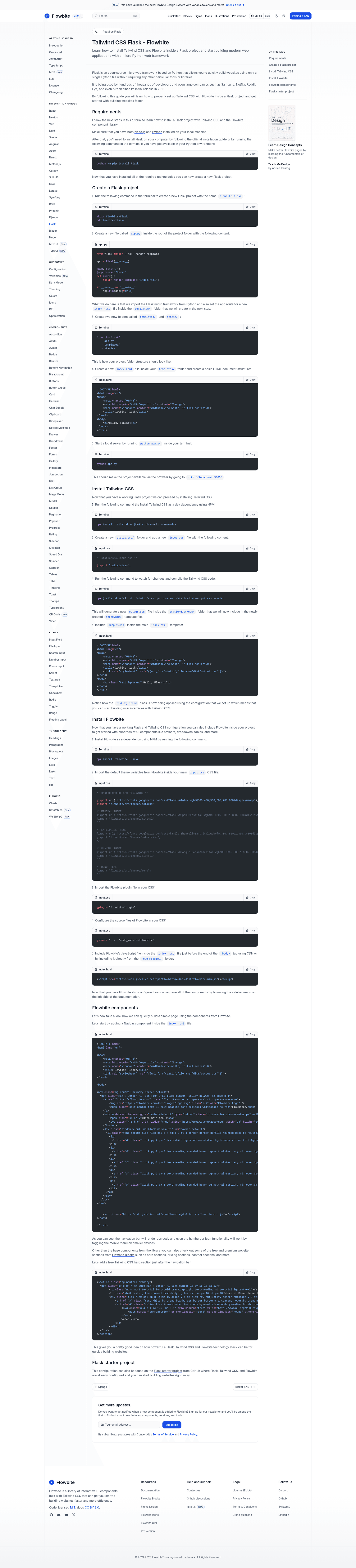
tailwind-flask-starter is a GitHub-hosted starter project that combines Flask, Tailwind CSS v4, and Flowbite. It is published by the Flowbite team and documented on the Flowbite Docs. As a boilerplate, it takes a project folder with app.py, templates/, and static/ and wires up Tailwind CSS compilation plus Flowbite UI components so that running python app.py serves a working page at http://localhost:5000/. The repo is free and open-source, currently showing 90 stars.
Key Features
- Flask micro-framework — A single
app.pyfile imports Flask and defines routes that renderindex.htmlfrom thetemplates/folder, using Flask's built-in development server. - Tailwind CSS v4 via the Tailwind CLI — The setup uses
@tailwindcss/clias a dev dependency, aninput.cssfile with@import "tailwindcss", and a watch command that compiles tostatic/dist/output.css. - Flowbite integration —
npm install flowbite --savebrings the component library, then the default theme, plugin, and source path are imported in the CSS and Flowbite's JavaScript is loaded from CDN ornode_modules/. - Starter file structure — The project layout includes
app.py,templates/index.html,static/src/input.css, andstatic/dist/output.css, with a clear separation of Python, templates, and static assets. - Ready-to-use UI components — The guide shows a responsive navbar with a mobile hamburger toggle and a hero section from Flowbite Blocks, both using standard Tailwind utility classes.
- Flowbite Blocks access — The starter points to the Flowbite Blocks library so developers can drop in pre-built hero, pricing, contact, and other marketing sections.
- Free and open source — The entire starter project is published on GitHub without licensing fees, so it can be used for personal and commercial projects.
Who is it for?
- Python developers who want to add modern styling to Flask apps without manually configuring a CSS build pipeline.
- Front-end developers who know Tailwind CSS and want a Python backend for their prototypes.
- Startup teams building marketing pages or internal dashboards who need a quick setup with reusable UI components from Flowbite.
- Flowbite users who prefer Flask over JavaScript-based frameworks for server-side rendering.
What can you do with it?
- Prototype a landing page: Add a navbar, hero, pricing, and contact sections from Flowbite Blocks directly into
index.htmland see them instantly with compiled Tailwind CSS. - Build a Flask web app: Expand the single route into multiple pages by adding more templates and routes in
app.py, while keeping the styling setup untouched. - Learn a Flask + Tailwind workflow: Use the documented steps to understand how Tailwind CSS v4 and Flowbite interact with Flask's static file handling.
How does it work?
The guide walks through creating a Flask project, then installing Tailwind CSS and Flowbite with NPM. The input.css file imports Tailwind and Flowbite's theme and plugin, and a watch command compiles it to output.css, which is linked in index.html via Flask's url_for helper. Flowbite's JavaScript file is loaded before the closing body tag so interactive components like the mobile menu work.
FAQ
Is tailwind-flask-starter free?
Yes, the starter project is open-source and free to use. It is published on GitHub, and the associated guide is part of the public Flowbite documentation.
Do I need Node.js and Python?
The guide lists both as requirements. Python is needed to run Flask, and Node.js (with NPM) is needed to install Tailwind CSS, the Tailwind CLI, and Flowbite.
What version of Tailwind CSS does it use?
The setup uses Tailwind CSS v4, indicated by the @import "tailwindcss" syntax and the use of the @tailwindcss/cli package.
Can I add more Flowbite components?
Yes. Once the starter is configured, you can copy any Flowbite component markup into index.html and it will render with the compiled CSS and JavaScript. The guide's example navbar and hero section demonstrate this.