Template details
Finwise
Free Next.js + Tailwind CSS landing page template for SaaS startups with 9 pre-built sections and Vercel deploy support.
About this template
Finwise is a free, open-source Next.js and Tailwind CSS landing page template built for SaaS startups that need a structured, optimized marketing page with minimal setup. The template ships as a complete Next.js App Router project with TypeScript, so it produces a deployable static landing page that can be customized entirely through a few data files. It is maintained as an open-source project on GitHub under the nexi-launch organization and is licensed under the MIT License, which allows free personal and commercial use.
What is Finwise?
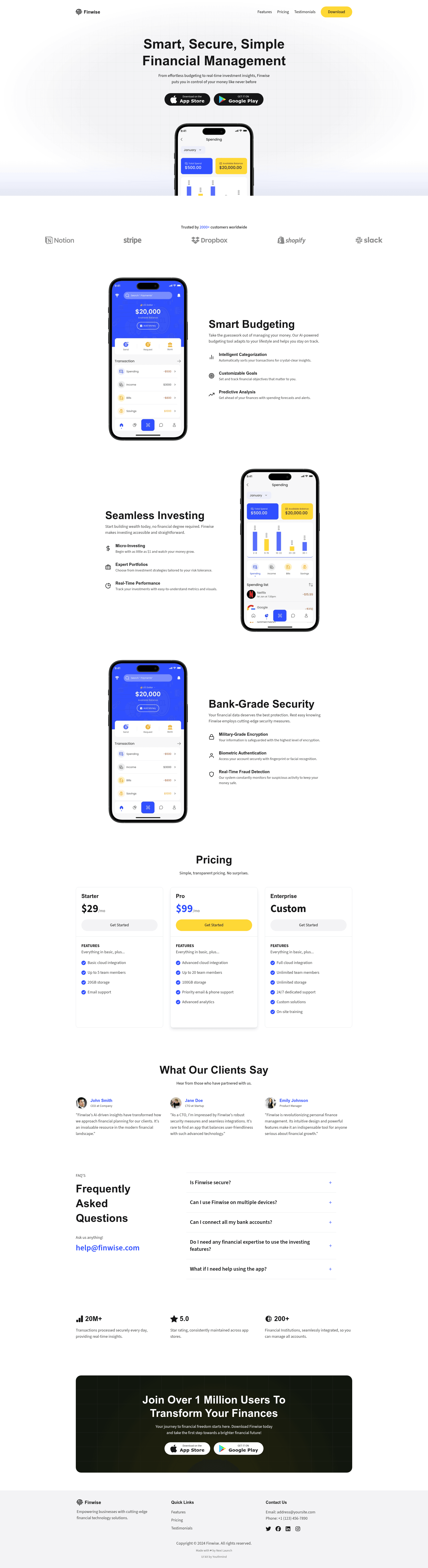
Finwise is a lightweight landing page starter that takes a Next.js project structure as input and outputs a fully styled, responsive marketing site with nine pre-built sections: Hero, Partners or Clients Logos, Features, Pricing, Testimonials, FAQ, Statistics, CTA, and Footer. It runs on any Node.js environment and is optimized for deployment on Vercel, with a one-click "Deploy with Vercel" button provided in the repository. The template uses the Next.js App Router with TypeScript, Tailwind CSS v3 for styling, and Framer Motion for smooth transitions.
Key Features
- Next.js App Router with TypeScript — The entire template is written in Next.js's modern App Router layout system with TypeScript type safety, providing a scalable file structure under
/src. - Tailwind CSS v3 styling — Utility-first styling with customization handled through
globals.cssfor primary, secondary, background, and accent colors, so no CSS framework lock-in. - Framer Motion transitions — Pre-implemented smooth, animated transitions across sections using the Framer Motion library, adding motion without extra setup.
- Font and image optimization — Built-in
next/fontandnext/imagecomponents automatically optimize fonts and images for performance, which contributes to a near-perfect Lighthouse score. - 31+ icon packs via React Icons — The template includes access to more than 31 icon sets from React Icons, so you can easily add relevant icons without adding individual dependencies.
- Modular and responsive components — Components are organized as reusable, scalable blocks that adapt to any screen size, making it straightforward to reorder or replace sections.
- One-click Vercel deployment — A Deploy with Vercel button in the README clones the repository and sets up the project on Vercel with a single click.
- Free lifetime updates — The open-source project commits to continuous improvements and free updates for all users.
Who is it for?
- SaaS startup founders — Quickly assemble a professional marketing page with pricing and testimonials to present a new product before writing custom front-end code.
- Developers and front-end engineers — Customize the template by editing
siteDetails.tsand content files in/src/data, swapping in brand data and images without touching layout components. - Product designers — Use the pre-built sections and color variables as a starting point for visual exploration, modifying
globals.cssto quickly test different brand palettes. - Open-source contributors — The project welcomes pull requests for new sections such as team introductions, comparison tables, and case studies, as well as additional themes and page variants.
What can you do with Finwise?
- Launch a SaaS marketing page: Stand up a polished landing page with hero, features, pricing, testimonials, FAQ, and CTA in under an hour by editing the data files and deploying to Vercel.
- Prototype a product idea: Replace the demo content in
/src/datawith your own messaging and use the built-in statistics and partners sections to showcase traction before building a full product. - Build a portfolio or promo site: Even though the template is marketed for SaaS, the same section architecture works for a portfolio or any promotional site that needs a clear call-to-action.
- Contribute new sections to the project: Use the existing component patterns to add a comparison table, team roster, or case-study block, then submit a pull request to the open-source repository.
How does Finwise work?
The template is a standard Next.js project. After cloning the repository, install dependencies with npm install, start the development server with npm run dev, and view the page at localhost:3000. Customization is driven by editing globals.css for colors, updating siteDetails.ts for brand information, and modifying content files inside /src/data. Deployment can be done by pushing the repository to Vercel or clicking the Deploy with Vercel button in the README.
Pros and cons
- Pros: Free and open-source under the MIT License; near-perfect Lighthouse score thanks to built-in font and image optimization; includes a large set of icons and a modular section-based design.
- Cons: The template currently ships only the landing page sections — extra pages like agency, eCommerce, or portfolio layouts are not included and are listed as future community contributions; a few configuration items like the favicon and Open Graph images require manual swapping in
/src/appandpublic/images.
Pricing
Finwise is completely free and open source. The repository is released under the MIT License, which permits personal and commercial use, modification, and redistribution with attribution. There are no paid tiers or premium features mentioned in the documentation.
FAQ
Is Finwise free?
Yes, Finwise is free and open source. The repository is licensed under the MIT License, so you can use it for personal and commercial projects without paying a fee or obtaining special permission.
Does Finwise use the Next.js App Router?
Yes, the template is built with the Next.js App Router and TypeScript. The project structure is organized under /src and uses the modern app directory conventions for layouts and pages.
How do I customize the colors and content in Finwise?
Colors are edited in globals.css, while site details such as brand name and metadata live in siteDetails.ts. Most visible content — navigation, features, pricing, and testimonials — is managed through data files in the /src/data directory.
How do I deploy Finwise to Vercel?
The easiest method is to click the "Deploy with Vercel" button at the top of the GitHub README, which clones the repository and deploys it to Vercel automatically. You can also deploy manually by connecting the repository to Vercel and following the standard Next.js deployment steps.
Can I contribute to Finwise?
Yes, the project is open to community contributions. You can fork the repository, create a new branch, implement your changes, and submit a pull request. The maintainers specifically suggest ideas like new sections, additional page variants, and new themes.