Template details
FitZone Gym - Fitness Astrojs Website Theme
Responsive gym fitness website theme built with Astro, Tailwind CSS, TypeScript, and Remix Icon.
About this template
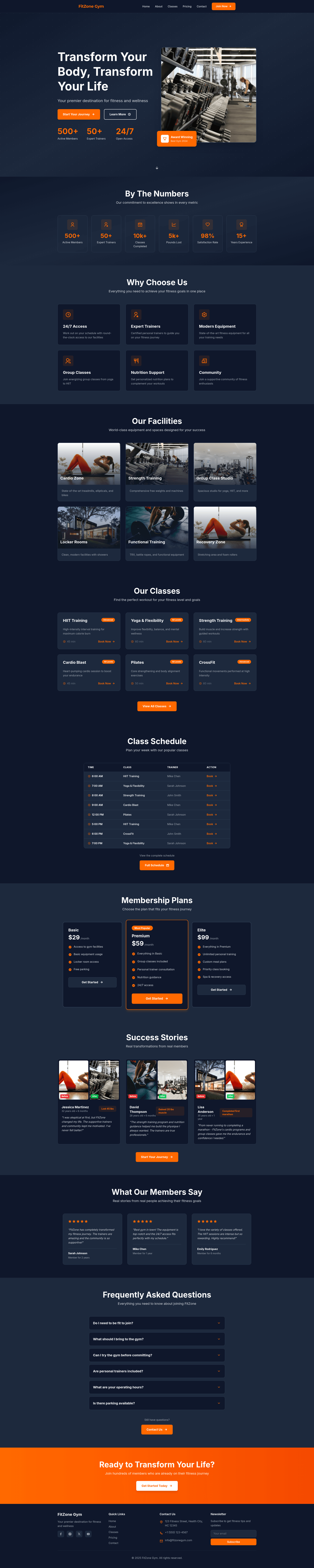
FitZone Gym is a static website template for gyms and fitness companies, built with Astro 5.15.3, Tailwind CSS 4.1.16, and TypeScript, that generates a six-page marketing site from a single data file.
What is the FitZone Gym template?
FitZone Gym is a multi-page Astro template that creates a complete fitness-center website. Its input is website content defined in src/data/siteData.ts — gym name, tagline, contact details, social links, navigation, features, classes, pricing plans, testimonials, FAQs, and schedules — and its output is a static HTML site in a dist folder after running npm run build. The project is open source under the MIT License and is described in the repository metadata as a modern Astro.js template for gym and fitness companies, with badges showing Astro 5.15.3, Tailwind CSS 4.1.16, and TypeScript.
What makes the template stand out?
- Six prebuilt pages — index, about, classes, pricing, contact, and 404 routes cover the full marketing flow of a gym website.
- Centralized content editing —
siteData.tsholds navigation, features, classes, pricing, testimonials, success stories, FAQs, and schedules, so non-developers can update copy in one file. - Astro static generation — the build command outputs a
dist/folder deployable to Vercel, Netlify, GitHub Pages, Cloudflare Pages, or AWS S3. - Tailwind CSS utility styling — responsive, mobile-first layouts composed from utility classes, with global overrides in
src/styles/global.css. - Reusable component library — 13 Astro components including Hero, Features, Statistics, Testimonials, PricingPlans, FAQ, ClassSchedule, ContactForm, Facilities, and SuccessStories.
- TypeScript configuration —
tsconfig.jsonand a typed data file give editor autocomplete and catch mistakes at build time. - Accessibility and SEO touches — the README lists accessibility best practices, meta tags, and semantic HTML as built-in considerations.
Who is the FitZone Gym template for?
Gym and fitness studio owners can launch a professional web presence by replacing the sample content in siteData.ts and running the build. Astro developers can use the project as a starter to learn how pages, components, layouts, and data files fit together in Astro. Freelancers building sites for wellness businesses can clone the repo, customize the Tailwind theme, and deploy to static hosting in an afternoon.
What can you do with the template?
- Gym owners: publish a homepage with hero, features, statistics, and testimonials plus dedicated about, classes, pricing, and contact pages without writing code.
- Developers: extend the site by creating new
.astrofiles insrc/pages— the filename becomes the route, and the Layout component fromsrc/layouts/Layout.astrocan be imported for consistent structure. - Designers: rebrand the site by editing
global.cssand swapping Tailwind utility classes across the components, with the Remix Icon library available for icons.
How does the template work?
After cloning the repository, run npm install, then npm run dev to start the development server at localhost:4321. The development workflow is: update src/data/siteData.ts with your content, adjust components and styles, then run npm run build to produce a static dist/ folder for deployment. The available npm scripts include dev, build, preview, and astro CLI commands.