Template details
Jekyll Serif
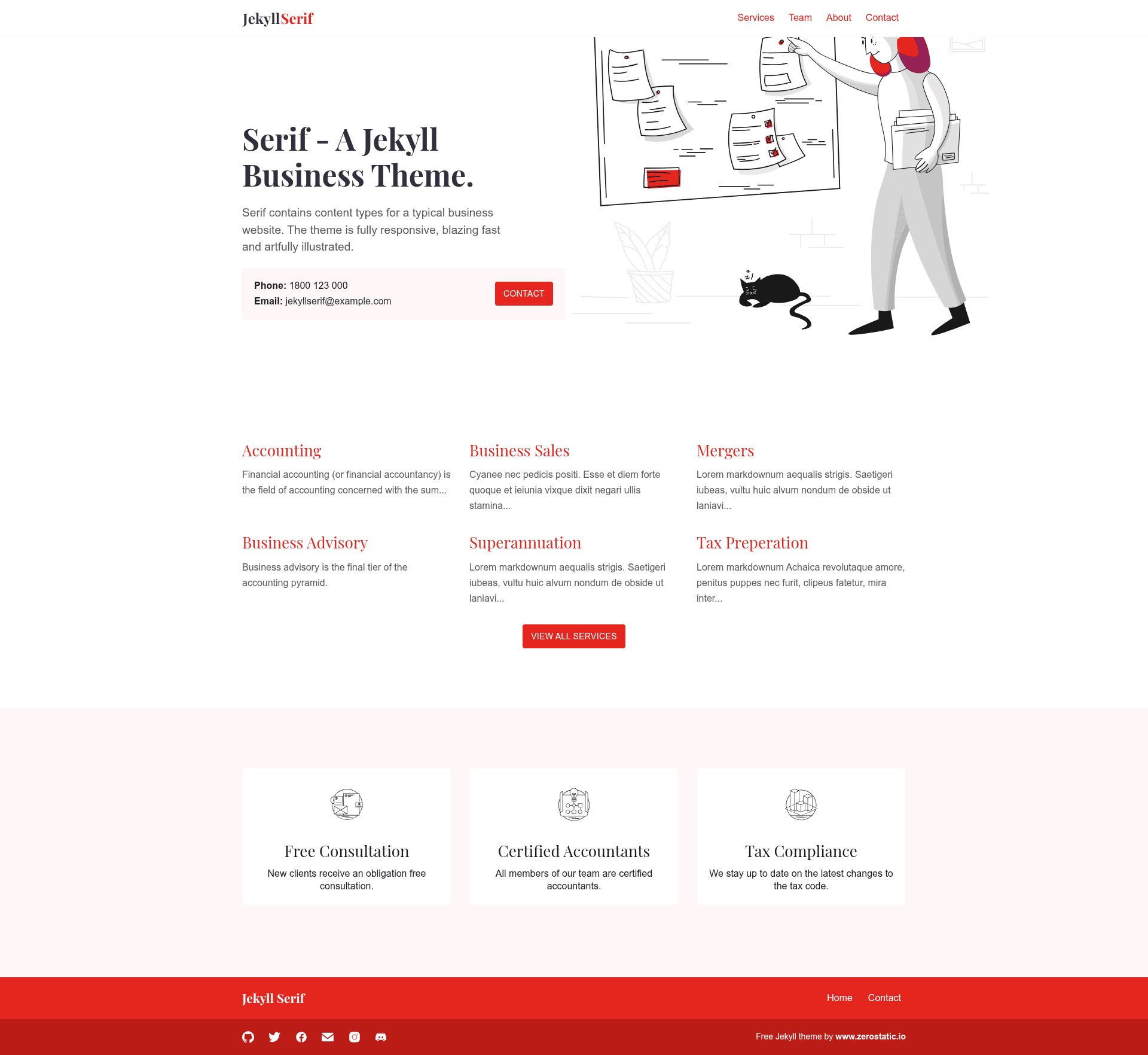
Open-source multi-page business theme for Jekyll with services/team collections, responsive Bootstrap design, and 100/100 Lighthouse scores.
About this template
Jekyll Serif is an open-source, multi-page business theme for Jekyll that generates a marketing website with services, team, and features sections. Built by Zerostatic Themes (Robert Austin) in Australia, it is designed to be fast, responsive, and easy to deploy on Netlify or GitHub Pages.
What is Jekyll Serif?
Jekyll Serif is a Jekyll theme for building brochure-style business websites. It takes content written in Markdown and data files (YAML) and produces a static HTML site. The theme runs on Jekyll 4.2 and above, and it includes example content and royalty-free illustrations so you can start with a complete site skeleton.
Key Features
- Jekyll 4.2+ — Built for the latest version of the Jekyll static site generator, requiring Ruby 2.5 or higher.
- Netlify & GitHub Pages ready — Includes a tested
netlify.tomland supports GitHub Pages with abaseurlupdate in_config.yml. - Services collection — Create service pages from Markdown documents in the
_servicesfolder, each with its own URL. - Team collection — Add team member pages via Markdown files, with support for photos and bios.
- Features data — Define feature highlights in
_data/features.ymland render them in the homepage layout. - SCSS with Bootstrap 4.6 grid — Styling is written in SCSS; only the grid and utilities are imported by default, with an option to uncomment the entire Bootstrap library.
- Responsive design — 100% responsive with an animated hamburger menu and a slide-in mobile navigation.
- Performance — 100/100 Google Lighthouse scores for speed, SEO, accessibility, and best practices, with a total under 50 KB before images.
Who should use Jekyll Serif?
- Small business owners — Launch a professional marketing site with a services page, team page, and feature highlights without hiring a web developer.
- Jekyll developers — Use the theme as a starting point for client projects, leveraging the pre-built collections, data files, and responsive layout.
- Agencies — Create a portfolio-style brochure site for an agency, using the team collection to showcase staff and the services collection to list offerings.
What can you do with Jekyll Serif?
- Create a service-based business site — List your services as individual pages using the Services collection, each with its own URL and layout.
- Showcase your team — Populate the Team collection with member bios, photos, and social links.
- Deploy to Netlify in one click — Use the provided
netlify.tomland the 1-click deploy button to go live quickly. - Build a fast, accessible site — Achieve 100/100 Lighthouse scores out of the box, making the site quick to load and easy to navigate.
How does Jekyll Serif work?
Jekyll Serif is a standard Jekyll theme: clone or download the repository, run bundle install to fetch dependencies, and start the local server with bundle exec jekyll serve. To build the site for production, run bundle exec jekyll build. For GitHub Pages, update baseurl in _config.yml to match your repository path.
Pricing
Jekyll Serif is open source and free to use. You can also buy the author a coffee via the Buy Me a Coffee link on the theme page. The associated premium themes (Advance, Origin, Curate) are paid.
Alternatives
- Jekyll Atlantic — Another open-source Jekyll theme by Zerostatic Themes, with a different visual style.
- Jekyll Advance — A premium Jekyll theme from the same author, offering additional features.
FAQ
Is Jekyll Serif free?
Yes, Jekyll Serif is open source and free to use under a license that allows personal and commercial use. The license does not permit creating ports of the theme or reselling it.
Does Jekyll Serif work with GitHub Pages?
Yes, the theme has been tested with GitHub Pages and GitHub Project Pages. You need to set the baseurl in _config.yml to your project path (e.g., /jekyll-serif-theme) for assets and links to resolve correctly.
How do I install Jekyll Serif?
Clone or download the theme, navigate to the directory, and run bundle install. Then start the development server with bundle exec jekyll serve to preview the site locally.
Can I use the full Bootstrap 4.6 library?
By default, only Bootstrap's grid and utilities are included to keep the CSS small. To enable the entire Bootstrap library, uncomment the @import line in style.scss and rebuild the site.
How small is the generated site?
The theme weighs under 50 KB without images and under 80 KB with the included demo images and illustrations. If you exclude Google Fonts, the CSS and HTML total less than 20 KB.