Template details
Gatsby Plugin Algolia
A Gatsby plugin that indexes GraphQL query results into Algolia during the build step.
About this template
gatsby-plugin-algolia is a Gatsby plugin that indexes GraphQL query results into Algolia during the build step, enabling site search without a dedicated search backend. It is currently in beta and not officially supported, but it works with any Gatsby site and requires an Algolia account.
What is gatsby-plugin-algolia?
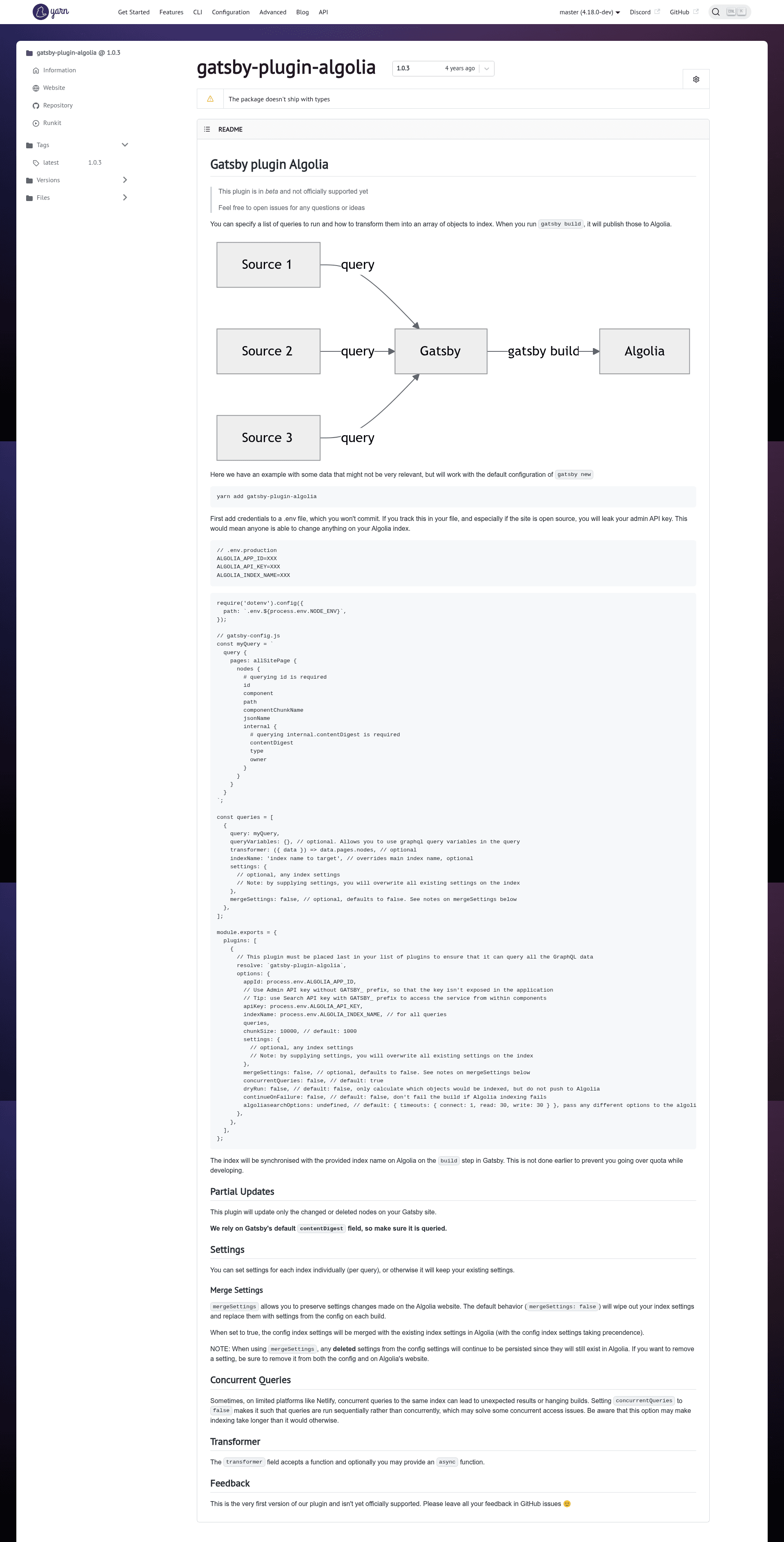
gatsby-plugin-algolia is a community plugin that pushes data from your Gatsby site to an Algolia index when you run gatsby build. You define one or more GraphQL queries in your Gatsby config, and the plugin transforms the query results into an array of objects that are then uploaded to Algolia. It runs only during the build process, not in development, to help you avoid exceeding your Algolia quota while working locally.
Key Features
- GraphQL-driven indexing — Configure queries directly in
gatsby-config.js; each query can target its own index, with optional per-query settings and variables. - Partial updates — Only changed or deleted nodes are synchronized, using Gatsby's default
internal.contentDigestfield (which must be included in your query). - Custom transformer — Accepts a function to transform query results before indexing, including async functions; commonly used to replace the content digest with a stable hash.
- Index settings management — You can specify settings per index or globally;
mergeSettingslets you preserve manual changes made on the Algolia website, though deleted settings persist unless removed from both config and Algolia. - Chunked uploads — Configurable
chunkSizedefaults to 1000 objects per batch, helping avoid request size limits. - Concurrency control — Set
concurrentQueries: falseto run queries sequentially on platforms like Netlify where concurrent access can cause hanging builds. - Safety flags —
dryRuncalculates which objects would be indexed without pushing, andcontinueOnFailureprevents a failed Algolia push from failing the entire Gatsby build. - Environment-aware credentials — Reads an Algolia App ID, Admin API key, and index name from environment variables loaded via
dotenv, with the.env.productionfile commonly used for build-time secrets.
Who is it for?
- Gatsby site developers who want to add full-text search to their static site with minimal setup, using Algolia as the managed search backend.
- Teams using continuous integration who need search indices to update automatically on every production build, without manual export/import steps.
- Headless CMS users who rely on Gatsby's GraphQL layer to pull content from multiple sources and want those unified records searchable through a single Algolia index.
What can you do with it?
- Add search to documentation sites — Index a query over all site pages, so users can find pages by title or path instantly.
- Index e-commerce products — Pull product data from a CMS via GraphQL and push it to an Algolia index for faceted search and filtering.
- Maintain a blog search index — Query blog posts with their markdown content, apply a transformer to create stable digests, and keep the index in sync on each build.
- Prototype Algolia integration — Use
dryRunto preview which objects would be indexed before committing to the feature.
How does gatsby-plugin-algolia work?
First, install the plugin and add your Algolia credentials to an environment file that is not committed to version control. Then define GraphQL queries in your Gatsby config, each with a transformer function and a target index name. When you run gatsby build, the plugin executes each query, transforms the result nodes into objects, and uploads them to Algolia in chunks, respecting your configured concurrency and threshold settings.
Pros and cons
The plugin is lightweight and integrates directly with Gatsby's build lifecycle, but it is in beta and carries some limitations.
- Pro: Automates index syncing on every build, with no manual reindexing.
- Pro: Supports partial updates, reducing unnecessary API calls.
- Pro: Flexible configuration via transformers and mergeSettings.
- Con: Only runs on
gatsby build, so development changes won't be reflected until a build is triggered. - Con: When
mergeSettingsis false, supplying settings in the config overwrites all existing settings on the Algolia index.
FAQ
Why do my updates not show up?
If you are running in development mode, remember that the plugin only pushes to Algolia during gatsby build. Also check that your query includes the internal.contentDigest field; some plugins don't regenerate this field when content changes, so you may need a custom transformer to compute a fresh digest.
Is gatsby-plugin-algolia free?
This plugin itself is open source and free, but you will need an Algolia account and are subject to Algolia's own pricing and quotas. The plugin avoids pushing during development to help you stay within those quotas.
What is the mergeSettings option?
The plugin defaults to overwriting your entire Algolia index settings on each build, using the settings from your Gatsby config. Setting mergeSettings to true merges the config settings with the existing index settings, giving precedence to the config values; however, settings deleted from the config will persist unless you also delete them on Algolia's website.
How do I use an async transformer?
The transformer field accepts either a synchronous or an async function. You can for example compute an MD5 hash of each object's JSON string using Node's crypto module and replace the provided contentDigest with that hash, ensuring changed content produces a new digest.
Does this plugin work with any Gatsby version?
It is built for Gatsby and should work with recent versions that support gatsby-config.js and GraphQL queries. Since it is in beta and not officially supported, check the GitHub issues for any reported compatibility problems with your specific Gatsby setup.