Template details
ancv
Renders your JSON resume/CV for online and terminal display, with ANSI styling and self-hosting options.
About this template
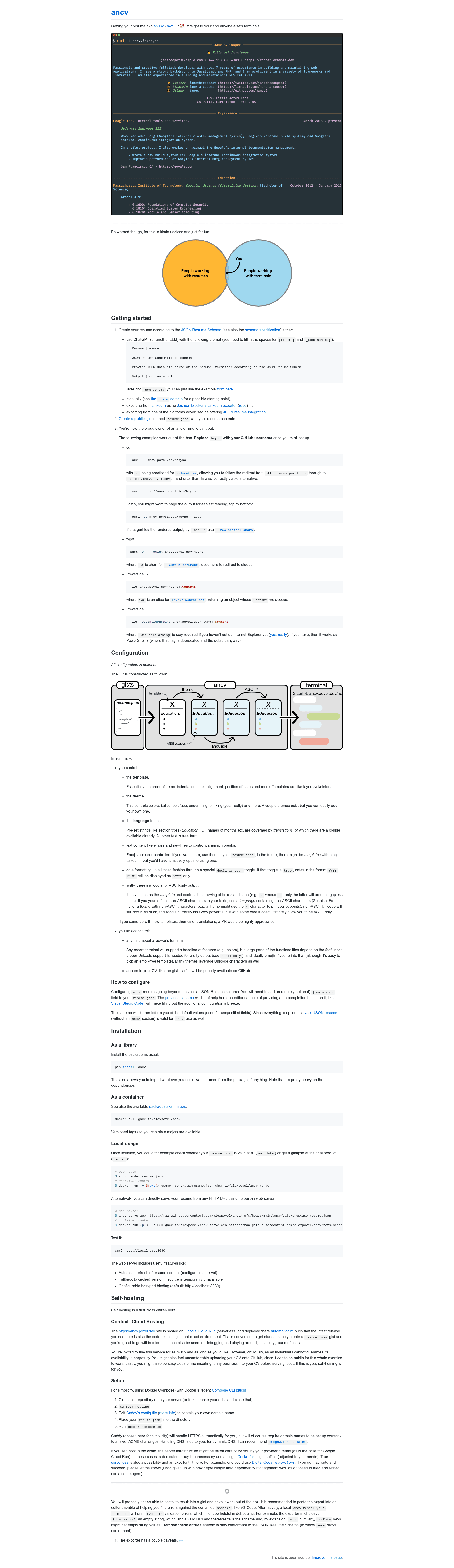
ancv is a Python tool that renders a JSON Resume-format CV into ANSI-styled terminal output, served from public GitHub gists for online display.
What is ancv?
ancv is an open-source Python package created by Alex Povel that consumes a resume in JSON Resume Schema format and outputs a formatted CV using ANSI escape codes for terminal display. It can serve resumes over HTTP, so visitors can view them with curl, wget, or PowerShell. The hosted instance at ancv.povel.dev runs on Google Cloud Run, and the project is built on Python 3.10, pydantic, rich, asyncio, and mypy.
Key Features
- JSON Resume Schema input — accepts a standard
resume.jsonconforming to the JSON Resume Schema; an optional$.meta.ancvfield adds configuration without breaking compatibility. - Terminal rendering — generates ANSI-colored output with user-controlled themes, templates, translations, emojis, and paragraph breaks.
- Public gist serving — a public gist named
resume.jsonbecomes accessible atancv.povel.dev/username;curl -Lfollows the redirect. - Local validation and preview — the
ancv validatecommand checks schema correctness andancv renderdisplays the final output before publishing. - Built-in web server —
ancv serve webhosts from an HTTP URL with configurable refresh interval, cached fallback, and host/port binding (defaultlocalhost:8080). - Self-hosting support — official Docker image at
ghcr.io/alexpovel/ancvplus a Docker Compose setup with Caddy for automatic HTTPS. - ASCII-only mode — the
ascii_onlytoggle restricts template drawing to ASCII characters like-instead of Unicode box-drawing lines. - Date display toggle — setting
dec31_as_yeartotrueshows dates like2024-12-31as just2024.
Who is it for?
- Developers and terminal enthusiasts who want to share a CV that renders as styled text inside a shell, reachable with a simple
curlcommand. - Privacy-focused job seekers who are uncomfortable uploading resumes to a public gist and prefer to self-host the container on their own infrastructure.
- People looking for a conversation piece — the project itself is labeled "kinda useless and just for fun," so it suits novelty or personal-brand use cases.
What can you do with ancv?
- Share a unique resume link: create a public gist named
resume.jsonfrom a JSON Resume export, then send theancv.povel.dev/your-usernameURL. - Preview and debug: run
ancv render resume.jsonlocally to see the exact terminal output and catch pydantic validation errors. - Serve locally over HTTP: start
ancv serve webonlocalhost:8080to test the web experience before going live. - Self-host with HTTPS: use the provided Docker Compose file with Caddy to serve your CV from your own domain.
How does ancv work?
First, create a resume file according to the JSON Resume Schema, either manually, with an LLM prompt, by exporting from LinkedIn with Joshua Tzucker's exporter, or from a JSON-resume-compatible platform. Second, upload that file as a public gist titled resume.json. Third, access the CV through ancv.povel.dev/username or your own self-hosted instance.
Self-hosting
Self-hosting is a first-class feature. The hosted ancv.povel.dev runs on Google Cloud Run and is deployed automatically from the latest release. For personal setups, the repository includes a self-hosting directory with a Caddyfile and Docker Compose configuration; clone the repo, edit the domain, add your resume.json, and run docker compose up. Caddy handles HTTPS via ACME. Serverless options like DigitalOcean Functions are also possible, though dependency management is noted as harder there.
FAQ
Is ancv free to use?
Yes, ancv is open-source and free. The hosted service at ancv.povel.dev is offered for convenience, but the author warns it cannot be guaranteed forever, so self-hosting is encouraged.
What format does the resume need to be in?
The resume must follow the JSON Resume Schema. A valid JSON Resume without an ancv metadata section works fine because all configuration is optional.
Can I use my own domain with ancv?
Yes, by self-hosting. The Docker Compose setup includes Caddy, which automatically provisions HTTPS certificates for the domain you configure in the Caddyfile.
How do I convert my LinkedIn profile to ancv?
Use Joshua Tzucker's LinkedIn profile to JSON Resume exporter. You will likely need to clean the output: remove empty string values for basics.url and endDate keys to stay conformant with the schema.
Does ancv support emojis?
Yes, emojis are user-controlled. You can include them in your resume.json text content; some themes also use Unicode characters like • for bullets.