Template details
Goomento PageBuilder
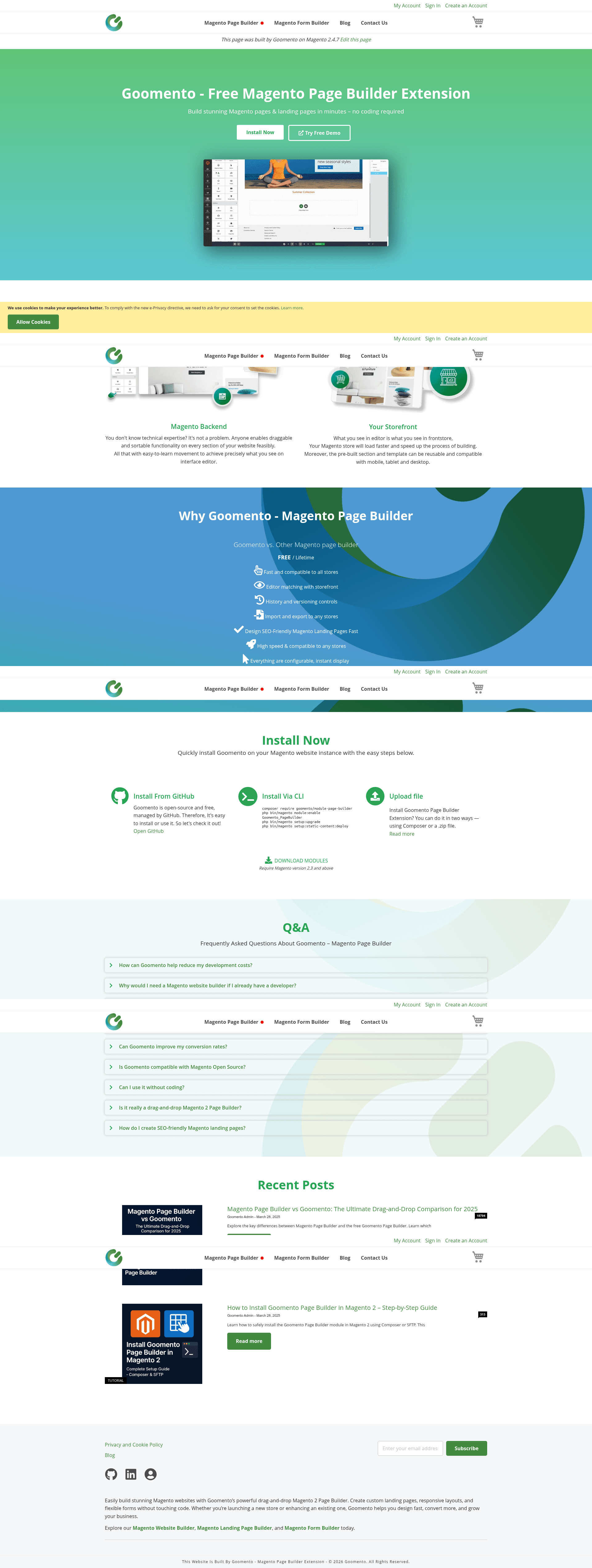
Free, open-source drag-and-drop page builder for Magento 2 with visual editor, custom CSS, animations, and SEO-friendly output.
About this template
Goomento PageBuilder is a free, open-source drag-and-drop page builder extension for Magento 2 that lets developers, agencies, and merchants create responsive storefront pages, landing pages, and custom blocks without writing code.
What is Goomento PageBuilder?
Goomento PageBuilder is a Magento 2 module distributed as goomento/module-page-builder via Composer, published by Goomento. It provides a visual, drag-and-drop editing interface that matches the storefront rendering exactly, and it outputs standard Magento pages and blocks that can be embedded anywhere in a layout. The extension runs on Magento Community and Enterprise editions from 2.3.x through 2.4.8.x.
Key Features
- 100% visual editor match — the backend preview renders exactly what appears on the storefront, so there are no layout surprises.
- Lightweight architecture — designed to keep the frontend fast without bloat.
- Drag-and-drop builder — build landing pages, banners, and custom blocks with no coding required.
- Full styling control — apply custom HTML, custom CSS, animations, and responsive design options to any element.
- SEO-friendly and mobile-first — optimized for performance and search engine visibility.
- Theme compatibility — works out of the box with Luma, Blank, Porto, Fastest, Market, and other standard Magento themes; Hyvä and PWA themes are not yet supported.
- Free and open source — no locked features; the entire extension is available on GitHub.
Who is it for?
- Magento developers — embed page builder output into any layout via XML or PHTML using the
PageBuilderRendererblock and a content identifier. - Digital agencies — build client landing pages and marketing pages quickly without custom development.
- Magento merchants — create visually rich product pages, category pages, and promotional content through the admin backend.
What can you do with it?
- Create landing pages — go to
Magento Backend > Goomento > Pages & Landing Pagesto generate a page that is immediately accessible on the storefront. - Embed content anywhere — reuse blocks and pages by referencing an identifier from
Magento Backend > Goomento > Sectionsin layout XML or PHTML templates. - Import and export templates — use the Export button on any content and the Importer at
Magento Backend > Goomento > Importerto move templates between sites.
How does it work?
After installing via composer require goomento/module-page-builder and running the Magento setup commands, you enable the module and manage content under the Goomento admin menu. The extension registers two cache types: Pagebuilder Frontend for frontend display and preview HTML, and Pagebuilder Backend for widget and system variable data. In Production mode, enabling both caches is recommended for best performance.
Pricing
Goomento PageBuilder is free and open source, distributed under an open-source license on GitHub. There are no paid tiers or locked features mentioned in the documentation.
Alternatives
- Magento Page Builder — the native page builder included with Magento 2, which Goomento directly compares against on its blog.
FAQ
Is Goomento PageBuilder free?
Yes, it is a free, open-source extension. The GitHub repository states it is "free, open-source, and developer-friendly — no locked features."
Which Magento versions are supported?
The compatibility table shows support for Magento Community and Enterprise editions from 2.3.x through 2.4.8.x, with full support up to 2.4.7 and partial support for 2.4.8.
Does Goomento PageBuilder support Hyvä themes?
No, Hyvä themes are marked as not compatible. The project states it does not fully support headless/PWA solutions such as Venia and Hyvä yet, but plans to adapt.
How do I install Goomento PageBuilder?
Install via Composer with composer require goomento/module-page-builder, then run php bin/magento module:enable Goomento_Core Goomento_PageBuilder, setup:upgrade, and setup:static-content:deploy.
Can I embed PageBuilder content into my own layout?
Yes, use the PageBuilderRenderer block class with an identifier argument in layout XML, or call the same block in a PHTML template with setIdentifier('your-content-identifier').