Template details
Dounut
Minimal e-commerce boilerplate using Astro and Crystallize.
About this template
Dounut
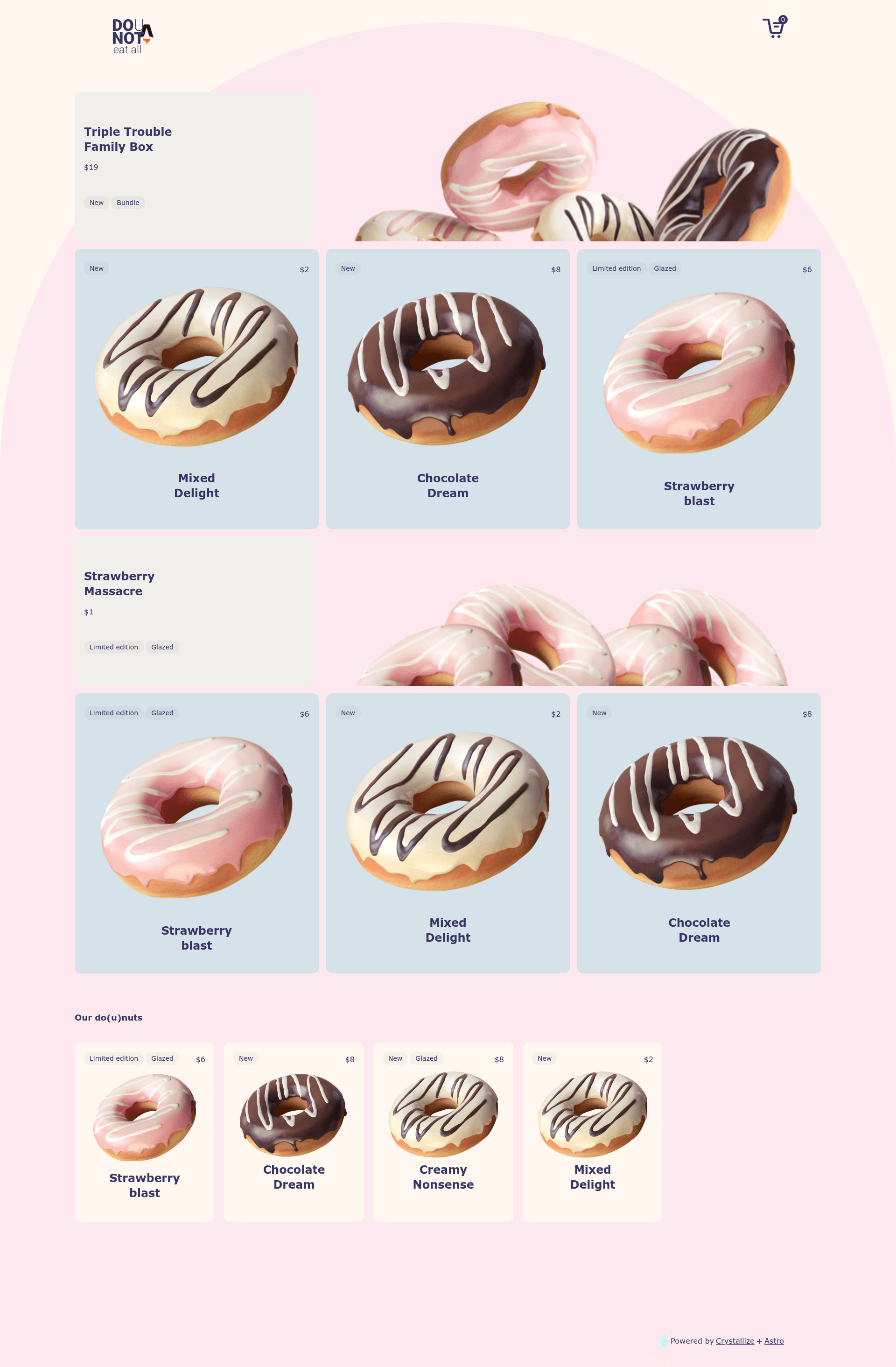
Dounut is a minimal eCommerce boilerplate built with AstroJS and the Crystallize headless commerce platform, designed to showcase a grid-driven storefront for product storytelling. It takes product catalog, grid, and layout data from Crystallize through GraphQL queries and renders a full set of storefront pages including product, cart, checkout, and confirmation.
What is Dounut?
Dounut is an open-source boilerplate maintained by Crystallize as part of their boilerplates repository. It runs on the AstroJS framework with Tailwind CSS for styling, and it uses Crystallize as both the content and commerce backend. The boilerplate receives its input as GraphQL queries in the src/use-cases folder and produces a static storefront with a frontpage grid, product pages, and a complete purchase flow. A live demo of the storefront is available at dounot.milliseconds.live.
Key Features
- AstroJS static generation — Built on AstroJS, the site compiles to static HTML with minimal JavaScript for fast page loads.
- Crystallize headless commerce integration — All product, grid, and layout data is fetched from Crystallize via GraphQL queries and mutations located in the src/use-cases folder.
- Tailwind CSS theme configuration — Colors, spacing, and typography are managed in a single tailwind.config.js file, making global theme changes straightforward.
- Grid-driven frontpage — The frontpage grid and its layout are loaded from Crystallize, so you can edit the grid structure in Crystallize and see changes without touching code.
- Modular product page components — Product pages use a product component for the hero section and Add to cart button, plus a product-body component for arranging marketing content.
- Complete cart, checkout, and confirmation pages — The pages folder includes basket, checkout, and confirmation routes; note that payments use a dummy method because no Stripe integration is included.
- Simple developer workflow — Clone the repository, run
npm install, thennpm run devto access the development server at http://localhost:4321/ with live reload.
Who is it for?
- Astro developers — Developers wanting to build an eCommerce storefront with AstroJS can use Dounut as a minimal reference implementation for integrating Crystallize.
- Crystallize users — Teams already using Crystallize will find concrete GraphQL query patterns and component structures to adapt for their own projects.
- Agencies and freelancers — Agencies prototyping product storytelling sites can quickly customize the theme and grid layout to demonstrate a storefront concept to clients.
What can you do with Dounut?
- Customize the entire theme — Change the site's colors, spacing, and typography by editing tailwind.config.js, affecting all pages instantly.
- Update the frontpage layout without code — Modify the grid structure in Crystallize and the frontpage will reflect the new arrangement because the grid data is fetched at runtime.
- Restructure product storytelling sections — Edit the product-body component to rearrange marketing information, images, and descriptions on product pages.
- Build a full purchase flow — Use the included cart, checkout, and confirmation pages to prototype an order process, and plug in a real payment gateway later since the current setup uses a dummy payment method.
How does Dounut work?
Dounut is set up as a standard Astro project with a two-folder structure: one for the frontend and another for the backend/API. To run it locally, clone the repository, run npm install in both folders, then npm run dev and browse to http://localhost:4321/. The site fetches all content and product data from Crystallize via GraphQL; the queries live in src/use-cases, and the components in src/components render that data into pages defined in src/pages.
FAQ
Does Dounut include payment integrations like Stripe?
No. The boilerplate explicitly does not contain payment integrations such as Stripe and instead uses a dummy payment method, so it is not ready for live transactions out of the box.
How do I edit the theme of Dounut?
All theme-related settings, including colors, spacing, and typography, are edited in the tailwind.config.js file at the root of the project.
Where are the GraphQL queries that communicate with Crystallize?
The GraphQL queries and mutations used to communicate with Crystallize are located in the src/use-cases folder.
What is the folder structure of Dounut?
The src folder contains three key directories: src/components contains all UI components, src/use-cases contains the GraphQL queries and mutations, and src/pages contains the individual pages of the website.
How do I run the development server?
Clone the repository, run npm install from the root (and any subfolders as noted), then run npm run dev and open http://localhost:4321/ in your browser.