Template details
hexo-theme-cafe
A minimal Hexo blog theme inspired by Ruan Yifeng's blog, focused on reading comfort and simple configuration.
About this template
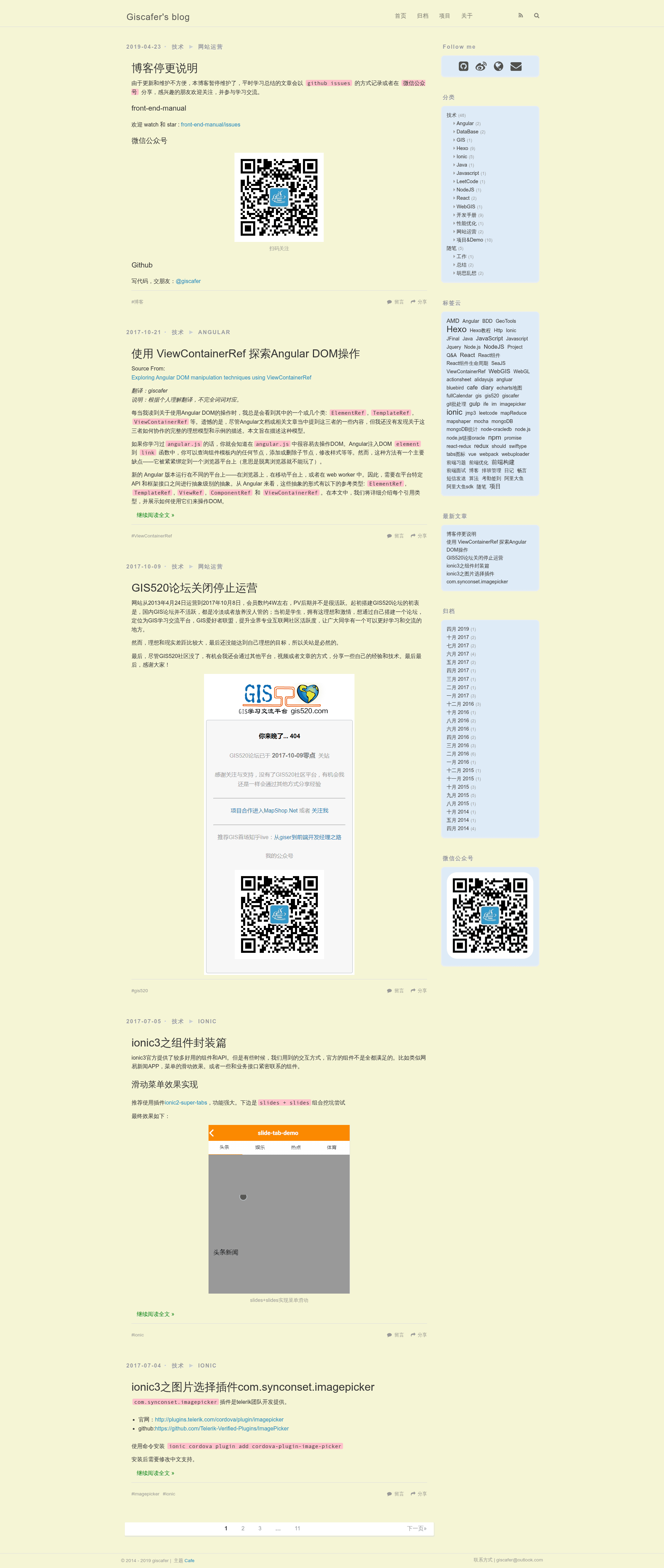
hexo-theme-cafe is a minimalist Hexo blog theme, inspired by the default Landscape theme and the blog layout of Ruan Yifeng, that prioritizes reading comfort and easy configuration.
What is hexo-theme-cafe?
hexo-theme-cafe is an open-source blog theme for the Hexo static site generator, created by developer giscafer (Nickbing Lao). It takes a Hexo blog with Markdown posts and renders a responsive, single-column blog layout with configurable sidebar widgets, social sharing, and image galleries. The theme requires Hexo 2.4 or newer and is distributed under the MIT license.
Key Features
- Responsive design — The theme adapts to mobile screens, with separate demonstration GIFs for PC and mobile layouts provided in the repository.
- Community sharing — Integrates sharing buttons for mainstream social platforms, both domestic (Chinese) and international services.
- Multiple comment plugins — Supports Disqus, NetEase Cloud Comments, Changyan, Youyan, and Gitment, so users can pick the one that fits their audience.
- Fancybox image display — Built-in Fancybox support for albums and photos; users can embed images with standard Markdown syntax or the
fancyboxtag plugin with thumbnail and caption options. - Configurable sidebar — Sidebar can be positioned on the left or right, and widgets are chosen in the theme config; built-in widgets include social links, categories, tags, tagcloud, archives, recent posts, and friendly links.
- Simple installation and updates — Install by cloning the repository into the
themes/cafefolder, enable it by settingtheme: cafein the site config, and update withgit pullinside the theme directory. - Buy me a coffee — Includes a donation link, letting readers support the theme author through a linked "Buy me a coffee" page.
Who is it for?
- Chinese-speaking bloggers — The README and comment plugin choices (NetEase, Changyan, Youyan) target Chinese audiences, while the theme also supports Disqus for international readers.
- Hexo users who want a minimalist layout — Those who prefer a clean, blog-centric design in the style of Ruan Yifeng's blog, with emphasis on reading comfort rather than visual complexity.
- Developers customizing their blog — Users comfortable with editing
_config.ymlcan configure sidebar widgets, social links, and comment plugins without touching the theme's code.
What can you do with hexo-theme-cafe?
- Personal blogs: Publish Markdown posts and have them rendered into a readable, responsive layout with category and tag archives automatically generated.
- Image galleries: Use Fancybox to display photo sets with captions and thumbnails for portfolio or travel posts.
- Multi-platform commenting: Pick a comment service (Disqus for global readers, Changyan/Youyan for Chinese sites) and let visitors leave feedback without building a custom system.
- Friendly links: Share a blogroll by enabling the
friendly_linkwidget in the sidebar.
How does hexo-theme-cafe work?
After cloning the repository into themes/cafe, set the site's _config.yml to use theme: cafe. The theme reads your Markdown posts and applies its layout, and you can adjust widgets, sidebar position, and comment plugins through the theme's own _config.yml file. The demo site and animated GIFs are available in the repository for preview.
Pricing
hexo-theme-cafe is free and open source under the MIT license, with no paid tiers; the author accepts optional donations through a "Buy me a coffee" page.
FAQ
Is hexo-theme-cafe free?
Yes, the theme is released under the MIT license, so it is free to use, modify, and distribute. The author also accepts voluntary donations via a linked "Buy me a coffee" page.
How do I install hexo-theme-cafe?
Clone the repository to the themes/cafe directory of your Hexo site, or download the latest release and rename the folder to cafe. Then set theme: cafe in your site _config.yml. It requires Hexo 2.4 or later.
Which comment systems does the theme support?
The theme supports Disqus, NetEase Cloud Comments, Changyan, Youyan, and Gitment. You enable one by editing the theme configuration file; the README does not list exact config keys, so check the _config.yml comments.
Can I change the sidebar position?
Yes, the theme allows you to place the sidebar on the left or right via the sidebar option in the theme config. You can also choose which widgets appear, including social, category, tag, tagcloud, archives, recent posts, and friendly links.
Does the theme work on mobile?
Yes, the theme is responsive and adapts to mobile screens. The repository includes a separate mobile demonstration GIF showing the layout on a phone.