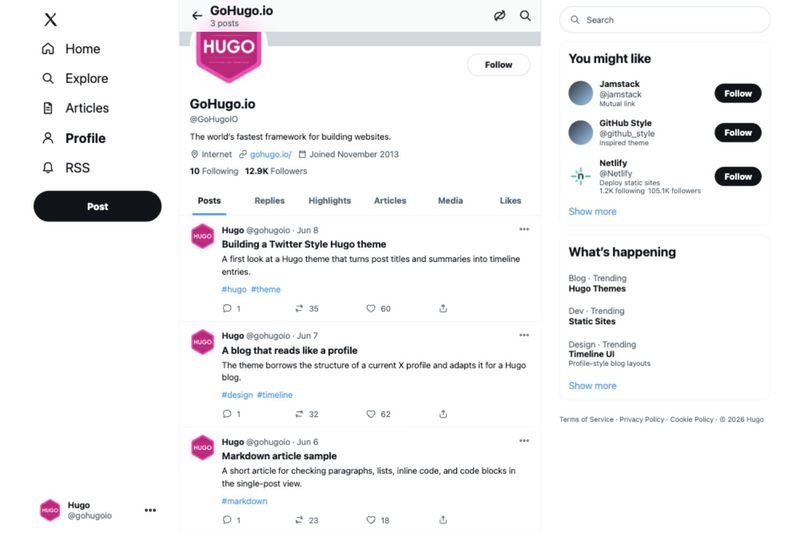
Hugo Twitter Style is a Hugo theme that mimics an X/Twitter profile page as the layout for a blog: each post appears as a timeline item with a title, description, tags, and action icons, and clicking an item opens the full article. It targets Hugo site generators and is configured entirely through TOML and JSON data files, with no JavaScript framework or build step beyond Hugo itself.
What is Hugo Twitter Style?
Hugo Twitter Style is a static-site theme for the Hugo framework that outputs a blog styled like the social network X, formerly Twitter. It takes Hugo content as input and produces a single-column timeline of posts on the profile page, plus full article pages that open when a user clicks an item. The theme is defined in the repository Kyure-A/hugo-twitter-style and includes an example site that runs with the command npm test, which serves the preview at http://127.0.0.1:1313/.
Key Features
- Profile-style homepage — Renders posts as timeline items with title, description, tags, and action icons, similar to tweets in a user profile.
- Configurable profile card — Accepts displayName, username, bio, location, website, joined date, following count, and followers count as
paramsin the site configuration file. - Data-driven follower counts — Reads
data/twitter.jsonto override profile counts, or enables X's official Follow Button widget for a client-side follower count without an X API key. - Live profile data without X API — Optionally fetches name and follower count from X's syndication JSONP endpoint and avatars from Unavatar; a configurable proxy endpoint such as FxTwitter can supply additional following data.
- Sidebar suggestions and trends — A right column loaded from
data/sidebar.json, with modules modeled on X's suggestion and trending sections. - Overridable navigation — The left navigation defaults to Home, Explore, Articles, Profile, and RSS links, and can be replaced with custom items from
data/navigation.json. - Hugo-native configuration — All options live in TOML and JSON, so no external content management system or payment platform is involved.
Who is it for?
Bloggers and content sites that want their posts displayed in the familiar X profile layout rather than a traditional blog index can adopt this theme for a one-column timeline. Hugo developers who want a compact, JSON-driven demo of profile data, live follower lookup, and custom sidebar links will find ready-made hooks in the example configuration. Personal sites with a low volume of posts can benefit from the short, tweet-like list format that makes each article clickable.
What can you do with Hugo Twitter Style?
- Bloggers: Publish posts and have them listed as a tweet-like feed on the homepage, with the full article still served as a normal Hugo page.
- Open-source maintainers: Reuse the documented FxTwitter proxy or X Follow Button setup to show a live follower count on a project profile, avoiding paid API access.
- Sidebar curators: Add mutual links and recommended accounts through the suggestions object, while placing notices and link lists in the trends object.
How does Hugo Twitter Style work?
First, set profile data such as display name, username, bio, and location under the params block in the Hugo site configuration. Then, optionally provide data files for live counts, sidebar content, and navigation overrides, and run the example site with npm test to preview on localhost port 1313. If both live count sources fail for any reason, the theme falls back to rendering 0 Following and 0 Followers.