Template details
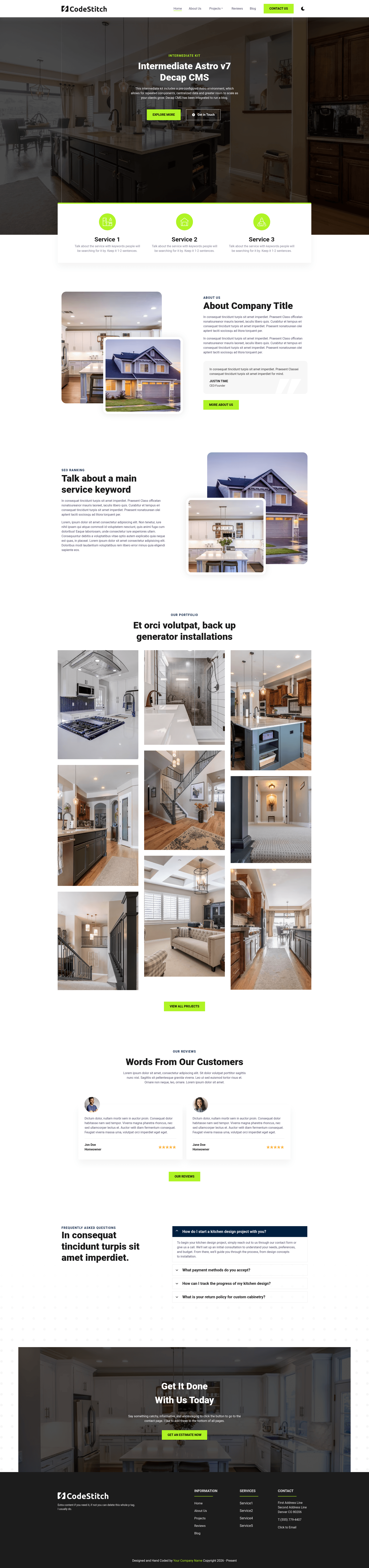
Intermediate Astro Kit - Decap CMS
Astro v7 starter kit with a Decap CMS blog, LESS styling, View Transitions, and five CodeStitch pages.
About this template
Intermediate Astro Kit - Decap CMS is a pre-configured Astro v7 starter template that pairs a Decap CMS‑powered blog with five CodeStitch component pages for building static marketing sites.
What is Intermediate Astro Kit - Decap CMS?
It's a free GitHub template from CodeStitchOfficial, created and maintained by BuckyBuck135. It runs on Astro v7 and produces a statically generated website with a client-editable blog. Inputs are the site config (src/data/client.ts), navigation data (src/data/navData.json), and Decap CMS configuration (public/admin/config.yml); the output is a deployable static site plus an /admin dashboard where clients manage Markdown posts and media. The kit comes with five pages filled with CodeStitch HTML/CSS blocks, LESS preprocessing, dark mode, View Transitions, and Astro's Content Collections for type-safe content.
Key Features
- Astro v7 — Uses the latest major Astro release with Content Collections, View Transitions, components, scoped styles, and built-in scripting.
- Decap CMS blog — A full blog system with Markdown/MDX posts in src/content/blog, a custom preview pane in src/pages/admin.astro, and a config at public/admin/config.yml. The CMS uses decapbridge authentication.
- LESS styling with design tokens — Colors, fonts, and spacing are centralized in src/styles/root.less; dark mode styles are isolated in src/styles/dark.less.
- SEO and structured data — The Meta component (src/components/Meta/Meta.astro) outputs Open Graph tags, Twitter Cards, and JSON-LD schemas for LocalBusiness and BlogPosting, with configurable social images.
- Image optimization — Astro's Picture and Image components handle responsive images, AVIF/WebP conversion, and hero preloading; a custom CSPicture component replicates code from CodeStitch with media-query-based source selection.
- Data-driven navigation — A DynamicHeader reads src/data/navData.json and auto-generates dropdown menus; a StaticHeader is available for hardcoded CodeStitch markup.
- Removal scripts —
npm run remove-demo,remove-decap, andremove-dark-modestrip optional features while backing up files to scripts/deleted/. - CodeTour walkthroughs — 8 interactive VS Code tours in .tours/ cover getting started, components, CMS setup, image optimization, navigation, styling, content collections, and deployment.
Who is it for?
- Freelance developers and agencies — Bootstrap client websites quickly with the included pages, then hand off blog and content management to the client through Decap CMS.
- Developers learning Astro — The pre-configured setup, comments, and CodeTour guides explain file locations and architecture without requiring prior Astro experience.
- Website owners who want to self-edit — The Decap CMS admin at /admin lets non-technical users create, edit, and delete blog posts and upload media without touching the codebase.
What can you do with it?
- Launch a five-page marketing site — The template ships Home, About, Contact, Projects, and Reviews pages built with CodeStitch components; replace or extend them via the component-per-folder architecture.
- Set up a client-editable blog — Connect Decap CMS to a GitHub repo via decapbridge, and your client can publish posts from the /admin dashboard with a preview pane that mirrors the live site.
- Remove features you don't need — Run the included npm scripts to strip demo content, the CMS, or dark mode while preserving the core build, navigation, and layout.
- Deploy to Netlify with caching — The repo includes netlify.toml with netlify-plugin-cache for faster subsequent builds, and the sitemap integration excludes /admin routes.
How does the template work?
- Create a project from the GitHub template or with the command
npm create astro@latest -- --template CodeStitchOfficial/Intermediate-Astro-Decap-CMS. - Install dependencies with
npm installand start the dev server withnpm run devat localhost:4321. - Configure site data, navigation, and CMS in src/data/client.ts, src/data/navData.json, and public/admin/config.yml.
- Deploy to a host like Netlify, then set up a decapbridge site to provide GitHub-based authentication for the CMS.
FAQ
How do I remove demo content?
Run npm run remove-demo to delete the demo pages (about, contact, projects, reviews), demo components, and demo images while keeping the blog, Decap CMS, and core infrastructure. Removed files are moved to scripts/deleted/ for backup.
How do I remove Decap CMS?
Run npm run remove-decap. You'll be asked whether to also delete blog content; choosing yes removes the CMS dashboard and blog files, while no keeps blog files for local Content Collections. Removed files are backed up to scripts/deleted/.
How do I enable a local backend for Decap CMS?
Add local_backend: true to public/admin/config.yml, install decap-server and npm-run-all, and update the package.json scripts to run Astro and the decap server in parallel. The dashboard then runs locally at /admin without requiring login.
Does the template include dark mode?
Yes, dark mode is included. Styles are consolidated in src/styles/dark.less and toggled by a DarkModeToggle component persisted in BaseLayout. You can remove dark mode entirely with npm run remove-dark-mode.
What authentication does the CMS use?
The kit uses decapbridge.com for authentication instead of Netlify Identity. You create a site on decapbridge with a GitHub repo and personal access token, then paste the generated backend config into public/admin/config.yml. Admin login uses your decapbridge credentials.