Template details
iTheme
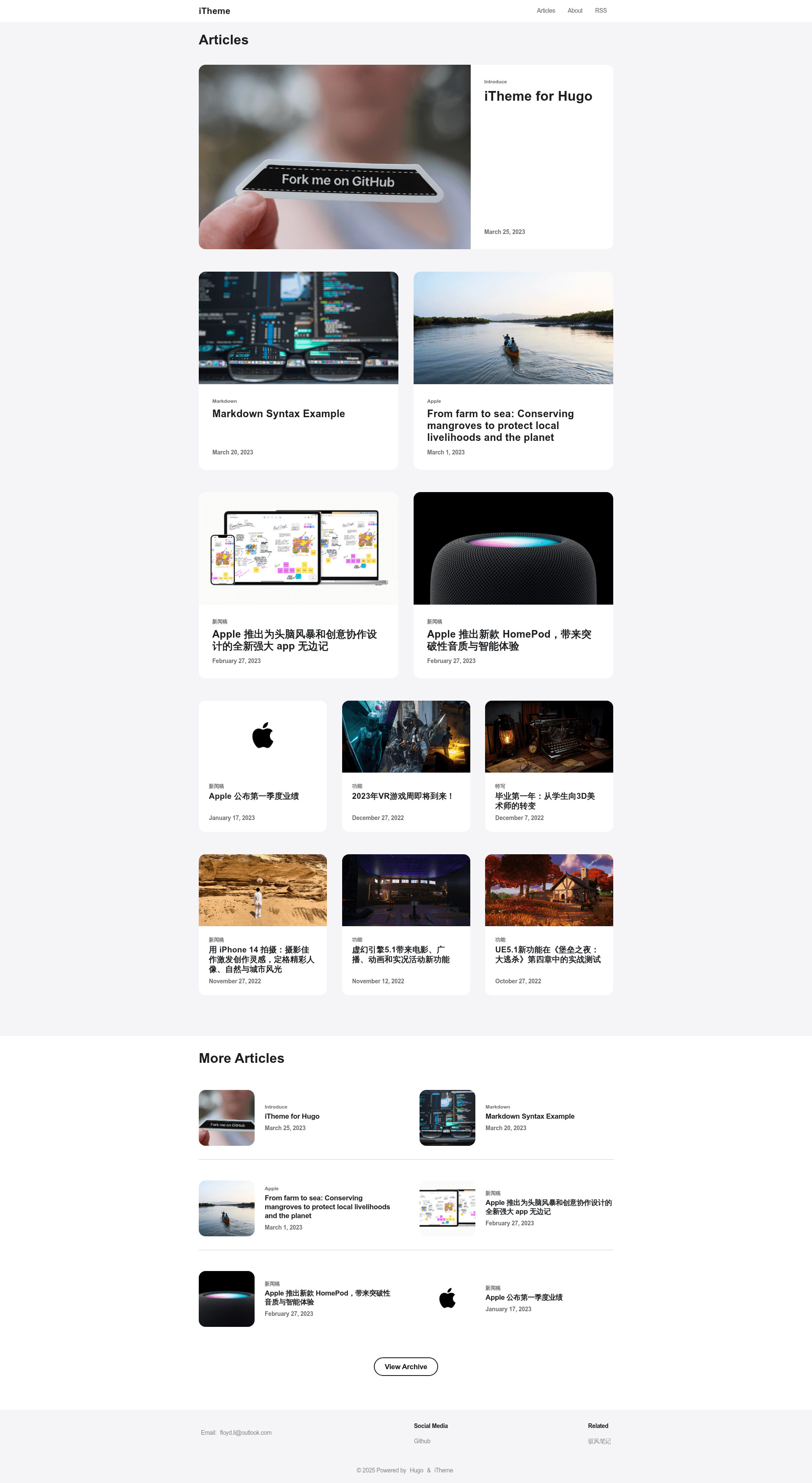
Apple-style Hugo theme with light/dark modes, Algolia search, i18n (en/zh-hans), and three image sizes.
About this template
iTheme is an Apple-style Hugo theme built for content-focused blogs and personal sites, delivering a clean, typography-first reading experience with built-in light/dark modes, Algolia search, and i18n support for English and Simplified Chinese.
What is iTheme?
iTheme is a Hugo theme that emulates Apple's minimal design language, created by developer floyd-li and published on GitHub. It takes a Hugo site's markdown content and renders it as a responsive blog with a strong focus on readability. The theme runs on Hugo, the open-source static site generator, and outputs static HTML files that can be hosted on any web server. The demo site is live on Netlify at hugo-theme-itheme.netlify.app, and a dedicated demo repository (itheme-demo-site) makes setup straightforward.
Key Features
- Light and Dark mode per post — Each post's front matter can set
theme: "dark"ortheme: "light", letting you tailor the reading experience article by article. - Three image display sizes — Append
|inline,|big, or|wideto the image's alt text (e.g., alt textalt|wide) to control whether an image renders inline, big, or wide; the default is big. - i18n support for en and zh-hans — Built-in translation files cover English and Simplified Chinese; the author explicitly welcomes contributions for additional languages.
- Algolia search integration — Configure the Algolia section in config.toml with your appId, appKey, and searchIndex to add instant, client-side search to your site.
- Custom JavaScript and CSS — Add custom stylesheets and scripts by placing files in the static directory and listing them in config.toml under params.css and params.js; multiple entries are allowed.
- Footer social media and blogroll links — Define unlimited social media links (e.g., GitHub, Twitter) and blogroll links (e.g., Apple, Google) through params to populate the site footer.
In addition, the theme's design is inspired by astro-air-blog, and its layout focuses on generous whitespace and a clean reading column. The configuration is TOML-based and the theme supports a default cover image for posts that omit their own cover.
Who is it for?
iTheme suits bloggers who value a clean, Apple-like aesthetic and want a simple but polished Hugo theme.
- Hugo users — Install the theme via git submodule, add the configuration block, and start writing markdown posts.
- Bilingual writers — With en and zh-hans UI strings built in, writers publishing in English or Simplified Chinese get localized navigation and interface text out of the box.
- Search-conscious bloggers — The built-in Algolia integration removes the need to wire up a third-party search plugin separately.
- Design-sensitive developers — The custom CSS/JS hooks and three image modes give developers concrete ways to fine-tune the presentation without forking the theme.
Use cases
- Personal bloggers — Publish articles with per-post light/dark themes and choose image display modes to create varied, readable posts.
- Chinese-English bilingual sites — Use the existing en/zh-hans i18n files to present the interface in either language, and add your own translations as needed.
- Tech writers and documentation maintainers — Enable Algolia search so readers can quickly query post content, and add custom JS/CSS to integrate analytics or other tools.
How does iTheme work?
The quick start uses the demo site repository: clone it with git clone --recurse-submodules, then run hugo server -D to serve the site locally. For an existing Hugo site, add the theme as a submodule, set theme = 'hugo-theme-itheme' in config.toml, and add the required params. Posts are ordinary markdown files with optional front matter for author, cover, tags, and theme mode.
FAQ
Does iTheme support languages other than English and Simplified Chinese?
Currently only English (en) and Simplified Chinese (zh-hans) translation files ship with the theme. The project maintainer explicitly invites community contributions to extend language support.
How do I use the three image display modes?
Append |inline, |big, or |wide to the image alt text in markdown, separated by a pipe character, like alt|wide. If no mode is specified, the default is big.
How do I enable Algolia search in iTheme?
In config.toml, add a [params.algolia] block with enabled = true along with your Algolia appId, appKey, and searchIndex values. You can obtain these from your Algolia dashboard.
Is there a live demo I can preview?
Yes, the author hosts a live demo at hugo-theme-itheme.netlify.app, and the demo site source is available as the itheme-demo-site repository for quick local setup.