Template details
Jekyll Lab Notebook
A full-featured electronic lab notebook theme (with plugins!) for Jekyll
About this template
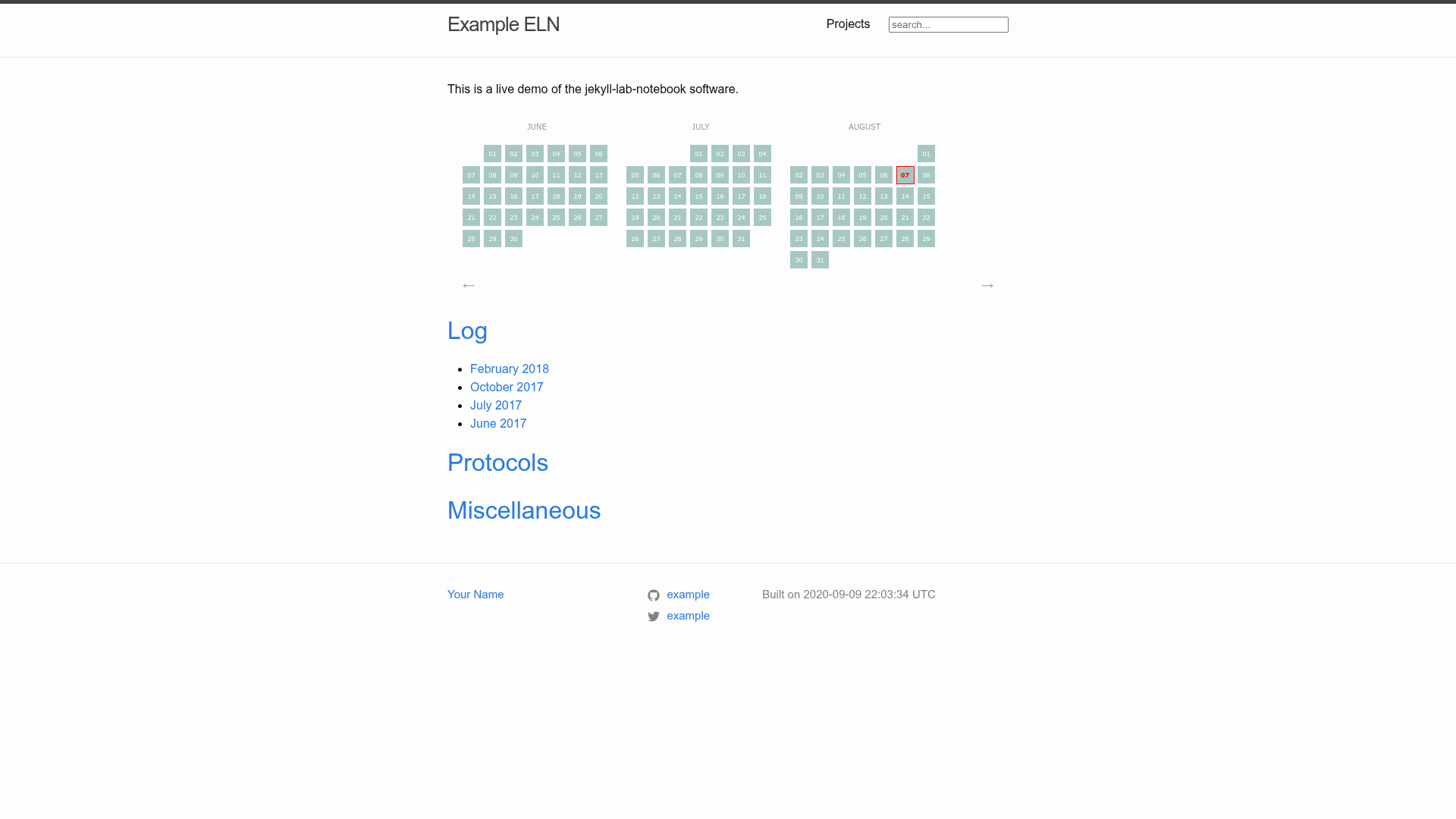
Jekyll Lab Notebook is a Jekyll theme and companion plugin set that converts plain markdown note files into an interactive HTML website for managing an electronic lab notebook. It is built on the static-site generator Jekyll, distributed under the MIT License, and maintained by tlnagy on GitHub with 63 stars at the time of writing.
What is Jekyll Lab Notebook?
Jekyll Lab Notebook is a full-featured Jekyll theme for writing electronic lab notebook (ELN) entries in markdown and rendering them as a searchable, taggable website. It takes markdown posts with embedded images, CSVs, or PDFs as input and produces a static HTML site with an interactive calendar and project tagging. The project is split into the theme repository and a separate plugins repository (jekyll-lab-notebook-plugins) where the heavy lifting happens.
Key Features
- Markdown-based notes — Write entries in any text editor using plain markdown; no database or CMS required.
- Media embedding — Embed images, CSVs, and PDFs directly in protocols and logs.
- Interactive calendar — See at a glance which days have log entries.
- Chronological + project tagging — Enter entries chronologically but tag them so entries from the same project appear together; multi-project tags are supported.
- Highlighted sections — Add note or thought bubbles to call out important details.
- Hackable core — Add pages, change layouts, and install Jekyll plugins since it is a standard Jekyll theme.
Who is it for?
- Research scientists — Keep a daily lab notebook with protocols, observations, and data files without learning a web framework.
- Graduate students — Track experiments over time and revisit tagged project entries when writing papers or theses.
- Lab groups — Share a static ELN on a local server or GitHub Pages with no backend required.
What can you do with Jekyll Lab Notebook?
- Biologists: store experimental protocols alongside microscope images and CSV data tables in one indexed site.
- Chemists: embed PDF spectra and reaction logs and tag them by project to quickly find related runs.
- Software developers in research: version-control the entire notebook as markdown files, enabling diffs and collaboration via git.
How does it work?
Install the theme via bundler inside the demo folder, run bundle exec jekyll serve -wi, then edit posts in the _posts/ subdirectory. The Jekyll build process converts each markdown file into an HTML page and generates the calendar and tag index.
Pricing
The theme is open source under the MIT License, so it is free to use and modify. No pricing tiers are involved.
Alternatives
eLabFTW, a web-based electronic lab notebook platform with built-in user management and a database, unlike this static Jekyll theme.
FAQ
Is Jekyll Lab Notebook free?
Yes, it is released under the MIT License, so it is free to use, modify, and distribute.
Do I need to know Jekyll to use it?
Basic familiarity with markdown is enough to start; the demo folder provides a working example and the theme is hackable for deeper customization.
Can I embed PDFs in my notes?
Yes, the theme supports embedding images, CSVs, and PDFs directly in markdown entries.
Does it require a database?
No, it generates a static HTML site from markdown files, so no database or server-side processing is needed.
How do I run it locally?
Clone the repo, install bundler, run bundle update in the demo folder, then bundle exec jekyll serve -wi and open the listed address.