Template details
Jekyll Theme Minimalistic
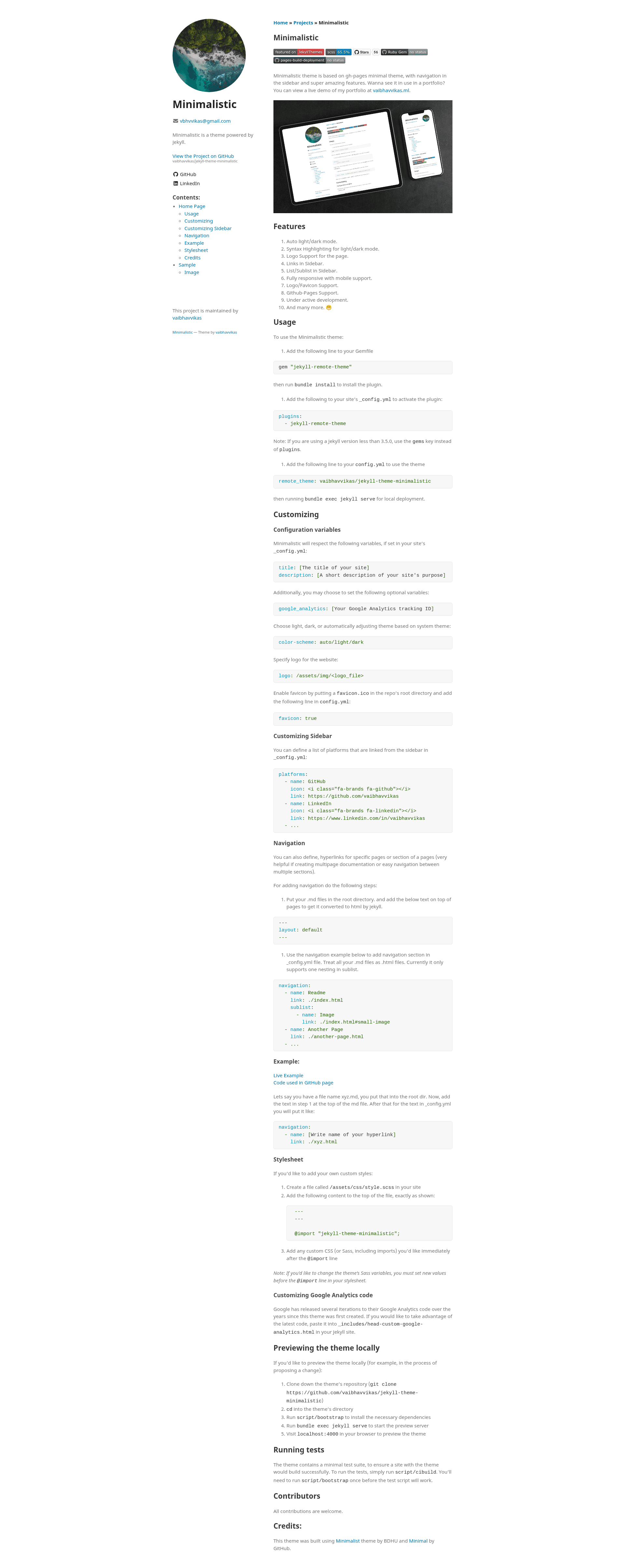
A minimal responsive Jekyll theme with sidebar navigation and many more amazing features.
About this template
Jekyll Theme Minimalistic is a free, minimal responsive Jekyll theme that adds a sidebar navigation and automatic light/dark mode to GitHub Pages sites, installable as a remote theme or Ruby gem. It is maintained by vaibhavvikas and builds on the Minimal theme by GitHub and the Minimalist theme by BDHU, giving you a clean base for personal sites, blogs, and documentation.
What is Jekyll Theme Minimalistic?
Jekyll Theme Minimalistic is a Jekyll theme that transforms a Jekyll site's Markdown content and _config.yml variables into a static HTML website with a responsive layout, sidebar, and theme-aware code highlighting. It runs on any Jekyll 3.5+ setup and is designed to work with GitHub Pages through the jekyll-remote-theme plugin, or as a conventional gem-based theme. The theme's configuration controls the site title, description, Google Analytics ID, color scheme (auto/light/dark), logo image, favicon, sidebar platforms, and navigation hierarchy.
Key Features
- Auto light/dark mode — The theme switches between light and dark palettes based on the visitor's system preference; you can force a scheme by setting
color-scheme: auto,light, ordarkin_config.yml. - Sidebar with nested navigation — Define a
navigationlist in_config.ymlwithnameandlinkentries, plus an optionalsublistfor one level of sub-items, letting you link to pages or anchors. - Syntax highlighting — Code blocks are highlighted in both light and dark modes, so your examples stay readable regardless of theme.
- GitHub Pages integration — Use the
jekyll-remote-themegem and setremote_theme: vaibhavvikas/jekyll-theme-minimalisticin your config to deploy with GitHub Pages; the repository also publishes a Ruby gem via GitHub Actions. - Logo and favicon support — You can specify a
logopath (for example,/assets/img/logo.png) and enable afavicon.icoby addingfavicon: trueand placing the file in the repo root. - Card component — A small HTML snippet (a
divwith classcard) creates a clickable card with a title, body text, and link, useful for highlighting projects or links. - Responsive layout — The theme is fully responsive with mobile support, so links and navigation wrap appropriately on small screens.
- Custom styles overrides — Create
assets/css/style.scssin your site with an@importof the theme to add your own CSS or change Sass variables.
Who is it for?
- Jekyll bloggers — Set up a minimal blog with sidebar social links, a logo, and dark mode without designing CSS from scratch.
- GitHub Pages users — Deploy a personal or project site on GitHub Pages with one line in
_config.ymlthrough the remote-theme plugin. - Technical documentation maintainers — Use the
navigationsublist feature to build multipage docs with nested links and section anchors. - Developers wanting a simple starting point — The theme's code is minimal, based on the Minimal theme, so it's easy to read, customize, and extend.
Use cases
- Personal blogger: Add posts in Markdown, configure
platformswith GitHub and LinkedIn icons, and get a responsive blog with auto dark mode. - Documentation site: Create
.mdfiles in the root directory, set their front matter tolayout: default, and define anavigationlist with sublists to link between pages. - Project showcase: Use the
logooption to display a project logo and thecardsnippet to create an attractive grid of project links.
How does it work?
- Add
gem "jekyll-remote-theme"to your Gemfile and runbundle install. - In
_config.yml, addplugins(orgemsif Jekyll is older than 3.5.0) with the plugin name, then setremote_theme: vaibhavvikas/jekyll-theme-minimalistic. - Configure optional variables like
title,description,google_analytics,color-scheme,logo,favicon,platforms, andnavigation. - Run
bundle exec jekyll serveto preview locally, or commit and push to GitHub Pages to build the site.
FAQ
Is Jekyll Theme Minimalistic free?
The theme is open source; the repository welcomes all contributions and suggestions. It is distributed as a free Ruby gem and via GitHub Pages remote theme, and the README documents no paid tiers or pricing models.
Does it support dark mode?
Yes. The theme offers automatic light/dark mode that follows the visitor's system theme, and you can override it by setting color-scheme in _config.yml to auto, light, or dark.
How do I add navigation to the sidebar?
Define a navigation list in _config.yml with name and link entries. Use sublist to add one level of nested links, treating every Markdown file as an HTML page (for example, xyz.md becomes xyz.html).
Can I use this theme on GitHub Pages without building locally?
Yes. GitHub Pages supports jekyll-remote-theme, so you only need to add the plugin and set remote_theme: vaibhavvikas/jekyll-theme-minimalistic in _config.yml, then push to your repository. The theme also includes a local preview workflow with script/bootstrap and bundle exec jekyll serve.
How do I customize the styling?
Create assets/css/style.scss in your site, add an @import of the theme (placing new Sass variable values before the @import line), and then write your own CSS or Sass after it.