Template details
XMag
XMag is a minimal magazine-style Hugo theme with responsive article summary blocks, thumbnails, and MathJax support.
About this template
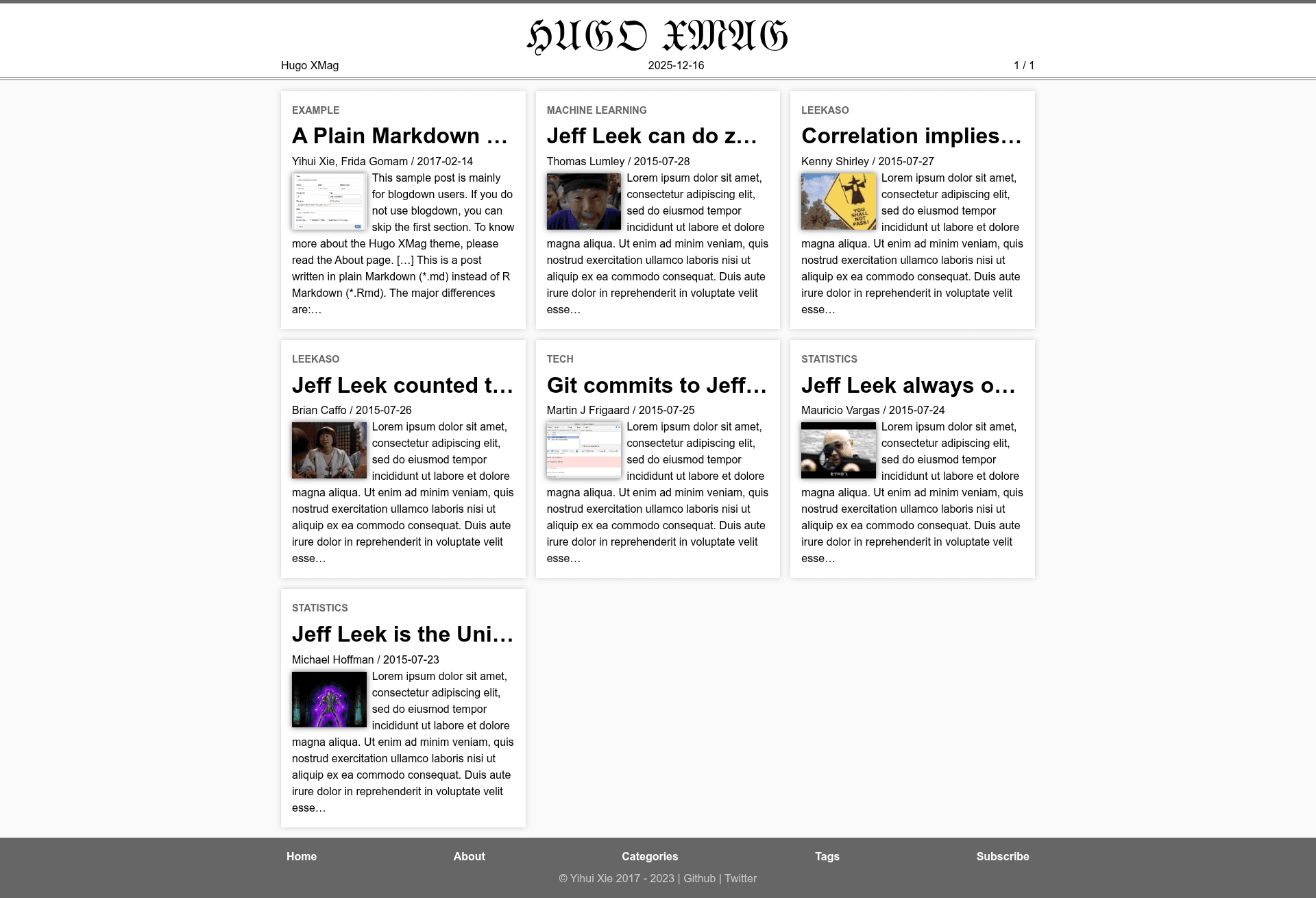
XMag is a minimal magazine-style Hugo theme that transforms a set of Markdown posts into a responsive homepage of article summary cards, modeled after Wikipedia's The Signpost.
What is XMag?
XMag is an open-source theme for the Hugo static site generator, created by Yihui Xie as a stylistic successor to his XMin theme. It takes Markdown content from a Hugo site and renders it as a magazine-style website, with a homepage of responsive article summary blocks, thumbnails, and a Blackletter masthead. The theme is configured through config.toml, and its source code is available on GitHub under the MIT license.
Key Features
- Responsive article summary blocks — the homepage renders each post as a summary card that adapts to screen size, creating a magazine-style grid.
- Thumbnails — each summary block can display an image thumbnail extracted from the article's front matter.
- Blackletter magazine title — the site header renders the word "BLACK LETTER" in a Blackletter font, matching The Signpost's aesthetic.
- GitHub edit links — each page includes a link to edit the source file on GitHub, handy for collaborative site maintenance.
- Author and site info — article pages show author details and site information in the footer area of each post.
- MathJax — LaTeX math expressions are rendered by MathJax, useful for technical or academic posts.
- Google Analytics and highlight.js — built-in support for Google Analytics tracking and syntax highlighting of code blocks via highlight.js.
- Categories, tags, and table of contents — single pages display categories and tags, and include a table of contents for long articles.
Who is it for?
- Bloggers and journalists — publish a magazine-like online publication with article cards and thumbnails.
- R users and blogdown fans — install it in one line with
blogdown::new_site(theme = 'yihui/hugo-xmag')and manage content from R. - Technical writers and academics — use built-in MathJax to render LaTeX equations and highlight.js for code examples.
- Open-source project maintainers — benefit from GitHub edit links that let contributors fix typos directly in the source.
What can you do with XMag?
- Launch a personal blog with a polished magazine homepage and minimal overhead.
- Publish a community newsletter where each post appears as a thumbnail card, like The Signpost.
- Run a documentation site with author info, categories, tags, and a table of contents on every page.
How does XMag work?
The theme relies on Hugo's standard content pipeline: write posts in Markdown with front matter for title, date, thumbnail, and tags. On the homepage, XMag loops through recent posts and renders summary blocks with optional thumbnails; on single pages, it displays the full article with metadata, author info, and a table of contents. Configuration happens in config.toml, and additional features can be enabled through custom layouts.
Pros and cons
Pros:
- Pure static output — fast and low-maintenance, as with any Hugo site.
- MIT licensed — free to use and modify.
- Includes MathJax, highlight.js, Google Analytics, and GitHub edit links out of the box.
Cons:
- The standard Hugo Quickstart Guide fails at Step 3, requiring a manual theme download and copy of the example site.
- Some features (like custom layouts) require editing Hugo templates, so a little Hugo knowledge is helpful.
Alternatives
XMin — the simpler base theme from the same author, without the magazine homepage style.
FAQ
Is XMag free?
Yes, XMag is released under the MIT license, so you can use and modify it freely, including for commercial projects.
Does XMag support MathJax?
Yes, XMag includes MathJax support, so you can write LaTeX math expressions in your Markdown posts and they will be rendered in the browser.
How do I install XMag with blogdown?
If you use R, run blogdown::new_site(theme = 'yihui/hugo-xmag') to create a new blogdown site with XMag. For non-R users, a manual installation guide is provided in the theme documentation.
Why does the standard Hugo quickstart fail for XMag?
The theme's documentation warns that the standard Quickstart Guide fails at Step 3. Instead of following that step, you should download the theme repository, unzip it, copy it into themes/, and then copy themes/hugo-mag/exampleSite into your site root before resuming at Step 5.
Can I customize XMag?
Yes, most features can be configured through config.toml, and a few can be enabled by creating custom layouts. The theme's About page provides detailed documentation.