Template details
Jekyll Theme Tufte
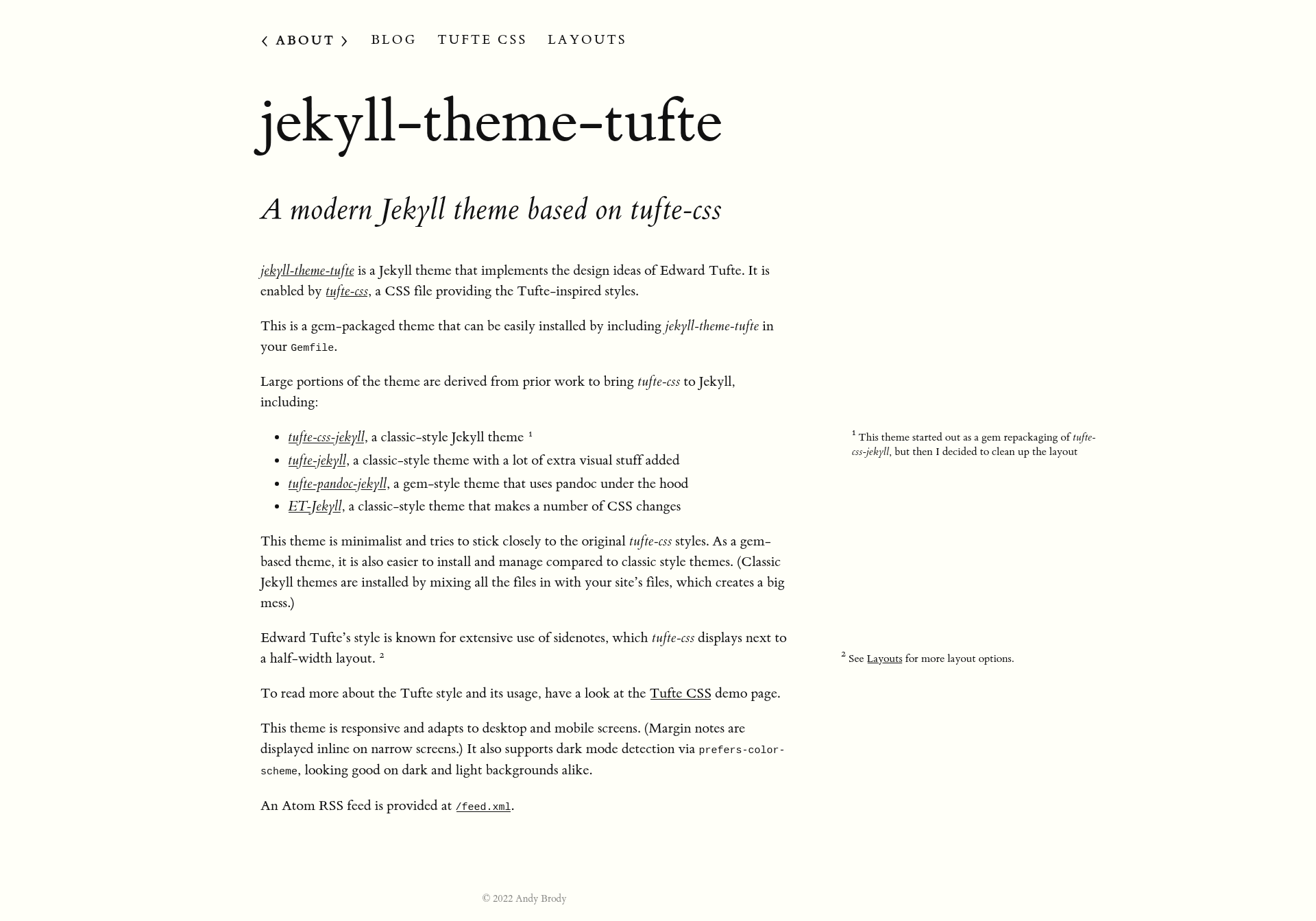
A minimalist Jekyll theme inspired by Edward Tufte's design, based on tufte-css, with margin notes and dark mode.
About this template
Jekyll Theme Tufte is a gem-packaged Jekyll static-site theme that brings Edward Tufte's signature text design — wide margins, margin notes, and a clean serif layout — to Jekyll blogs and documentation sites via tufte-css.
What is Jekyll Theme Tufte?
Jekyll Theme Tufte is a minimalist Jekyll theme inspired by Edward Tufte's book design, built on tufte-css. It is distributed as a Ruby gem and installed by adding it to a site's Gemfile. The theme takes a standard Jekyll site (Markdown/HTML posts and pages) and renders it with Tufte-style typography, including side-bar margin notes that display inline on narrow screens.
The theme is created and maintained on GitHub at https://github.com/ab/jekyll-theme-tufte, and a live demo is available at https://ab.github.io/jekyll-theme-tufte/.
Key Features
- Gem-based installation — Install like any Ruby gem; no need to copy theme files into your site directory, unlike classic-style Jekyll themes.
- tufte-css styling — Uses the original tufte-css stylesheet, with minimal modifications, to recreate Tufte's book design in the browser.
- Margin notes via Liquid tags — Custom template tags such as
{% marginnote %}let you place margin notes in posts; these must be enabled by adding the theme to the plugins list in_config.yml. - Responsive layout — Adapts to desktop and mobile; margin notes are shown inline on narrow screens.
- Dark mode support — Respects the
prefers-color-schemeCSS media query, so the theme looks good on both dark and light backgrounds. - Configurable header — The large site title and subtitle can be turned on or off by setting
headerto false in_config.yml. - Configurable navigation — The nav menu page order and titles are controlled by YAML front matter on each page.
Who is it for?
- Jekyll bloggers who want an academic, book-like reading experience with margin notes and a clean serif typeface.
- Technical documentation writers who need a minimal, content-focused layout without visual clutter.
- Fans of Edward Tufte's design who want that aesthetic on a modern static site generator.
What can you do with Jekyll Theme Tufte?
- Publish long-form essays: Write Markdown posts and render them with wide margins and margin notes for a scholarly feel.
- Create a documentation site: Use the simple nav configuration and page layouts to build a minimal docs section.
- Customize the theme for your brand: Adjust the header display and page ordering via
_config.ymland front matter, or fork the theme and edit the gemspec regex to add custom directories.
How does Jekyll Theme Tufte work?
Like any Jekyll theme, you add gem 'jekyll-theme-tufte' to your Gemfile, set theme: jekyll-theme-tufte and add the plugin to _config.yml, then run bundle. Content is written as normal Jekyll Markdown/HTML files, and the theme's Liquid tags handle margin notes. For development, clone the repo, run bundle install, then bundle exec jekyll serve -w to test changes locally.
Pricing
Jekyll Theme Tufte is free and open source, released under the MIT License.
Alternatives
- tufte-css-jekyll — a classic-style Jekyll theme that also adapts tufte-css.
- tufte-jekyll — a classic-style theme with extra visual additions.
- tufte-pandoc-jekyll — a gem-style theme that uses pandoc to process content.
- ET-Jekyll — a classic-style theme with different CSS changes.
FAQ
Is Jekyll Theme Tufte free?
Yes, the theme is open source under the MIT License, so you can use, modify, and redistribute it freely. There are no paid tiers or premium features.
How do I install Jekyll Theme Tufte?
Add gem 'jekyll-theme-tufte' to your Gemfile, set theme: jekyll-theme-tufte and add - jekyll-theme-tufte to your plugins list in _config.yml, then run bundle. The plugins entry is required to use the custom Liquid tags like {% marginnote %}.
Does Jekyll Theme Tufte support dark mode?
Yes. It uses the prefers-color-scheme media query to detect the user's system preference and renders a dark version accordingly. Margin notes and other elements adapt to both backgrounds.
What is the difference between a gem-based theme and a classic Jekyll theme?
Gem-based themes like this one are installed as a Ruby gem and don't mix their files into your site's directory, making updates easier. Classic themes require copying theme files directly into your site, which can create a mess.