Template details
Karma
Free Bootstrap 4 eCommerce website template with product grid, cart, checkout, and blog pages.
About this template
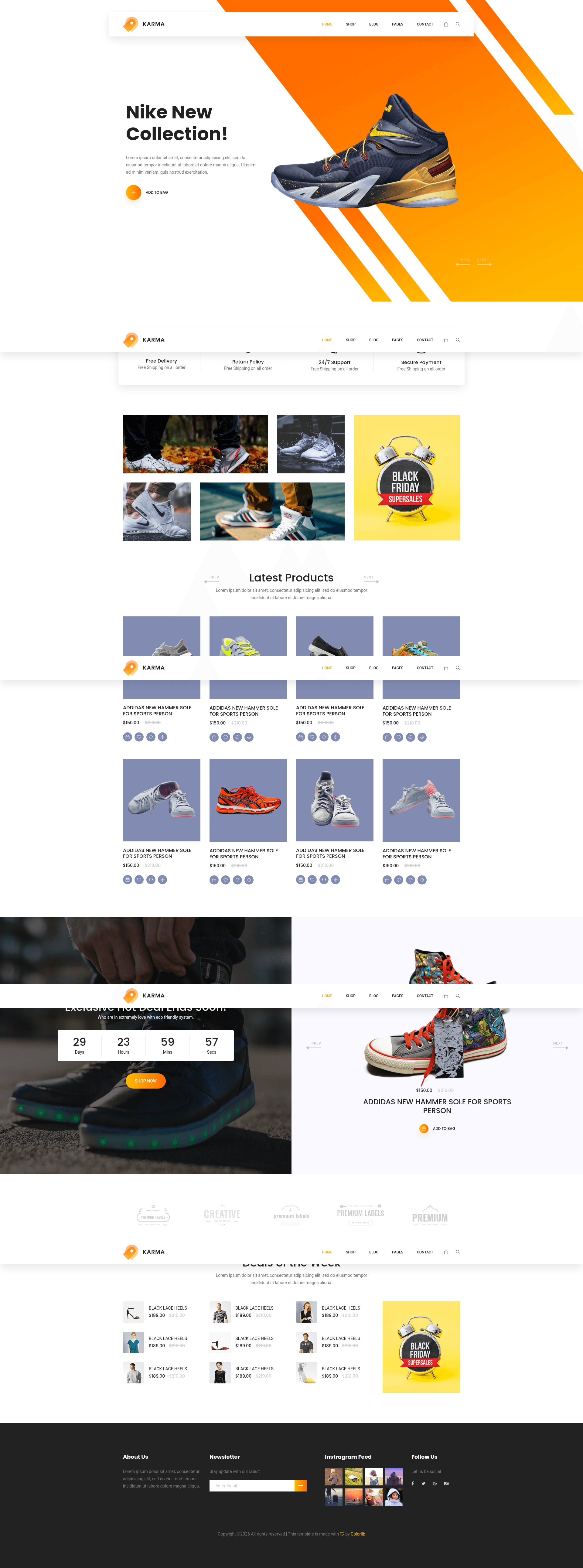
Karma is a free, multi-page Bootstrap 4 e-commerce website template from Colorlib that gives online stores a complete front-end layout with product, cart, checkout, and blog pages.
What is Karma?
Karma is a free, fully responsive e-commerce website template built on Bootstrap 4 with HTML5 and CSS3, created by Colorlib and listed on ThemeWagon. It takes a set of HTML, CSS, SCSS, JavaScript, and library files and produces a complete multi-page online storefront layout — 12 HTML pages plus one PHP file for a working contact form. The template targets modern browsers including Chrome, Edge, Firefox, Opera, Safari, and mobile browsers.
Key Features
- Responsive layout — 100% responsive design that adapts to mobile, tablet, and desktop viewports, tested across Chrome, Edge, Firefox, Opera, Safari, and mobile browsers.
- Multi-page structure — 12 HTML pages include product grid, product detail, cart, checkout, login, order tracking, review form, blog, and contact sections.
- Product grid with filters — customers can sort and filter products; photos open in a modal view powered by Magnific-popup.
- Sticky top navigation bar — keeps the menu visible while scrolling; includes a drop-down menu and search option.
- E-commerce components — call-to-action buttons, hero header, countdown timer, price ranger, product slider (Owl Carousel), and gradient styling.
- Social & marketing integrations — Instagram feed section, newsletter subscription form (uses Ajax Mailchimp), Google Maps embed, and FontAwesome/Flaticon/Themify icon sets.
- Well-structured code — includes CSS and SCSS files, JavaScript source files, library/plugin files, and extensive documentation for customization.
Who is Karma for?
- Independent online clothing and fashion retailers — can use Karma to launch a storefront with product filtering, cart, and checkout pages without paying for a template.
- Web developers building e-commerce sites for clients — get a clean, commented Bootstrap 4 codebase to customize and extend quickly; the free version requires credit/attribution.
- Startups and small businesses — stand up a professional-looking store with hero header, Instagram feeds, and newsletter capture sections to promote products and grow email lists.
What can you do with Karma?
- Sell products online — create product grids with filters, product sliders, and modal photo views so shoppers can browse and buy.
- Leverage the working contact form — the included PHP file enables a functional contact form for customer inquiries (requires server with PHP support).
- Use Google Maps integration — display a physical store location on the contact or about pages.
Pricing
Karma is free to download and use, with lifetime free updates and commercial use allowed. ThemeWagon also sells the premium Phoenix All Versions bundle, which adds 24/7 support, no attribution requirement, and Figma source files.
Pros and cons
Pros
- Free to download and use in commercial projects with lifetime updates.
- 100% responsive and cross-browser compatible (Chrome, Edge, Firefox, Opera, Safari, mobile).
- Includes 12 ready-made pages plus a working PHP contact form.
Cons
- Free version requires credit/attribution to the author.
- No support is provided for the free template; customization help is limited to the documentation.
FAQ
Is Karma really free?
Yes. Karma is a free download with lifetime free updates and can be used in commercial projects. The free license requires credit/attribution to the author, and no support is included.
Does Karma require attribution?
Yes, the free version requires credit to be given to the template author. Upgrade to the premium Phoenix All Versions bundle to remove the attribution requirement and get 24/7 support plus Figma files.
What files are included in Karma?
The download contains 12 HTML files, 1 PHP file, all demo images, CSS and SCSS files, JavaScript source files, library and plugin files, Font icons, and extensive documentation.
Which frameworks and libraries does Karma use?
Karma is built on Bootstrap 4 and jQuery, and integrates Owl Carousel for sliders, Magnific-popup for modal images, Masonry for the photo grid, Ajax Mailchimp for the newsletter form, and the Font Awesome, Flaticon, and Themify icon sets.