Template details
lichter.io
Personal website and CV template built with Nuxt.js 3 and Tailwind CSS.
About this template
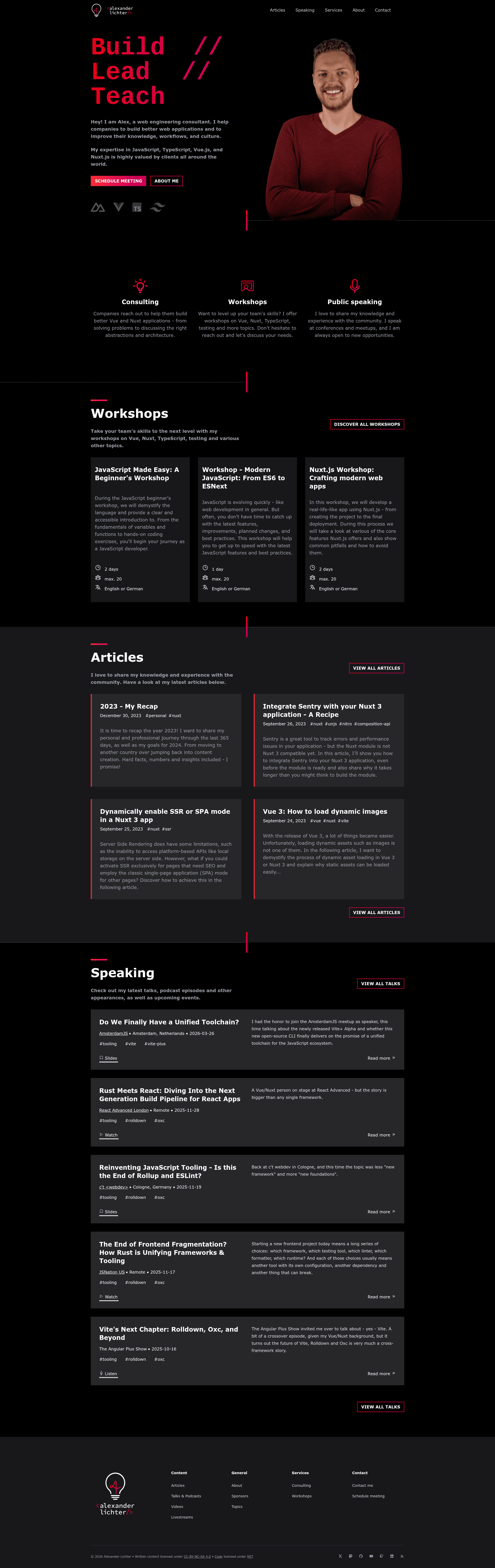
lichter.io is an open-source personal website and CV template built with Nuxt.js 3 and Tailwind CSS, serving as the official site of developer Alexander Lichter.
What is lichter.io?
lichter.io is a portfolio website template that showcases a personal brand, blog, and CV. It is built on Nuxt.js 3, a Vue.js meta-framework, and styled with Tailwind CSS. The repository contains the complete source code for the site, including a nuxt.config.ts file that lists the Nuxt modules used. The template outputs a static or server-rendered website depending on Nuxt configuration, and is designed to be deployed to any Node.js-compatible host. The repository metadata describes it as "My own website and CV" and lists topics such as cv, nuxt, portfolio, tailwindcss, and vue.
Key Features
- Nuxt.js 3 framework — Uses Nuxt 3 with a modular architecture; the exact modules are listed in the
nuxt.config.tsfile. - Tailwind CSS styling — Integrates Tailwind CSS for utility-first styling, making the design system easy to customize.
- Portfolio and CV content — The site presents a personal website, blog, speaking lists, articles, and other professional content.
- pnpm-based setup — Local development relies on pnpm (enabled via Corepack), with commands
pnpm ito install dependencies andpnpm devto start the dev server. - MIT-licensed code — The source code is released under the MIT License, while all written content is licensed under CC BY-NC-SA 4.0.
- Security reporting channel — Security-related issues are reported via email rather than the public issue tracker, keeping vulnerabilities private.
Who is it for?
- Developers looking to build their own portfolio site by forking a production-ready Nuxt 3 project with Tailwind CSS preconfigured.
- Tech speakers and writers who want a site to host speaking lists, article archives, and a blog with a clean layout.
- Open-source enthusiasts seeking a real-world example of Nuxt 3 best practices, including module configuration and content licensing.
What can you do with lichter.io?
- Personal branding: Showcase your name, bio, speaking engagements, and articles to create a professional online presence.
- Blogging: Publish posts through Nuxt's content capabilities (or your own setup) on a styled blog section.
- CV presentation: Present a résumé-like page with work history and skills, tailored to recruiters.
How does lichter.io work?
The repository is set up for local development. First, install Node.js and enable Corepack, then clone the repository and run pnpm i to install dependencies. Finally, run pnpm dev to start the Nuxt dev server and preview the site locally. The code is meant to be customized with your own information before deploying.